MultiDrive – free backup, clone & wipe disk utility from Atola Technology

All times are UTC - 5 hours [ DST ]


Post new topic Reply to topic  [ 5 posts ] 
Author Message
 Post subject: Data recovery on CRUCIAL MX500 SM2259H controller
PostPosted: June 9th, 2024, 11:09 
Offline

Joined: June 9th, 2024, 10:52
Posts: 4
Location: The world
Hello everyone, first of all, i introduce myself, im just a humble pc technician. My name is Ezequiel, i always browse this forums because they are filled with great info and great people too

Sorry for my spelling,

if you please want to help me, I would really like to ask you this:

I have a Crucial MX500 2TB SSD that has an SM2259H controller ( silicon motion, from what I could research). I'm not an expert at all , i would say that I'm new to all of this.
The problem is that I had an accident where windows erased all my important and personal files instead of only erasing temporary files. Which i never authorized to disc cleanup just decided to destroy all files in my user folder.

So I need to find a way, without using any fancy electronic adapters, expensive PC3000 or pro electronics knowledge,

how I can stop the SSD controller from erasing information that was accidentally deleted.

I started investigating about ROM MODE, SAFE MODE , FACTORY ACCESS MODE, TECHNOMODE, but the topic is really obscure even on the internet. Little information or hard to find at least by common means.

What i did was, i soon as i realized the disaster I shut down the system and unplugged the SSD say 10 minutes after the incident and never plugged it back into power.

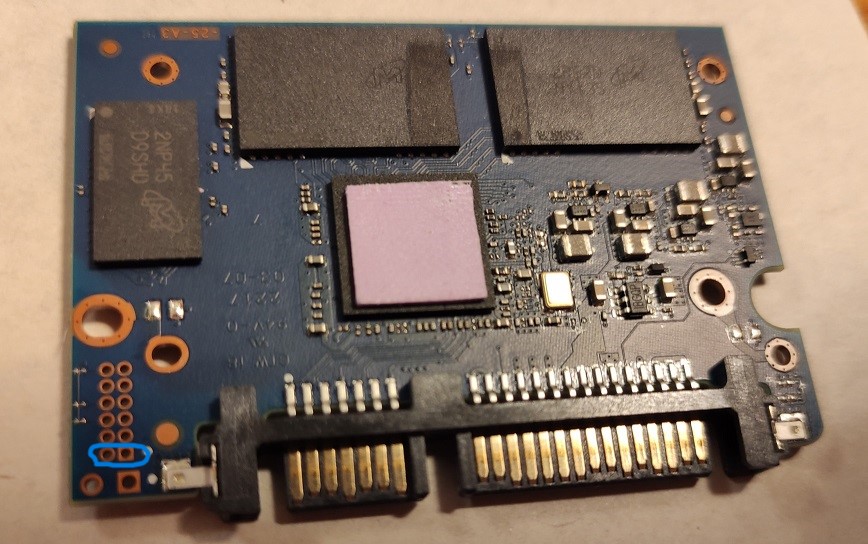
I also think i figured out how to short this drive into ROM mode (I uploaded a photo from here that shows the pin).Image .

what I really need to know is how to force the controller to stop wiping data via garbage collection, trimming and relocation and actually put it into a READ-ONLY STATE state from which rendering or recovery programs can be run.

Is there any software/tool ​​that can help me with this task?. i Started to investigate about MP tools. Should I keep the ssd in factory mode/ rom mode/ techno mode/ during the entire imaging process? is it just about keeping the short in there while doing to imaging or is there something else i have to do?. In other words, how do you make sure that all background processes associated with trimming or garbage collection/redistribution of cells will be stopped when cloning or restoring from disk? Do I need to change the SSD firmware to stop this, if so how do I do it?

Thank you very much in advance.

Kindest regards,

Ezequiel


Top
 Profile  
 
 Post subject: Re: Data recovery on CRUCIAL MX500 SM2259H controller
PostPosted: June 9th, 2024, 17:20 
Offline
User avatar

Joined: May 13th, 2019, 7:50
Posts: 1150
Location: Nederland
Best way to assure it does no background tasks like garbage collection is by disconnecting the drive from power.

AFAIK, any kind of techno or factory mode wil prevent you from imaging the drive, you will not have access to the NAND.

MPtools should be avoided IMO, they're more likely to destroy your data.

To have a fighting chance, you'll need PC3000 AFAIK.

_________________
Joep - http://www.disktuna.com - video & photo repair & recovery service


Top
 Profile  
 
 Post subject: Re: Data recovery on CRUCIAL MX500 SM2259H controller
PostPosted: June 10th, 2024, 11:38 
Offline

Joined: June 9th, 2024, 10:52
Posts: 4
Location: The world
Thanks for your Reply Arch, if you let me ill input some details for context about the case:

I live in a poor country where data recovery is not an option ( is the magnitudes of impossible to afford)
Purchasing the PC3000 for my personal own use is even more impossible than the later.

The data was accidentally deleted by a Windows 10 the infamous Rogue Disk Cleanup fail. Once i realized it took place (like 5 minutes more or less ) I closed everything and realized that i should shut down, and physically removed the drive from the notebook. i think it took me less than 10 minutes in total. more likely to be in the figures of 6 to 7.

The Capacity of the drive is 2TB, with at least extra 20% space manually assigned for OP purposes, and 1 TB in use so almost has 600GB left untouched, another detail is that this SSD is not the OS drive. It is a secondary storage SSD drive. D:\

Two articles from AceLabs really hook up my attention This https://blog.acelab.eu.com/pc-3000-ssd- ... -trim.html and this https://blog.acelab.eu.com/pc-3000-ssd- ... -trim.html

which where exactly the ones that inspired me to ask about this. I know they are using PC3000 to create a translator to extract the information by loading it into the RAM of the SSD.
But then i've seen is I've seen some videos of people using the SM2259MPToolT0506A version to modify the MX500 Firmware. They use it primary for changing factory parameters and for erasing the SMART DATA. (That is, without afecting the information that is stored, by disabling the PRETEST check suppousedly).

That gave me the idea and i thought it would be somehow one could possibly modify the firmware in some way so TRIM and GC gets disabled but you can still use the controller in some form of READ ONLY MODE.
I thought maybe that was posible using the SMI MP tool could be used in place of PC3000 ( i know they are two totally different things ) in order to try and firmware-disable trim and GC from the controller ( Temporarely ) so it does not continue with the erase Cycle, i also

since i wont be able to purchase PC-3000 ever because i can't afford it. I live in a poor country and data recovery is unthinkable. i really need to recover the information since its work and life related important documentation ( i know i should have backed up my fault i was about to do it but had no place.).

in a forensic forum i've read , they tested crucial BX500 and other drives in comparison while deleting files and the crucial BX500 lasted 20 hours before actual deletion of data. Mine is an MX500 , controllers are not exactly the same ( SM2259H vs SM2259XT) but similar in some aspects ( the core functionalities maybe? )

Then, knowing all this, what would be my best bet ???
i have the SSD disassembled and disconnected, SHORTED INTO the Rom mode. as we speak


Top
 Profile  
 
 Post subject: Re: Data recovery on CRUCIAL MX500 SM2259H controller
PostPosted: June 10th, 2024, 16:08 
Offline
User avatar

Joined: September 8th, 2009, 18:21
Posts: 16960
Location: Australia
I'm not aware of any DIY solution for your controller, but here is a solution for an SM2258XT SSD:

https://www.hddoracle.com/viewtopic.php?f=106&t=3238

It won't be of any use to you, but it does give you an idea of what needs to be done.

BTW, I believe that the ROM mode shorting points are the two larger pads immediately below the ones you have circled.

_________________
A backup a day keeps DR away.


Top
 Profile  
 
 Post subject: Re: Data recovery on CRUCIAL MX500 SM2259H controller
PostPosted: June 10th, 2024, 23:33 
Offline

Joined: June 9th, 2024, 10:52
Posts: 4
Location: The world
wow fzabkar,

that was really inspiring. i believe as you said that i dont have the tools for my current drive as the version and files seem to be very hard to get, and for some reason the topic of tryign to recover date from SSDS seems to be quite obscure even through whole the net this kind of quality information you shared it pretty much unknown.

What would be the next step to do in order to try a best chance recovery knowing that the drive was removed ASAP from the system.

would a data extraction method with HDDSuperclone and DMDE aid in the fast recovery of targeted files?. is should i just try to clone it as fast as possible?


Top
 Profile  
 
Display posts from previous:  Sort by  
Post new topic Reply to topic  [ 5 posts ] 

All times are UTC - 5 hours [ DST ]


Who is online

Users browsing this forum: No registered users and 7 guests


You cannot post new topics in this forum
You cannot reply to topics in this forum
You cannot edit your posts in this forum
You cannot delete your posts in this forum
You cannot post attachments in this forum

Search for:
Jump to:  
Powered by phpBB © 2000, 2002, 2005, 2007 phpBB Group