MultiDrive – free backup, clone & wipe disk utility from Atola Technology

All times are UTC - 5 hours [ DST ]


Post new topic Reply to topic  [ 21 posts ]  Go to page 1, 2  Next
Author Message
 Post subject: Western Digital WD 60EZAZ not recognized by BIOS
PostPosted: February 28th, 2021, 22:04 
Offline

Joined: February 28th, 2021, 21:47
Posts: 2
Location: United States
Good evening.
Some background.
My computer did not turn on last yesterday, at all. some fans worked dome didn't. I ordered a replacement motherboard and a replacement CPU.
After swamping the MB with the old CPU, the PC came back to life, however my WD60EZAZ-00ZGHB0 is no longer recognized by the BIOS.

I tried another PC and the drive makes no sound, no vibration... nothing. This is the 6 TB version and I had on it quite a lot of critical documents, that I don't want to lose.

So the desperate google search leads me to this forum, which it is my last hope to get my data back.

So I have a couple of questions.
First is I'm guessing purchasing a replacement board, in this case it will be a "2060-800077-003" but I'm reading there are two versions, an unlocked, and an locked version. What is the difference?
I read that you need to remove the old bios chips. (3 on this board) and put them on the new donor board

So what do I do? do I buy an unlocked or unlocked board and is https://www.hddzone.com/ a good source for this?
Would that be the first step?


Top
 Profile  
 
 Post subject: Re: Western Digital WD 60EZAZ not recognized by BIOS
PostPosted: March 1st, 2021, 12:53 
Offline
User avatar

Joined: September 8th, 2009, 18:21
Posts: 16960
Location: Australia
Check the TVS diodes and fuses.

TVS Diode FAQ:
http://www.hddoracle.com/viewtopic.php?f=100&t=86

... or upload a photo and I'll show you what to test.

_________________
A backup a day keeps DR away.


Top
 Profile  
 
 Post subject: Re: Western Digital WD 60EZAZ not recognized by BIOS
PostPosted: March 2nd, 2021, 12:45 
Offline

Joined: August 18th, 2010, 17:35
Posts: 3669
Location: Massachusetts, USA
lendarios wrote:
So what do I do? do I buy an unlocked or unlocked board and is https://www.hddzone.com/ a good source for this? Would that be the first step?

Professionals buy unlocked boards to enable them to work with the drive's firmware.

In your case, the drive should not have a firmware problem, since the problem should be relegated to just an electronics issue (hopefully internal preamp chip isn't damaged).

HDDZone is ok, along with fzabkar's advice to try out first.

_________________
Hard Disk Drive (HDD), Solid State Drive (SSD, SATA, NVMe, etc), USB Flash Drive and RAID Data Recovery Specialist in Massachusetts


Top
 Profile  
 
 Post subject: Re: Western Digital WD 60EZAZ not recognized by BIOS
PostPosted: March 2nd, 2021, 13:33 
Offline
User avatar

Joined: September 8th, 2009, 18:21
Posts: 16960
Location: Australia
The drive is an SMR model, so 2 of the 3 "ROMs" may be nonvolatile cache for power loss protection. If so, then I would think that all 3 chips would need to be transferred, otherwise there may be a risk of contaminating the patient's data with the donor's cache.

https://hddscan.com/blog/2020/hdd-wd-smr.html

_________________
A backup a day keeps DR away.


Top
 Profile  
 
 Post subject: Re: Western Digital WD 60EZAZ not recognized by BIOS
PostPosted: March 4th, 2021, 20:42 
Offline

Joined: February 28th, 2021, 21:47
Posts: 2
Location: United States
fzabkar wrote:
The drive is an SMR model, so 2 of the 3 "ROMs" may be nonvolatile cache for power loss protection. If so, then I would think that all 3 chips would need to be transferred, otherwise there may be a risk of contaminating the patient's data with the donor's cache.

https://hddscan.com/blog/2020/hdd-wd-smr.html


here is the electronic picture


Attachments:
20210304_193454.jpg
20210304_193454.jpg [ 872.41 KiB | Viewed 18521 times ]
Top
 Profile  
 
 Post subject: Re: Western Digital WD 60EZAZ not recognized by BIOS
PostPosted: March 5th, 2021, 0:27 
Offline
User avatar

Joined: June 8th, 2006, 19:44
Posts: 3144
Location: Atlanta, GA
This is an MCU locked drive, so transplanting the ROM to another PCB won't help. Buying an unlocked PCB isn't going to help an end user, because it only allows access to the firmware -- the actual data will be still encrypted.

Your best bet is to repair the original PCB.

If the MCU is damaged, you are out of luck.

This is the current trend for WD security. Right now bad MCUs mean unrecoverable data, unless there is a copy of the key somewhere on the platter or ROM, that is not also encrypted . . .

_________________
http://www.datasaversllc.com


Top
 Profile  
 
 Post subject: Re: Western Digital WD 60EZAZ not recognized by BIOS
PostPosted: March 5th, 2021, 2:56 
Offline
User avatar

Joined: September 8th, 2009, 18:21
Posts: 16960
Location: Australia
Check the TVS diodes and fuses.

TVS Diode FAQ:
http://www.hddoracle.com/viewtopic.php?f=100&t=86


Attachments:
TVS_diodes_fuses.jpg
TVS_diodes_fuses.jpg [ 195.04 KiB | Viewed 18488 times ]

_________________
A backup a day keeps DR away.
Top
 Profile  
 
 Post subject: Re: Western Digital WD 60EZAZ not recognized by BIOS
PostPosted: March 6th, 2021, 1:33 
Offline
User avatar

Joined: September 8th, 2009, 18:21
Posts: 16960
Location: Australia
The OP's model is the subject of a law suit:

Western Digital Lawsuit For Shipping Slower SMR Hard Drives Including WD Red NAS:
https://www.hattislaw.com/cases/investigations/western-digital-lawsuit-for-shipping-slower-smr-hard-drives-including-wd-red-nas/

Code:
The affected HDD (hard disk drive) models are:

3.5″ WD Red 2TB, 3TB, 4TB, 6TB
(SKUs: WD20EFAX, WD30EFAX, WD40EFAX, WD60EFAX)

3.5″ WD Blue 2TB, 6TB
(SKUs: WD20EZAZ, WD60EZAZ)

2.5″ WD Blue 1TB, 2TB
(SKUs: WD10SPZX, WD20SPZX)

2.5″ WD Black 1TB
(SKU: WD10SPSX)

_________________
A backup a day keeps DR away.


Top
 Profile  
 
 Post subject: Re: Western Digital WD 60EZAZ not recognized by BIOS
PostPosted: August 22nd, 2024, 7:47 
Offline

Joined: August 22nd, 2024, 7:28
Posts: 8
Location: Spain
I have a similar problem with the same HDD, my PCB is WD60EDAZ WD PCB 2060-800077-003. It is an internal HDD unit and got dead when my power supply stop working. I think due to an overvoltage in the 12V pins there was a fuse that I had to replace with a 0 ohm resistor from another unit.

The thing is, my HDD has the same symphtoms: not spinning, no clicks, not recognized... even after I replaced the fuse. I have checked:
- No cap is shorted.
- Inductors have continuity.
- Fuses also have continuiy.

Even more important I suspect the problem is on a LDO or Voltage regulator marked as 3 in the picture. I cannot find the part number to order one, I ask you some help to find it. When I put the HDD in the board and connect it to the SATA Data and Power connector the zone in the IC gets extremely hot and I have to take rapidly the connector off to avoid more damage.

I have more pics just in case you need further information.


Attachments:
FORUM PIC.jpg
FORUM PIC.jpg [ 292.87 KiB | Viewed 8300 times ]
Top
 Profile  
 
 Post subject: Re: Western Digital WD 60EZAZ not recognized by BIOS
PostPosted: August 22nd, 2024, 8:14 
Offline

Joined: August 22nd, 2024, 7:28
Posts: 8
Location: Spain
seergio wrote:
I have a similar problem with the same HDD, my PCB is WD60EDAZ WD PCB 2060-800077-003. It is an internal HDD unit and got dead when my power supply stop working. I think due to an overvoltage in the 12V pins there was a fuse that I had to replace with a 0 ohm resistor from another unit.

The thing is, my HDD has the same symphtoms: not spinning, no clicks, not recognized... even after I replaced the fuse. I have checked:
- No cap is shorted.
- Inductors have continuity.
- Fuses also have continuiy.

Even more important I suspect the problem is on a LDO or Voltage regulator marked as 3 in the picture. I cannot find the part number to order one, I ask you some help to find it. When I put the HDD in the board and connect it to the SATA Data and Power connector the zone in the IC gets extremely hot and I have to take rapidly the connector off to avoid more damage.

I have more pics just in case you need further information.


Edit: TVS diodes were in the range of 700 ohms, the diode test in my multimeter shows in the 12V side 1.81V and 0.146V and in the 5V side 2.58V and 0.146V.


Top
 Profile  
 
 Post subject: Re: Western Digital WD 60EZAZ not recognized by BIOS
PostPosted: August 22nd, 2024, 12:59 
Offline
User avatar

Joined: September 8th, 2009, 18:21
Posts: 16960
Location: Australia
Component "3" is a MOSFET. I suspect it is getting hot because there is a problem on the load side. I doubt that it is faulty. I would test for continuity between the MOSFET and the 5V and 12V SATA inputs.

Si3456DDV, Vishay Siliconix, N-Ch MOSFET, 30V, 6.3A, 6-TSOP, marking AYxxx:
https://www.vishay.com/doc?69075

_________________
A backup a day keeps DR away.


Top
 Profile  
 
 Post subject: Re: Western Digital WD 60EZAZ not recognized by BIOS
PostPosted: August 22nd, 2024, 14:24 
Offline

Joined: August 22nd, 2024, 7:28
Posts: 8
Location: Spain
First of all, thank you for the fast and accurate reply. I have tested the mosfet IC that you menction and you are absolutely right.
I have tried to measure and check all the connections and I attach a file with the scheme I have followed with the multimeter.

Attachment:
FORUM PIC 2.jpg
FORUM PIC 2.jpg [ 769.87 KiB | Viewed 8197 times ]


There are few things that I cannot understand, first the gate goes to earth through Z829 Zener diode, then all drain outputs go to earth as well.
Source is attached to 5VDC line.

So, what is the purpose of this MOSFET? Could it be related to any kind of DC bias / spikes protection?

And what could be the reason for the overheating?

Sorry but im not an expert in SATA power schemes, but the HDD seemed close to be repaired and this problem is driving me crazy.


Top
 Profile  
 
 Post subject: Re: Western Digital WD 60EZAZ not recognized by BIOS
PostPosted: August 22nd, 2024, 14:42 
Offline
User avatar

Joined: September 8th, 2009, 18:21
Posts: 16960
Location: Australia
I don't understand what that MOSFET does, but it appears to be functioning as a diode.

This is what Crucial does in their SSDs, but they use a P-channel MOSFET, and the channel actually carries the current rather than the body diode:

https://www.hddoracle.com/viewtopic.php?p=23212#p23212

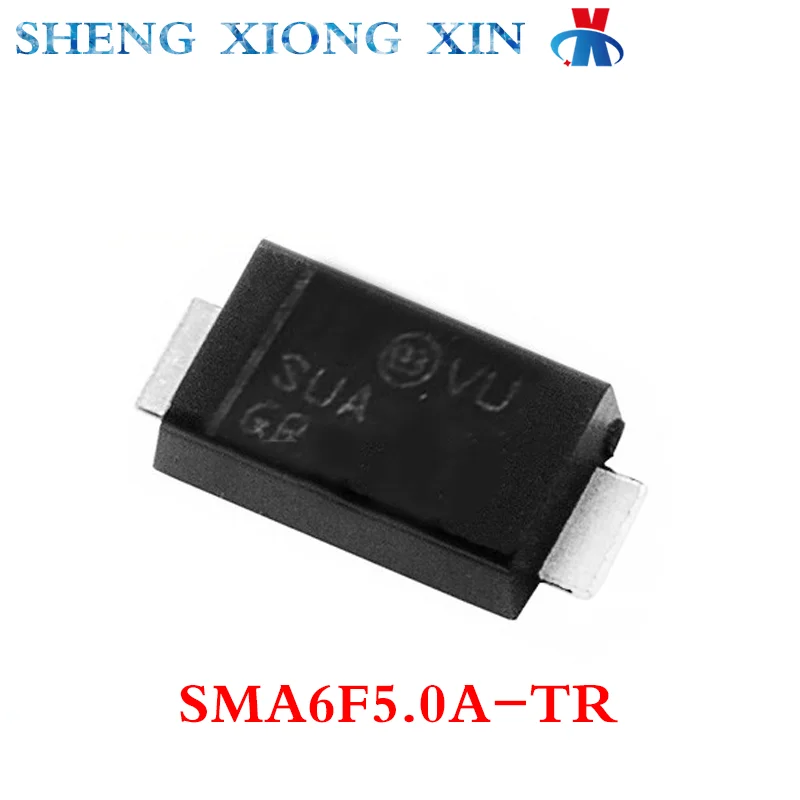
"SUA" is a 5V TVS diode (SMA6F5.0A), not a Zener.

https://ae-pic-a1.aliexpress-media.com/kf/S0eb58d7e273f49b899528db336ed59c8F.png

Is there a short between Drain and Ground?

_________________
A backup a day keeps DR away.


Top
 Profile  
 
 Post subject: Re: Western Digital WD 60EZAZ not recognized by BIOS
PostPosted: August 22nd, 2024, 15:03 
Offline
User avatar

Joined: September 8th, 2009, 18:21
Posts: 16960
Location: Australia
https://media.digikey.com/pdf/Data%20Sheets/ST%20Microelectronics%20PDFS/SMA6F.pdf

_________________
A backup a day keeps DR away.


Top
 Profile  
 
 Post subject: Re: Western Digital WD 60EZAZ not recognized by BIOS
PostPosted: August 22nd, 2024, 16:02 
Offline

Joined: August 22nd, 2024, 7:28
Posts: 8
Location: Spain
No shorts between drain and GND. The MOSFET IC should be okay in spite of my concern.

Well, so according to the post
Quote:
https://www.hddoracle.com/viewtopic.php?p=23212#p23212
it seems to be a TVS current collector, might be there for leaking the overcurrent due to spikes that the other TVS diode can't manage. This MOSFET seems good AFAICT.

So, I have to make more research and there are new things...

I am trying to test the PCB connected to an external USB but it does not overheat. Once I put the PCB on my PC 700W PS, there is a part that goes really hot. This time I have checked the PCB without the disk and I found that I did not detect the chip that is getting hot, after a quick check again with the PC power source is WDSPIKE074 which may be shorted ( labeled as 1 in the picture).

Attachment:
File comment: Faulty WDSPIKE074
faulty chip detail2.jpg
faulty chip detail2.jpg [ 952.97 KiB | Viewed 8114 times ]


Also, I replaced the capacitor labelled as 2 in the image, which was also in short.

If I'm not wrong IC (1) seems to be the motor controller, so not sure that I can replace it without modifying anything in the flash or BIOS chips.

Can you give me any directions? Is there any way to replace this chip? Any link to buy it?

Thanks fzabkar, you are really helping me.


Top
 Profile  
 
 Post subject: Re: Western Digital WD 60EZAZ not recognized by BIOS
PostPosted: August 22nd, 2024, 19:20 
Offline
User avatar

Joined: September 8th, 2009, 18:21
Posts: 16960
Location: Australia
Are you saying that the motor controller becomes very hot when the PCB is on the drive but remains cool when the PCB is off the drive? If so, then I expect that one or more of the MOSFET phase drivers is shorted. These MOSFET half-bridges drive each of the 3 spindle motor phases.

I think the most expedient solution might be to purchase a replacement PCB and transfer the 3 ROMs from patient to donor.

_________________
A backup a day keeps DR away.


Top
 Profile  
 
 Post subject: Re: Western Digital WD 60EZAZ not recognized by BIOS
PostPosted: August 22nd, 2024, 19:42 
Offline

Joined: August 22nd, 2024, 7:28
Posts: 8
Location: Spain
No, the WDSPIKE074 IC becomes hot in any case, no matter whether the motor is connected or not. I've checked all the components around it and no direct GND leakages or shorts. The bad thing is that the capacitor (2) that blew up when the former PS died. It is placed in a wide track and it may have burned something inside the motor driver IC. Also, it must be related with one burnt fuse (the one in 12VCC side) that had been replaced because it became an open circuit.

Yep, I already bought one PCB with same P/N on eBay. I just wanted to try to repair it but the IC that has to be replaced is about 10$ - 20$ and arrives to my country in mid september, while the whole PCB ships from Germany and should be here by end of the current month. Hope I can transfer the 3 IC with the ROM and have a successful ending!

https://www.ebay.com/sch/i.html?_from=R ... 4&_sacat=0

Many thank for your help, I will update the post when the PCB arrives.


Top
 Profile  
 
 Post subject: Re: Western Digital WD 60EZAZ not recognized by BIOS
PostPosted: September 5th, 2024, 12:49 
Offline

Joined: August 22nd, 2024, 7:28
Posts: 8
Location: Spain
Today I've received the replacement PCB. I have desoldered the three chips from the donor board and then put them on the replacement board.

Attachment:
PCB photo_2024-08-22_21-27-36.jpg
PCB photo_2024-08-22_21-27-36.jpg [ 331.33 KiB | Viewed 5721 times ]


Now the disk appears on BIOS and spins when I put it on the PC. Also is recognised by test disk but doesnt seem to work.

Attachment:
testdisk.png
testdisk.png [ 84.24 KiB | Viewed 5721 times ]

Is there any way to make it work again?


Top
 Profile  
 
 Post subject: Re: Western Digital WD 60EZAZ not recognized by BIOS
PostPosted: September 6th, 2024, 8:48 
Offline

Joined: August 22nd, 2024, 7:28
Posts: 8
Location: Spain
Here I a mesage from dmesg on linux: It seems ATA command does not yield an answer:

ata1.00: cmd 60/08:50:00:00:00/00:00:00:00:00/40 tag 10 ncq dma 4096 in
res 40/00:08:00:00:00/00:00:00:00:00/e0 Emask 0x4 (timeout)


[1772.961574] scsi 0:0:0:0: Direct-Access ATA WDC WD60EZAZ-00Z 0A80 PQ: 0 ANSI: 5
[ 1772.961882] sd 0:0:0:0: Attached scsi generic sg0 type 0
[ 1772.962004] sd 0:0:0:0: [sda] 11721045168 512-byte logical blocks: (6.00 TB/5.46 TiB)
[ 1772.962011] sd 0:0:0:0: [sda] 4096-byte physical blocks
[ 1772.962032] sd 0:0:0:0: [sda] Write Protect is off
[ 1772.962041] sd 0:0:0:0: [sda] Mode Sense: 00 3a 00 00
[ 1772.962079] sd 0:0:0:0: [sda] Write cache: enabled, read cache: enabled, doesn't support DPO or FUA
[ 1803.430754] ata1.00: exception Emask 0x0 SAct 0x400 SErr 0x0 action 0x6 frozen
[ 1803.430770] ata1.00: failed command: READ FPDMA QUEUED
[ 1803.430773] ata1.00: cmd 60/08:50:00:00:00/00:00:00:00:00/40 tag 10 ncq dma 4096 in
res 40/00:08:00:00:00/00:00:00:00:00/e0 Emask 0x4 (timeout)
[ 1803.430786] ata1.00: status: { DRDY }
[ 1803.430795] ata1: hard resetting link
[ 1804.882751] ata1: SATA link up 6.0 Gbps (SStatus 133 SControl 300)
[ 1804.886405] ata1.00: configured for UDMA/133
[ 1804.886420] ata1: EH complete
[ 1833.951840] audit: type=1400 audit(1725626360.569:129): apparmor="DENIED" operation="file_mmap" profile="/snap/core/17200/usr/lib/snapd/snap-confine" name="/usr/lib/x86_64-linux-gnu/libgtk3-nocsd.so.0" pid=4909 comm="snap-confine" requested_mask="m" denied_mask="m" fsuid=0 ouid=0
[ 1834.086325] audit: type=1400 audit(1725626360.701:130): apparmor="DENIED" operation="unlink" profile="snap.firefox.firefox" name="/dev/char/195:255" pid=5074 comm="firefox" requested_mask="d" denied_mask="d" fsuid=1000 ouid=0
[ 1834.086577] audit: type=1400 audit(1725626360.701:131): apparmor="DENIED" operation="unlink" profile="snap.firefox.firefox" name="/dev/char/195:0" pid=5074 comm="firefox" requested_mask="d" denied_mask="d" fsuid=1000 ouid=0
[ 1834.086686] audit: type=1400 audit(1725626360.701:132): apparmor="DENIED" operation="unlink" profile="snap.firefox.firefox" name="/dev/char/195:0" pid=5074 comm="firefox" requested_mask="d" denied_mask="d" fsuid=1000 ouid=0
[ 1834.086835] audit: type=1400 audit(1725626360.701:133): apparmor="DENIED" operation="unlink" profile="snap.firefox.firefox" name="/dev/char/195:0" pid=5074 comm="firefox" requested_mask="d" denied_mask="d" fsuid=1000 ouid=0
[ 1834.090743] audit: type=1400 audit(1725626360.705:134): apparmor="DENIED" operation="unlink" profile="snap.firefox.firefox" name="/dev/char/195:255" pid=5074 comm="firefox" requested_mask="d" denied_mask="d" fsuid=1000 ouid=0
[ 1834.090959] audit: type=1400 audit(1725626360.709:135): apparmor="DENIED" operation="unlink" profile="snap.firefox.firefox" name="/dev/char/195:254" pid=5074 comm="firefox" requested_mask="d" denied_mask="d" fsuid=1000 ouid=0
[ 1834.091056] audit: type=1400 audit(1725626360.709:136): apparmor="DENIED" operation="unlink" profile="snap.firefox.firefox" name="/dev/char/195:0" pid=5074 comm="firefox" requested_mask="d" denied_mask="d" fsuid=1000 ouid=0
[ 1834.091235] audit: type=1400 audit(1725626360.709:137): apparmor="DENIED" operation="unlink" profile="snap.firefox.firefox" name="/dev/char/195:0" pid=5074 comm="firefox" requested_mask="d" denied_mask="d" fsuid=1000 ouid=0
[ 1834.103236] audit: type=1400 audit(1725626360.721:138): apparmor="DENIED" operation="unlink" profile="snap.firefox.firefox" name="/dev/char/195:254" pid=5074 comm="firefox" requested_mask="d" denied_mask="d" fsuid=1000 ouid=0
[ 1836.190872] ata1.00: NCQ disabled due to excessive errors
[ 1836.190878] ata1.00: exception Emask 0x0 SAct 0x10 SErr 0x0 action 0x6 frozen
[ 1836.190888] ata1.00: failed command: READ FPDMA QUEUED
[ 1836.190891] ata1.00: cmd 60/08:20:00:00:00/00:00:00:00:00/40 tag 4 ncq dma 4096 in
res 40/00:01:00:4f:c2/00:00:00:00:00/00 Emask 0x4 (timeout)
[ 1836.190901] ata1.00: status: { DRDY }
[ 1836.190910] ata1: hard resetting link
[ 1837.882897] ata1: SATA link up 6.0 Gbps (SStatus 133 SControl 300)
[ 1837.886585] ata1.00: configured for UDMA/133
[ 1837.886602] ata1: EH complete
[ 1837.898888] ata1: limiting SATA link speed to 3.0 Gbps
[ 1837.898893] ata1.00: exception Emask 0x0 SAct 0x0 SErr 0x0 action 0x6
[ 1837.898898] ata1.00: irq_stat 0x40000001
[ 1837.898903] ata1.00: failed command: READ DMA
[ 1837.898906] ata1.00: cmd c8/00:08:00:00:00/00:00:00:00:00/e0 tag 7 dma 4096 in
res 61/04:08:00:00:00/00:00:00:00:00/e0 Emask 0x1 (device error)
[ 1837.898915] ata1.00: status: { DRDY DF ERR }
[ 1837.898918] ata1.00: error: { ABRT }
[ 1837.898925] ata1: hard resetting link
[ 1838.213136] ata1: SATA link up 3.0 Gbps (SStatus 123 SControl 320)
[ 1838.216794] ata1.00: configured for UDMA/133
[ 1838.216819] ata1: EH complete
[ 1838.234884] ata1: limiting SATA link speed to 1.5 Gbps
[ 1838.234890] ata1.00: exception Emask 0x0 SAct 0x0 SErr 0x0 action 0x6
[ 1838.234896] ata1.00: irq_stat 0x40000001
[ 1838.234903] ata1.00: failed command: READ DMA
[ 1838.234906] ata1.00: cmd c8/00:08:00:00:00/00:00:00:00:00/e0 tag 11 dma 4096 in
res 61/04:08:00:00:00/00:00:00:00:00/e0 Emask 0x1 (device error)
[ 1838.234918] ata1.00: status: { DRDY DF ERR }
[ 1838.234922] ata1.00: error: { ABRT }
[ 1838.234930] ata1: hard resetting link
[ 1838.549097] ata1: SATA link up 1.5 Gbps (SStatus 113 SControl 310)
[ 1838.552769] ata1.00: configured for UDMA/133
[ 1838.552782] ata1: EH complete
[ 1838.566894] ata1.00: limiting speed to UDMA/100:PIO4
[ 1838.566898] ata1.00: exception Emask 0x0 SAct 0x0 SErr 0x0 action 0x6
[ 1838.566901] ata1.00: irq_stat 0x40000001
[ 1838.566905] ata1.00: failed command: READ DMA
[ 1838.566906] ata1.00: cmd c8/00:08:00:00:00/00:00:00:00:00/e0 tag 12 dma 4096 in
res 61/04:08:00:00:00/00:00:00:00:00/e0 Emask 0x1 (device error)
[ 1838.566912] ata1.00: status: { DRDY DF ERR }
[ 1838.566914] ata1.00: error: { ABRT }

<font color="#C01C28"> res 40/00:08:00:00:00/00:00:00:00:00/e0 Emask 0x4 (timeout)</font>
<font color="#26A269">[ 1803.430786] </font><font color="#A2734C">ata1.00</font><font color="#C01C28">: status: { DRDY }</font>
<font color="#26A269">[ 1803.430795] </font><font color="#A2734C">ata1</font>: hard resetting link
<font color="#26A269">[ 1804.882751] </font><font color="#A2734C">ata1</font>: SATA link up 6.0 Gbps (SStatus 133 SControl 300)
<font color="#26A269">[ 1804.886405] </font><font color="#A2734C">ata1.00</font>: configured for UDMA/133
<font color="#26A269">[ 1804.886420] </font><font color="#A2734C">ata1</font>: EH complete
<font color="#26A269">[ 1833.951840] </font><font color="#A2734C">audit</font>: type=1400 audit(1725626360.569:129): apparmor=&quot;DENIED&quot; operation=&quot;file_mmap&quot; profile=&quot;/snap/core/17200/usr/lib/snapd/snap-confine&quot; name=&quot;/usr/lib/x86_64-linux-gnu/libgtk3-nocsd.so.0&quot; pid=4909 comm=&quot;snap-confine&quot; requested_mask=&quot;m&quot; denied_mask=&quot;m&quot; fsuid=0 ouid=0
<font color="#26A269">[ 1834.086325] </font><font color="#A2734C">audit</font>: type=1400 audit(1725626360.701:130): apparmor=&quot;DENIED&quot; operation=&quot;unlink&quot; profile=&quot;snap.firefox.firefox&quot; name=&quot;/dev/char/195:255&quot; pid=5074 comm=&quot;firefox&quot; requested_mask=&quot;d&quot; denied_mask=&quot;d&quot; fsuid=1000 ouid=0
<font color="#26A269">[ 1834.086577] </font><font color="#A2734C">audit</font>: type=1400 audit(1725626360.701:131): apparmor=&quot;DENIED&quot; operation=&quot;unlink&quot; profile=&quot;snap.firefox.firefox&quot; name=&quot;/dev/char/195:0&quot; pid=5074 comm=&quot;firefox&quot; requested_mask=&quot;d&quot; denied_mask=&quot;d&quot; fsuid=1000 ouid=0
<font color="#26A269">[ 1834.086686] </font><font color="#A2734C">audit</font>: type=1400 audit(1725626360.701:132): apparmor=&quot;DENIED&quot; operation=&quot;unlink&quot; profile=&quot;snap.firefox.firefox&quot; name=&quot;/dev/char/195:0&quot; pid=5074 comm=&quot;firefox&quot; requested_mask=&quot;d&quot; denied_mask=&quot;d&quot; fsuid=1000 ouid=0
<font color="#26A269">[ 1834.086835] </font><font color="#A2734C">audit</font>: type=1400 audit(1725626360.701:133): apparmor=&quot;DENIED&quot; operation=&quot;unlink&quot; profile=&quot;snap.firefox.firefox&quot; name=&quot;/dev/char/195:0&quot; pid=5074 comm=&quot;firefox&quot; requested_mask=&quot;d&quot; denied_mask=&quot;d&quot; fsuid=1000 ouid=0
<font color="#26A269">[ 1834.090743] </font><font color="#A2734C">audit</font>: type=1400 audit(1725626360.705:134): apparmor=&quot;DENIED&quot; operation=&quot;unlink&quot; profile=&quot;snap.firefox.firefox&quot; name=&quot;/dev/char/195:255&quot; pid=5074 comm=&quot;firefox&quot; requested_mask=&quot;d&quot; denied_mask=&quot;d&quot; fsuid=1000 ouid=0
<font color="#26A269">[ 1834.090959] </font><font color="#A2734C">audit</font>: type=1400 audit(1725626360.709:135): apparmor=&quot;DENIED&quot; operation=&quot;unlink&quot; profile=&quot;snap.firefox.firefox&quot; name=&quot;/dev/char/195:254&quot; pid=5074 comm=&quot;firefox&quot; requested_mask=&quot;d&quot; denied_mask=&quot;d&quot; fsuid=1000 ouid=0
<font color="#26A269">[ 1834.091056] </font><font color="#A2734C">audit</font>: type=1400 audit(1725626360.709:136): apparmor=&quot;DENIED&quot; operation=&quot;unlink&quot; profile=&quot;snap.firefox.firefox&quot; name=&quot;/dev/char/195:0&quot; pid=5074 comm=&quot;firefox&quot; requested_mask=&quot;d&quot; denied_mask=&quot;d&quot; fsuid=1000 ouid=0
<font color="#26A269">[ 1834.091235] </font><font color="#A2734C">audit</font>: type=1400 audit(1725626360.709:137): apparmor=&quot;DENIED&quot; operation=&quot;unlink&quot; profile=&quot;snap.firefox.firefox&quot; name=&quot;/dev/char/195:0&quot; pid=5074 comm=&quot;firefox&quot; requested_mask=&quot;d&quot; denied_mask=&quot;d&quot; fsuid=1000 ouid=0
<font color="#26A269">[ 1834.103236] </font><font color="#A2734C">audit</font>: type=1400 audit(1725626360.721:138): apparmor=&quot;DENIED&quot; operation=&quot;unlink&quot; profile=&quot;snap.firefox.firefox&quot; name=&quot;/dev/char/195:254&quot; pid=5074 comm=&quot;firefox&quot; requested_mask=&quot;d&quot; denied_mask=&quot;d&quot; fsuid=1000 ouid=0
<font color="#26A269">[ 1836.190872] </font><font color="#A2734C">ata1.00</font><b>: NCQ disabled due to excessive errors</b>
<font color="#26A269">[ 1836.190878] </font><font color="#A2734C">ata1.00</font><font color="#C01C28">: exception Emask 0x0 SAct 0x10 SErr 0x0 action 0x6 frozen</font>
<font color="#26A269">[ 1836.190888] </font><font color="#A2734C">ata1.00</font><font color="#C01C28">: failed command: READ FPDMA QUEUED</font>
<font color="#26A269">[ 1836.190891] </font><font color="#A2734C">ata1.00</font><font color="#C01C28">: cmd 60/08:20:00:00:00/00:00:00:00:00/40 tag 4 ncq dma 4096 in</font>
<font color="#C01C28"> res 40/00:01:00:4f:c2/00:00:00:00:00/00 Emask 0x4 (timeout)</font>
<font color="#26A269">[ 1836.190901] </font><font color="#A2734C">ata1.00</font><font color="#C01C28">: status: { DRDY }</font>
<font color="#26A269">[ 1836.190910] </font><font color="#A2734C">ata1</font>: hard resetting link
<font color="#26A269">[ 1837.882897] </font><font color="#A2734C">ata1</font>: SATA link up 6.0 Gbps (SStatus 133 SControl 300)
<font color="#26A269">[ 1837.886585] </font><font color="#A2734C">ata1.00</font>: configured for UDMA/133
<font color="#26A269">[ 1837.886602] </font><font color="#A2734C">ata1</font>: EH complete
<font color="#26A269">[ 1837.898888] </font><font color="#A2734C">ata1</font><b>: limiting SATA link speed to 3.0 Gbps</b>
<font color="#26A269">[ 1837.898893] </font><font color="#A2734C">ata1.00</font><font color="#C01C28">: exception Emask 0x0 SAct 0x0 SErr 0x0 action 0x6</font>
<font color="#26A269">[ 1837.898898] </font><font color="#A2734C">ata1.00</font><font color="#C01C28">: irq_stat 0x40000001</font>
<font color="#26A269">[ 1837.898903] </font><font color="#A2734C">ata1.00</font><font color="#C01C28">: failed command: READ DMA</font>
<font color="#26A269">[ 1837.898906] </font><font color="#A2734C">ata1.00</font><font color="#C01C28">: cmd c8/00:08:00:00:00/00:00:00:00:00/e0 tag 7 dma 4096 in</font>
<font color="#C01C28"> res 61/04:08:00:00:00/00:00:00:00:00/e0 Emask 0x1 (device error)</font>
<font color="#26A269">[ 1837.898915] </font><font color="#A2734C">ata1.00</font><font color="#C01C28">: status: { DRDY DF ERR }</font>
<font color="#26A269">[ 1837.898918] </font><font color="#A2734C">ata1.00</font><font color="#C01C28">: error: { ABRT }</font>
<font color="#26A269">[ 1837.898925] </font><font color="#A2734C">ata1</font>: hard resetting link
<font color="#26A269">[ 1838.213136] </font><font color="#A2734C">ata1</font>: SATA link up 3.0 Gbps (SStatus 123 SControl 320)
<font color="#26A269">[ 1838.216794] </font><font color="#A2734C">ata1.00</font>: configured for UDMA/133
<font color="#26A269">[ 1838.216819] </font><font color="#A2734C">ata1</font>: EH complete
<font color="#26A269">[ 1838.234884] </font><font color="#A2734C">ata1</font><b>: limiting SATA link speed to 1.5 Gbps</b>
<font color="#26A269">[ 1838.234890] </font><font color="#A2734C">ata1.00</font><font color="#C01C28">: exception Emask 0x0 SAct 0x0 SErr 0x0 action 0x6</font>
<font color="#26A269">[ 1838.234896] </font><font color="#A2734C">ata1.00</font><font color="#C01C28">: irq_stat 0x40000001</font>
<font color="#26A269">[ 1838.234903] </font><font color="#A2734C">ata1.00</font><font color="#C01C28">: failed command: READ DMA</font>
<font color="#26A269">[ 1838.234906] </font><font color="#A2734C">ata1.00</font><font color="#C01C28">: cmd c8/00:08:00:00:00/00:00:00:00:00/e0 tag 11 dma 4096 in</font>
<font color="#C01C28"> res 61/04:08:00:00:00/00:00:00:00:00/e0 Emask 0x1 (device error)</font>
<font color="#26A269">[ 1838.234918] </font><font color="#A2734C">ata1.00</font><font color="#C01C28">: status: { DRDY DF ERR }</font>
<font color="#26A269">[ 1838.234922] </font><font color="#A2734C">ata1.00</font><font color="#C01C28">: error: { ABRT }</font>
<font color="#26A269">[ 1838.234930] </font><font color="#A2734C">ata1</font>: hard resetting link
<font color="#26A269">[ 1838.549097] </font><font color="#A2734C">ata1</font>: SATA link up 1.5 Gbps (SStatus 113 SControl 310)
<font color="#26A269">[ 1838.552769] </font><font color="#A2734C">ata1.00</font>: configured for UDMA/133
<font color="#26A269">[ 1838.552782] </font><font color="#A2734C">ata1</font>: EH complete
<font color="#26A269">[ 1838.566894] </font><font color="#A2734C">ata1.00</font><b>: limiting speed to UDMA/100:PIO4</b>
<font color="#26A269">[ 1838.566898] </font><font color="#A2734C">ata1.00</font><font color="#C01C28">: exception Emask 0x0 SAct 0x0 SErr 0x0 action 0x6</font>
<font color="#26A269">[ 1838.566901] </font><font color="#A2734C">ata1.00</font><font color="#C01C28">: irq_stat 0x40000001</font>
<font color="#26A269">[ 1838.566905] </font><font color="#A2734C">ata1.00</font><font color="#C01C28">: failed command: READ DMA</font>
<font color="#26A269">[ 1838.566906] </font><font color="#A2734C">ata1.00</font><font color="#C01C28">: cmd c8/00:08:00:00:00/00:00:00:00:00/e0 tag 12 dma 4096 in</font>
<font color="#C01C28"> res 61/04:08:00:00:00/00:00:00:00:00/e0 Emask 0x1 (device error)</font>
<font color="#26A269">[ 1838.566912] </font><font color="#A2734C">ata1.00</font><font color="#C01C28">: status: { DRDY DF ERR }</font>
<font color="#26A269">[ 1838.566914] </font><font color="#A2734C">ata1.00</font><font color="#C01C28">: error: { ABRT }</font>
</pre>


Im about to surrender... I have tried all my best. Now I will try a data rescue company.

Hope the drive can be recovered, at least I have tried to swap the ROM chips. In a post above were right, the only way to avoid dropping the disk is to repair the original PCB. Here in my dependencies I cannot replace the microprocessor or the biggest chips. And I dont know if they are faulty too.

WD should make a bigger effort to protect their motor controllers. In my case at least WDSPIKE 074 chip ended up shorted.

Hope you have better luck guys!


Top
 Profile  
 
 Post subject: Re: Western Digital WD 60EZAZ not recognized by BIOS
PostPosted: September 9th, 2024, 9:56 
Offline

Joined: August 22nd, 2024, 7:28
Posts: 8
Location: Spain
This is the final diagnosis:

Device Diagnostics: WD60EZAZ -WX51DB8P768S SMR Technology

The device fails to read data even after connecting to specific data recovery hardware (the device enters kernel mode, gives ID but no data). It is necessary to replace the reading unit, as well as its adaptation to the surface of the original plates. Sometimes the protections of the electronic boards (diodes) are not capable of blocking voltage surges, which causes them to also affect the electronics of the heads.

Just in case you have a WD disk I encourage you to take a backup from time to time or you can loose 700€ in recovering you precious data. I wont buy a WD unit again (at least as an inner HD drive).


Top
 Profile  
 
Display posts from previous:  Sort by  
Post new topic Reply to topic  [ 21 posts ]  Go to page 1, 2  Next

All times are UTC - 5 hours [ DST ]


Who is online

Users browsing this forum: No registered users and 47 guests


You cannot post new topics in this forum
You cannot reply to topics in this forum
You cannot edit your posts in this forum
You cannot delete your posts in this forum
You cannot post attachments in this forum

Search for:
Jump to:  
Powered by phpBB © 2000, 2002, 2005, 2007 phpBB Group