MultiDrive – free backup, clone & wipe disk utility from Atola Technology

All times are UTC - 5 hours [ DST ]


Post new topic Reply to topic  [ 30 posts ]  Go to page 1, 2  Next
Author Message
 Post subject: Help with OCZ ARC100 120GB ssd water damaged
PostPosted: September 15th, 2024, 6:10 
Offline

Joined: September 9th, 2020, 8:51
Posts: 44
Hi,

I have the SSD that it has been water damaged. After an accurate cleaning I tried to connect it to pc3000 but I have clear green status LEDs so I suppose there is an electrical problem.

After trying a few measurements, there doesn't seem to be any short circuits. Does anyone have any suggestions? What components could I check?

Thanks in advance for your help


Top
 Profile  
 
 Post subject: Re: Help with OCZ ARC100 120GB ssd water damaged
PostPosted: September 15th, 2024, 14:27 
Offline
User avatar

Joined: September 8th, 2009, 18:21
Posts: 16955
Location: Australia
Measure the voltages at the inductors.

_________________
A backup a day keeps DR away.


Top
 Profile  
 
 Post subject: Re: Help with OCZ ARC100 120GB ssd water damaged
PostPosted: September 16th, 2024, 5:51 
Offline

Joined: September 9th, 2020, 8:51
Posts: 44
Hi,

thanks for your reply.

Below a photo with some measurements:


Attachments:
Capture_ocz.JPG
Capture_ocz.JPG [ 245.93 KiB | Viewed 9883 times ]
Top
 Profile  
 
 Post subject: Re: Help with OCZ ARC100 120GB ssd water damaged
PostPosted: September 16th, 2024, 10:30 
Offline

Joined: November 7th, 2020, 5:31
Posts: 1290
Location: United Kingdom
Things look in general, low by about 0.2v , but I doubt that's your issue. What the current draw like ?

_________________
Data Recovery Services in the UK.
https://www.usbrecovery.co.uk/


Top
 Profile  
 
 Post subject: Re: Help with OCZ ARC100 120GB ssd water damaged
PostPosted: September 16th, 2024, 11:56 
Offline

Joined: September 9th, 2020, 8:51
Posts: 44
About 0,3A


Top
 Profile  
 
 Post subject: Re: Help with OCZ ARC100 120GB ssd water damaged
PostPosted: September 16th, 2024, 12:41 
Offline

Joined: November 7th, 2020, 5:31
Posts: 1290
Location: United Kingdom
Check the caps around the nand for voltage

_________________
Data Recovery Services in the UK.
https://www.usbrecovery.co.uk/


Top
 Profile  
 
 Post subject: Re: Help with OCZ ARC100 120GB ssd water damaged
PostPosted: September 16th, 2024, 14:42 
Offline
User avatar

Joined: September 8th, 2009, 18:21
Posts: 16955
Location: Australia
R72 (10R0) has 5V on one side and 1.6V on the other. This means that it would be dissipating 1W. Also, the resistance between ground and the 1.6V side of the resistor would be 5 ohms. Clearly something is amiss here. I would measure the resistance of R72, and check for 5 ohms to ground.

_________________
A backup a day keeps DR away.


Top
 Profile  
 
 Post subject: Re: Help with OCZ ARC100 120GB ssd water damaged
PostPosted: September 16th, 2024, 15:48 
Offline
User avatar

Joined: September 8th, 2009, 18:21
Posts: 16955
Location: Australia
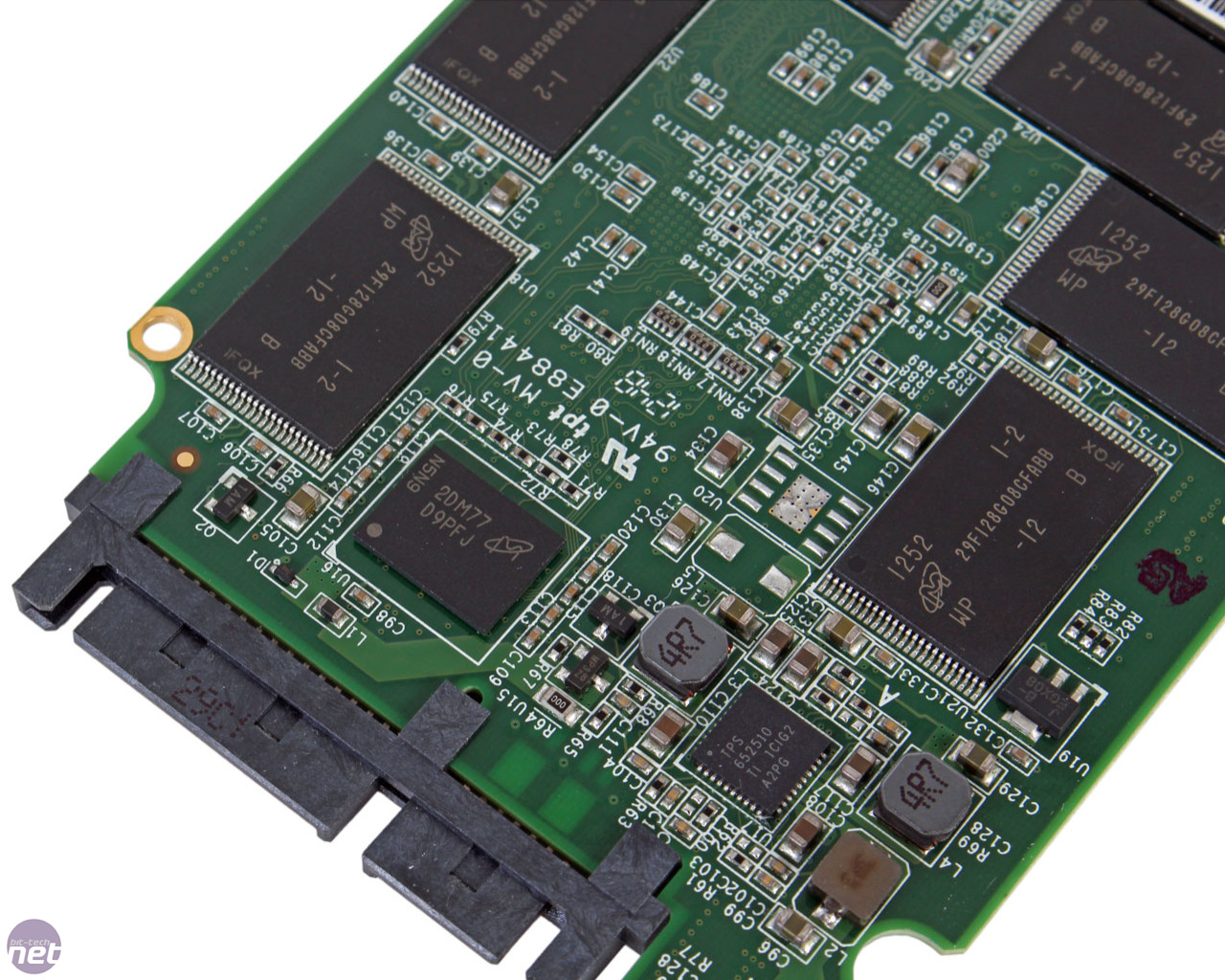
This photo has a "000" link at R72:

https://images.bit-tech.net/content_images/2013/09/ocz-vertex-450-256gb-review/vertex450-7b.jpg

This makes U15 seem pointless. :-?

U15 appears to be a P-channel MOSFET, possibly configured as a high-side load switch for soft starting:

https://www.diodes.com/assets/Datasheets/DMP2035U.pdf

_________________
A backup a day keeps DR away.


Top
 Profile  
 
 Post subject: Re: Help with OCZ ARC100 120GB ssd water damaged
PostPosted: September 16th, 2024, 16:17 
Offline
User avatar

Joined: September 8th, 2009, 18:21
Posts: 16955
Location: Australia
This is my theory, but ICBW.

I believe that Q24, U15 and R72 constitute a soft-start circuit. Initially after power-on, the SSD receives its 5V supply via R72. This 10-ohm resistor provides inrush current limiting.

The 3 DC-DC converters (U17, U19, U20) then power up partially, providing some power to the flash controller's IO section. A signal from this section then switches on the base of Q24, which then switches on U15, which in turn shunts R72. The 3 converters then receive a full 5V supply via U15 and then begin regulating at their specified voltages.

In the present case Q24 is not being switched on, so this would suggest that the flash controller may be dead.

If you wish to bypass the soft start, replace R72 with a shorting link, or flow a blob of solder over it. Of course, test for shorts before considering this approach.

_________________
A backup a day keeps DR away.


Top
 Profile  
 
 Post subject: Re: Help with OCZ ARC100 120GB ssd water damaged
PostPosted: September 17th, 2024, 1:17 
Offline
User avatar

Joined: September 8th, 2009, 18:21
Posts: 16955
Location: Australia
fzabkar wrote:
I believe that Q24, U15 and R72 constitute a soft-start circuit.

Sorry, all references to Q24 should instead be Q4.

_________________
A backup a day keeps DR away.


Top
 Profile  
 
 Post subject: Re: Help with OCZ ARC100 120GB ssd water damaged
PostPosted: September 17th, 2024, 5:14 
Offline

Joined: September 9th, 2020, 8:51
Posts: 44
Hi,

first of all thanks for your reply.

Lardman wrote:
Check the caps around the nand for voltage


The caps seem to be good

fzabkar wrote:
This is my theory, but ICBW.

I believe that Q24, U15 and R72 constitute a soft-start circuit. Initially after power-on, the SSD receives its 5V supply via R72. This 10-ohm resistor provides inrush current limiting.

The 3 DC-DC converters (U17, U19, U20) then power up partially, providing some power to the flash controller's IO section. A signal from this section then switches on the base of Q24, which then switches on U15, which in turn shunts R72. The 3 converters then receive a full 5V supply via U15 and then begin regulating at their specified voltages.

In the present case Q24 is not being switched on, so this would suggest that the flash controller may be dead.

If you wish to bypass the soft start, replace R72 with a shorting link, or flow a blob of solder over it. Of course, test for shorts before considering this approach.


I tried to bypass the soft start as your suggestion and this is the situation:


Attachments:
Capture2_ocz.JPG
Capture2_ocz.JPG [ 406.41 KiB | Viewed 9716 times ]
Top
 Profile  
 
 Post subject: Re: Help with OCZ ARC100 120GB ssd water damaged
PostPosted: September 17th, 2024, 5:25 
Offline
User avatar

Joined: September 8th, 2009, 18:21
Posts: 16955
Location: Australia
L3 and L4 don't seem right. At least one of them must be Vcore. What resistance do you measure between ground and each of L3 and L4?

_________________
A backup a day keeps DR away.


Top
 Profile  
 
 Post subject: Re: Help with OCZ ARC100 120GB ssd water damaged
PostPosted: September 17th, 2024, 5:48 
Offline

Joined: September 9th, 2020, 8:51
Posts: 44
L4 61ohm
L3 1,6Kohm


Top
 Profile  
 
 Post subject: Re: Help with OCZ ARC100 120GB ssd water damaged
PostPosted: September 17th, 2024, 13:13 
Offline
User avatar

Joined: September 8th, 2009, 18:21
Posts: 16955
Location: Australia
Check the EN1, EN2 and EN3 pins. They should all be high.

https://www.ti.com/lit/ds/symlink/tps652510.pdf

_________________
A backup a day keeps DR away.


Top
 Profile  
 
 Post subject: Re: Help with OCZ ARC100 120GB ssd water damaged
PostPosted: September 18th, 2024, 4:18 
Offline

Joined: September 9th, 2020, 8:51
Posts: 44
EN1 -> 2,5V
EN2 -> 0,09V
EN3 -> 2,1V


Top
 Profile  
 
 Post subject: Re: Help with OCZ ARC100 120GB ssd water damaged
PostPosted: September 18th, 2024, 5:35 
Offline
User avatar

Joined: September 8th, 2009, 18:21
Posts: 16955
Location: Australia
It appears that buck regulator #2 is not being turned on. One of the other regulators (L3) is enabled but has no output or an output which is too low, so it is either faulty or overloaded.

This is my guess for the power distribution:

Code:
                      DC-DC converters       Main ICs
                      .--------------.    .-------------.
            R72       |              |    |             |
  +5V       ___   Vin |     U20      |    |    NAND     |
    o--+---|___|--+-->|              |    |             |
       |    10R   |   |     U19      |--->|    SDRAM    |
       |          |   |              |    |             |
       +----+^+---'   |     U17      |    |  Controller |
       |    |||       |              |    |             |
      .-.   === U15   |              |    |             |
      | |     |       |              |    |             |
      | |     |       |              |    | PSU         |
      '-'     |       |   ENable     |    | control     |
       |      |       '--------------'    '-------------'
       '------+             ^                | |
              |             |                | |
      ___   |/              '----------------' |
  .--|___|--|   Q4                             |
  |         |>                                 |
  |           |                                |
  |           |                                |
  |          ===                               |
  |          GND        <-- PSU-ON             |
  '--------------------------------------------'

AISI, the SSD is stuck in soft-start mode. All the current for the SSD passes through R72. Applying Ohm's Law, we calculate the current draw as 0.34A.

    I = V / R = (5V - 1.6V) / 10 ohms = 0.34 amp

To switch from soft-start mode to full-on run mode, a PSU-ON signal must come from somewhere. Also, two of the DC-DC converters need an ENable signal, possibly from the same source. I expect that this source is a small "PSU control" section within the flash controller. U19 is a 2.5V LDO linear regulator, so perhaps it provides the enable signal for buck regulator #1.

I think I would need to determine the sources of the ENable signals and the PSU-ON signal before I could begin to properly understand this circuit. I confess I am stuck at this point.


Attachments:
TPS652510_pinout.gif
TPS652510_pinout.gif [ 29.13 KiB | Viewed 9558 times ]

_________________
A backup a day keeps DR away.
Top
 Profile  
 
 Post subject: Re: Help with OCZ ARC100 120GB ssd water damaged
PostPosted: September 18th, 2024, 8:30 
Offline

Joined: September 9th, 2020, 8:51
Posts: 44
Hi,

thank you very much for your analysis.
I tried to take some measure from a similar part ( OCZ VTR1-25SAT3 ) and seems there are significant discrepancies on capacitor and resistors near the pin 1 of TPS652510:

C133 -> 0,9V corresponding cap on VTR1 -> 6,5V
R71 -> 0,6V corresponding on VTR1 -> 1,2V
C12 -> 0,9 corresponding on VTR1 -> 2,1V

These other measure could help you ? Can you suggest other measures I should take?

THanks a lot


Top
 Profile  
 
 Post subject: Re: Help with OCZ ARC100 120GB ssd water damaged
PostPosted: September 18th, 2024, 14:59 
Offline
User avatar

Joined: September 8th, 2009, 18:21
Posts: 16955
Location: Australia
I would replace U17, but I expect there will be other problems.

_________________
A backup a day keeps DR away.


Top
 Profile  
 
 Post subject: Re: Help with OCZ ARC100 120GB ssd water damaged
PostPosted: September 18th, 2024, 16:42 
Offline
User avatar

Joined: September 8th, 2009, 18:21
Posts: 16955
Location: Australia
I just noticed that, after you bypassed R72, the PSU-ON signal is now active. If this signal is coming from the flash controller, then perhaps it is alive.

_________________
A backup a day keeps DR away.


Top
 Profile  
 
 Post subject: Re: Help with OCZ ARC100 120GB ssd water damaged
PostPosted: September 19th, 2024, 6:11 
Offline

Joined: September 9th, 2020, 8:51
Posts: 44
fzabkar wrote:
I just noticed that, after you bypassed R72, the PSU-ON signal is now active. If this signal is coming from the flash controller, then perhaps it is alive.


Considering this, could it work by replacing the U17?

Thanks a lot


Top
 Profile  
 
Display posts from previous:  Sort by  
Post new topic Reply to topic  [ 30 posts ]  Go to page 1, 2  Next

All times are UTC - 5 hours [ DST ]


Who is online

Users browsing this forum: No registered users and 14 guests


You cannot post new topics in this forum
You cannot reply to topics in this forum
You cannot edit your posts in this forum
You cannot delete your posts in this forum
You cannot post attachments in this forum

Search for:
Jump to:  
Powered by phpBB © 2000, 2002, 2005, 2007 phpBB Group