MultiDrive – free backup, clone & wipe disk utility from Atola Technology

All times are UTC - 5 hours [ DST ]


Post new topic Reply to topic  [ 6 posts ] 
Author Message
 Post subject: Fujitsu Celsius H910 cloned hard drive not booting:mistery!
PostPosted: November 7th, 2024, 10:04 
Offline

Joined: November 7th, 2024, 9:33
Posts: 3
Location: italy
I have cloned a Samsung 2,5" SSD hard drive that was onboard of a Fujitsu Celsius H910 old machine. OS is Win 7 pro (!). Tried Acronis True image and Aomei Partition Master Pro, cloned with no errors.
When I try to boot the cloned drive from a different PC (HP Elite Book 840 G7 or HP Pro Desk 405 G4) disk is recognized but no bootable partitions are found. the system does not start in recovery mode even after several trials.
The original disk was working until the day the mainboard broke, data have been copied so the disk is readable, disk image was done.
Looking at the partitions (MBR) the strange thing is that all the partitions are logical, the only active partition is not the one of Windows 7 but one labeled "HDRbr_OS" marked as logical and active (17 Gb not enough to contain Windows nor programs!)
I suspect that this was something cutomized by Fujitsu but I can make the cloned HD boot again.
Tried to flag the Windows 7 partition (300 Gb, with apps) ad primary and active but still does not boot !
Any idea ?
I'm quite desperate, thanks in advance for any hints.


Top
 Profile  
 
 Post subject: Re: Fujitsu Celsius H910 cloned hard drive not booting:miste
PostPosted: November 8th, 2024, 1:27 
Offline
User avatar

Joined: September 8th, 2009, 18:21
Posts: 16960
Location: Australia
Can you show us the Partitions tab in DMDE?

https://dmde.com/

_________________
A backup a day keeps DR away.


Top
 Profile  
 
 Post subject: Re: Fujitsu Celsius H910 cloned hard drive not booting:miste
PostPosted: November 8th, 2024, 4:14 
Offline

Joined: November 7th, 2024, 9:33
Posts: 3
Location: italy
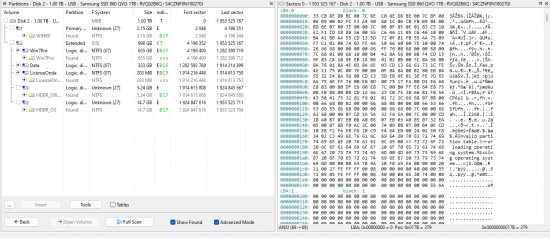
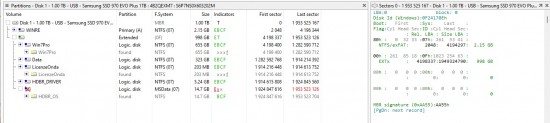
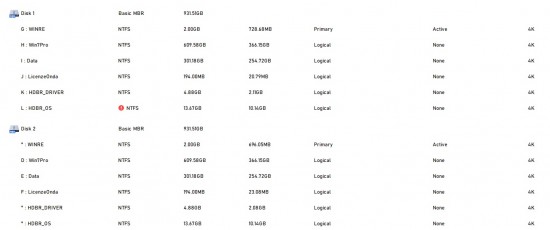
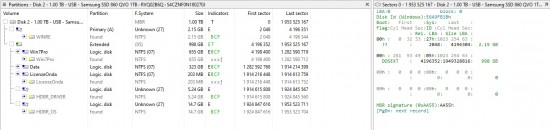
Hi, thanks for asking. in attachment some feedbacks about cloned and original drive. yesterday I've tried also sector by sector cloning but still the problem persists.
with DMDE seems that original disk has already issues (see pic, in the Hex\Ascii view there's a clue but I'm not a guru), odd thing is that for example Aomei Partition Mater Pro seems to recognize partitions that DMDE didn't but the last partition HDBR_OS is still not recognized (this partition with other software is recognized as REcovery partition, 14, Gb, sounds the right size for the purpose, I think was created originally by the vendor). DAta on both original and cloned disks are readable but also original disk is not booting anymore on different hardware (original laptop's mainboard faulted, tried to boot on 2 different PCs with no success)
Any clues or suggestions ?
Thank in advance for any help.

Attachment:
original_Drive.jpg
original_Drive.jpg [ 140.18 KiB | Viewed 4564 times ]


Attachment:
Original_Disk_seems_broken.jpg
Original_Disk_seems_broken.jpg [ 403.39 KiB | Viewed 4564 times ]


Attachment:
Cloned_Drive_Not_booting.jpg
Cloned_Drive_Not_booting.jpg [ 141.44 KiB | Viewed 4564 times ]


Attachment:
HD_Comparison.jpg
HD_Comparison.jpg [ 88.29 KiB | Viewed 4564 times ]


Top
 Profile  
 
 Post subject: Re: Fujitsu Celsius H910 cloned hard drive not booting:miste
PostPosted: November 8th, 2024, 6:12 
Offline
User avatar

Joined: September 8th, 2009, 18:21
Posts: 16960
Location: Australia
I don't understand why the WINRE partition would be the active primary partition. It has a partition ID of 0x27, the same as the HDBR_OS and HDBR_DRIVER partitions. These appear to be regular NTFS partitions which are being hidden from the OS by changing the ID byte from 0x07 to 0x27.

If you d-click each of the NTFS partitions, you should see a file/folder tree. That will give you an idea of the purpose of each partition.

_________________
A backup a day keeps DR away.


Top
 Profile  
 
 Post subject: Re: Fujitsu Celsius H910 cloned hard drive not booting:miste
PostPosted: November 13th, 2024, 6:59 
Offline

Joined: November 7th, 2024, 9:33
Posts: 3
Location: italy
Problem solved. I had to move to an old laptop because new 2024 HP laptops (Pro Book) did not support legacy OS with old NOT UEFI boot type and couldn't find any hybrid nor compatible mode to activate (even after firmware upgraded to last version).
Just by moving to the old hardware the Win 7 Pro OS started and is working fine, just had to reactivate the Windows license because of the hardware changes.
Cheers.


Top
 Profile  
 
 Post subject: Re: Fujitsu Celsius H910 cloned hard drive not booting:miste
PostPosted: November 13th, 2024, 7:53 
Offline
User avatar

Joined: September 8th, 2009, 18:21
Posts: 16960
Location: Australia
Doh! I have seen this problem at Tom's Hardware several times. I should have recognised it.

_________________
A backup a day keeps DR away.


Top
 Profile  
 
Display posts from previous:  Sort by  
Post new topic Reply to topic  [ 6 posts ] 

All times are UTC - 5 hours [ DST ]


Who is online

Users browsing this forum: No registered users and 11 guests


You cannot post new topics in this forum
You cannot reply to topics in this forum
You cannot edit your posts in this forum
You cannot delete your posts in this forum
You cannot post attachments in this forum

Search for:
Jump to:  
Powered by phpBB © 2000, 2002, 2005, 2007 phpBB Group