Hi all,
I have an Crucial MX500 1TB that suddenly becoming not detectable by BIOS after laptop (BSOD) crashed during Windows update.
Model: Crucial MX500 1TB M.2 SATA NGFF
Brought date: 20200926
Health (last known 2025/03/20): 96 %
SMART shows drive as healthy
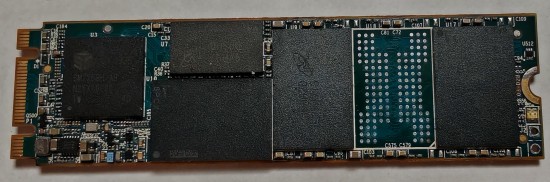
Controller: SM2258H
DRAM: D9SHD X 2 (MT41K256M16TW-107:P)
Nand: NW913 X 8 (MT29F1T08EMHAFJ4-3R:A)
Attachment:
File comment: SSD Front/Top side
 0_1_Front.jpg [ 1.06 MiB | Viewed 1076 times ]
Attachment:
File comment: SSD Back/Bottom side
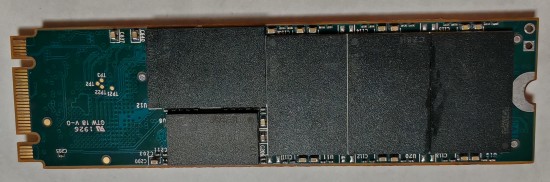 0_2_Back.jpg [ 1.33 MiB | Viewed 1076 times ]
Troubleshooting NAND chip numbering as follow:
- Top (T) side (with controller) - First NAND is beside DRAM with forth (last) beside test pin.
- Back (B) (Bottom) side (without controller) - First NAND is beside DRAM with forth (last) beside test.
Using Easytools with test pin (ROM mode) shorted manage to forced the drive to ROM mode.
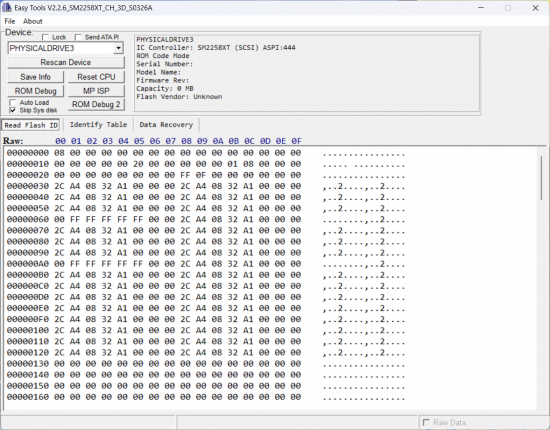
From Easytools tab (Read flash ID) address location (Raw):
- From 00000060 to 00000120 should have device ID available (2C A4 08 32 A1 00 00 00) for first and second column respectively.
- But 00000060 and 000000A0 first column device ID is not identified (00 FF FF FF FF FF 00 00).
Attachment:
File comment: Device ID with all NAND soldered
 1_SSD_fail_Top_3.png [ 493.33 KiB | Viewed 1076 times ]
- By trying NAND removal procedure, it has been found that NAND chip (T no. 3) to be the culprit.
- Each NAND chip has four device ID
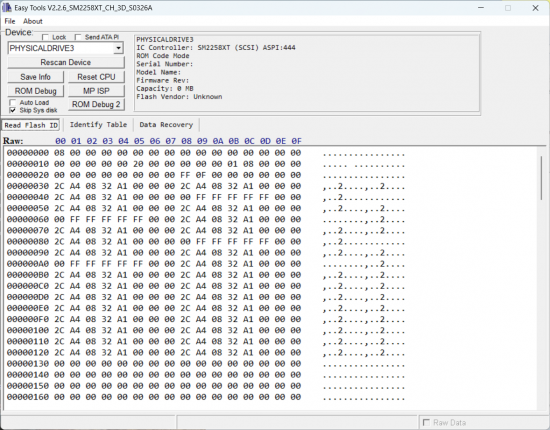
- Removing good NAND chip should cause additional four device ID not identified that would be 6 in total.
- Removing NAND chip (T no. 3), four device ID is not identified has appeared on (00000040 and 00000080) second column alongside (0000060 and 000000A0) first column.
Attachment:
File comment: Device ID with faulty NAND (T no. 3) removed
 2_SSD_fail_Top_3_removed.png [ 488.48 KiB | Viewed 1076 times ]
- By swapping (T no. 3 and T no. 4) NAND chip location has also shifted not identified device ID from (00000060 and 000000A0) first column to becoming second column. This shows chip is the culprit and not solder joint/pad.
Attachment:
File comment: Device ID with NAND (T no. 3 & T no. 4) swapped
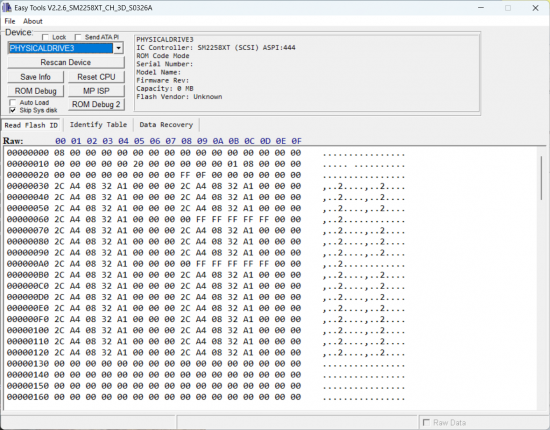 3_SSD_fail_Top_3&4_Swap.png [ 542.44 KiB | Viewed 1076 times ]
According to
https://support.rusolut.com/portal/en/kb/articles/reading-bga132-152- BGA132/152 chips has 2 data lines with 4 CE (Crystal) for each data lines respectively.
From here, it is possible one of the two data line of NAND chip becoming not detectable due to NAND chip write wear out?
It is possible to recover it or to recover the data?
Thanks.



 FAQ
FAQ Search
 Login
Login Register
 HDDGURU FILES
