MultiDrive – free backup, clone & wipe disk utility from Atola Technology

All times are UTC - 5 hours [ DST ]


Post new topic Reply to topic  [ 19 posts ] 
Author Message
 Post subject: Seagate IronWolf Pro 18TB ST18000NT001 Water Damage
PostPosted: January 21st, 2026, 3:16 
Offline

Joined: January 21st, 2026, 2:30
Posts: 5
Location: Denver
First I'd like to thank everyone in advance that is willing to try to help me through this.

I have a NAS with 6 drives (ST18000NT001) configured in a ZFS RAIDZ2 in a utility room. Unfortunately, I had a water pipe burst and spray my server. It was never submerged, but it did get a little wet. The motherboard was damaged and I have since replaced it. I made sure they were dried out, but when I tried to connect them to the new motherboard, only 1 of the 6 drives connected.

So, here is where I stand right now. I think it's a PCB issue with them and not the drives themselves. I don't think any water got inside of them, but I don't know how well they are sealed.

-I ordered some replacement PCBs with the correct revision: ERBP02PCB 100852967REVB and I also have an exact replacement version from the one drive that is still working.
-I bought an airflow station, a multimeter, EEPROM BIOS USB Programmer CH341A + 1.8v adapter, USON8 pen probe
-I have tried copying the ROM over from the bad boards with no luck. The drives will spin up with some abnormal noises then spin down and not connect.

I'm at a loss of what to do or try next. I tried to look at removing the ROM chips on a replacement board and I didn't have much luck with that as the ROM chip(s) are extremely tiny. I contacted a data recovery business I found online and they said they couldn't give me a quote without looking at the drives. They said that at the very low end, it would cost $2k and could very well go up from there. Sadly, the drives have some wedding videos and a pictures that never made it into the cloud.

Any help that anyone can give me is greatly appreciated. I'm not the most technologically savvy, so I also appreciate your patience as you try to help me. Thanks again!


Top
 Profile  
 
 Post subject: Re: Seagate IronWolf Pro 18TB ST18000NT001 Water Damage
PostPosted: January 21st, 2026, 18:39 
Offline
User avatar

Joined: September 8th, 2009, 18:21
Posts: 16960
Location: Australia
Some (all?) of these newer drives have unique security/encryption keys in the MCU, so a ROM swap on its own will not suffice.

Your 18TB HDDs are helium models, so the HDA would be sealed and welded shut.

https://www.seagate.com/files/www-content/datasheets/pdfs/ironwolf-pro-20tb-DS1914-21-2206US-en_US.pdf

Prior to the ROM transfers, did all the bad drives spin up and then spin down?

You say you replaced the motherboard. Did you replace the PSU, or did you disturb or replace the PSU cables?

_________________
A backup a day keeps DR away.


Top
 Profile  
 
 Post subject: Re: Seagate IronWolf Pro 18TB ST18000NT001 Water Damage
PostPosted: January 22nd, 2026, 0:40 
Offline

Joined: January 21st, 2026, 2:30
Posts: 5
Location: Denver
Thank you for your response, I'll try to answer these as succinctly as possible.

The drive that still works, always has worked. The other five, none of them would spin or down. Only when I tried a replacement PCB did some of them spin up, but they don't sound quite right and they do not display in the SATA BIOS of my motherboard when booting up.

I did replace the PSU, but it looks like it is still good. That was what I thought went bad originally, but it was actually the motherboard. Unfortunately, I did recycle cables as I didn't know that could be a problem, it is the same exact PSU make and model, but a newer version (this one has a fan override knob on it). After reading that you shouldn't use old cables, I've swapped to use all new cables with the drives.


Top
 Profile  
 
 Post subject: Re: Seagate IronWolf Pro 18TB ST18000NT001 Water Damage
PostPosted: January 22nd, 2026, 0:48 
Offline
User avatar

Joined: September 8th, 2009, 18:21
Posts: 16960
Location: Australia
You have probably killed your PCBs with the wrong cables. Modular cable pinouts are not standardised.

http://www.hddoracle.com/viewtopic.php?f=56&t=2545

Can you upload photos of the dead PCBs? There will probably be open fuses, shorted TVS diodes or open e-fuses, or a combination of all three.

_________________
A backup a day keeps DR away.


Top
 Profile  
 
 Post subject: Re: Seagate IronWolf Pro 18TB ST18000NT001 Water Damage
PostPosted: January 22nd, 2026, 14:38 
Offline
User avatar

Joined: September 8th, 2009, 18:21
Posts: 16960
Location: Australia
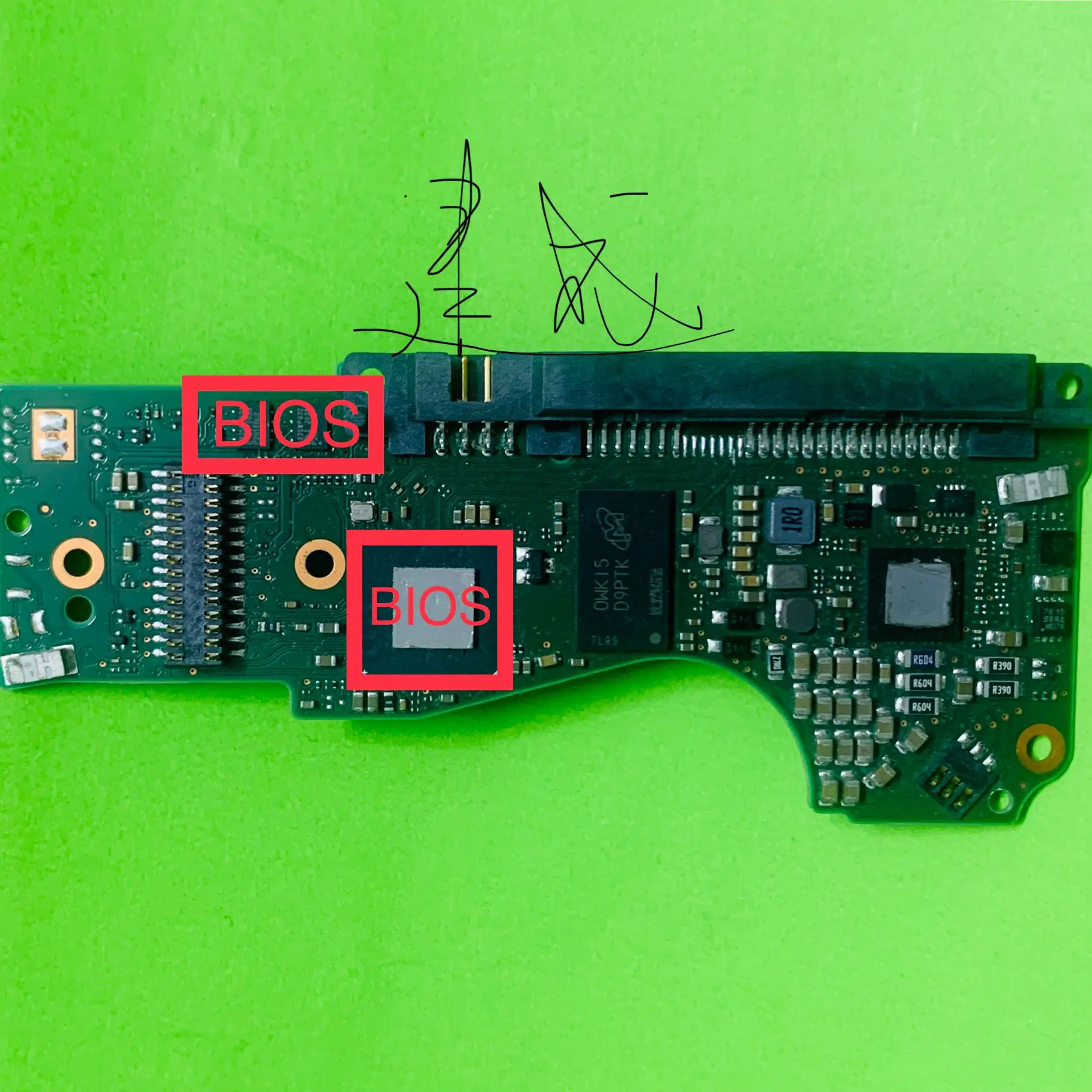
This vendor photo would suggest that the MCU does indeed have a unique key:

https://ae01.alicdn.com/kf/Sea692b1527fd46b8a01c160eafbb29baa.png

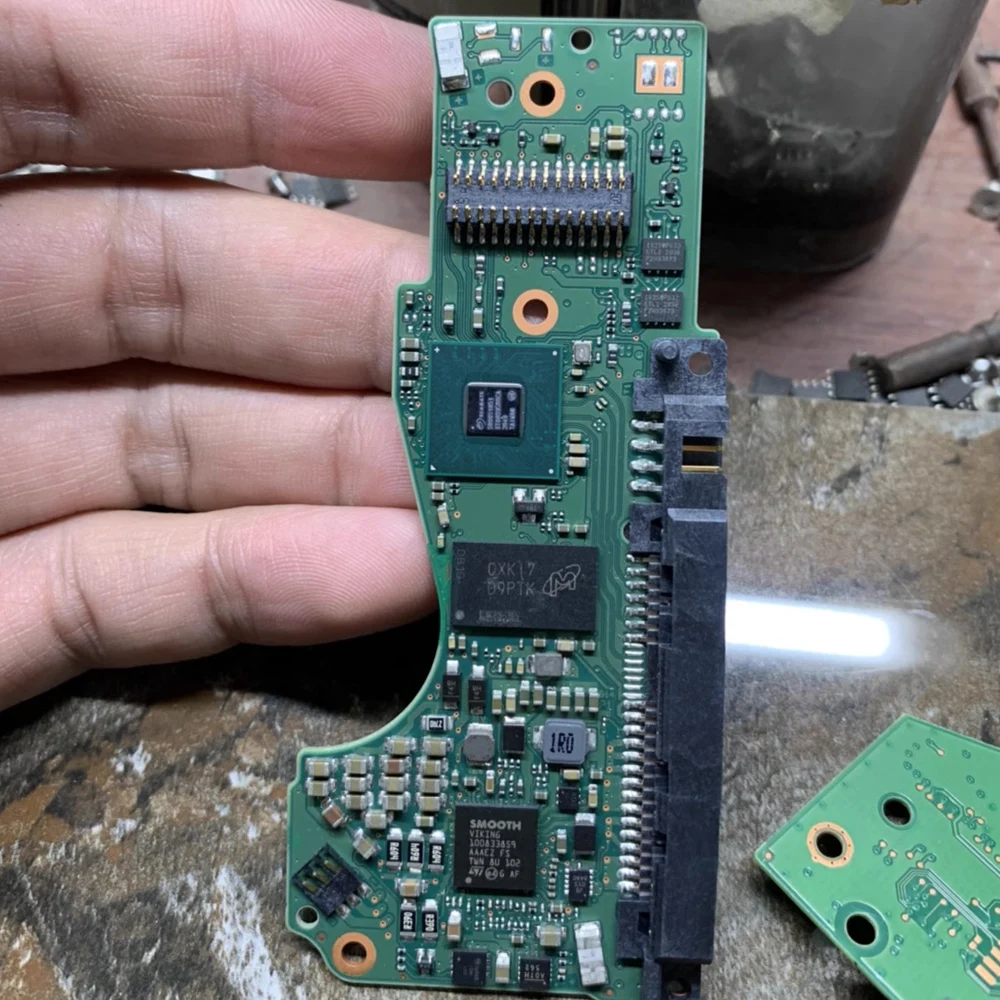
This photo shows two e-fuses:

https://ae01.alicdn.com/kf/S2a4777ad65cb46f0ac7db20ab9c55aa8A.jpg

_________________
A backup a day keeps DR away.


Top
 Profile  
 
 Post subject: Re: Seagate IronWolf Pro 18TB ST18000NT001 Water Damage
PostPosted: January 22nd, 2026, 16:03 
Offline
User avatar

Joined: October 14th, 2005, 9:26
Posts: 1060
fzabkar wrote:
Some (all?) of these newer drives have unique security/encryption keys in the MCU, so a ROM swap on its own will not suffice.

Your 18TB HDDs are helium models, so the HDA would be sealed and welded shut.

https://www.seagate.com/files/www-content/datasheets/pdfs/ironwolf-pro-20tb-DS1914-21-2206US-en_US.pdf

Prior to the ROM transfers, did all the bad drives spin up and then spin down?

You say you replaced the motherboard. Did you replace the PSU, or did you disturb or replace the PSU cables?


Hi to all !
These are different models that use the same PCB numbering system, with some physical differences.
Please look. Is pcb photos compatibles? Is it possible to change the ROM? rom and mcu?


Attachments:
IMG_7567.jpeg
IMG_7567.jpeg [ 1007.35 KiB | Viewed 701 times ]
IMG_7565.jpeg
IMG_7565.jpeg [ 897.62 KiB | Viewed 701 times ]

_________________
Нет ничего невозможного
Top
 Profile  
 
 Post subject: Re: Seagate IronWolf Pro 18TB ST18000NT001 Water Damage
PostPosted: January 22nd, 2026, 16:18 
Offline
User avatar

Joined: September 8th, 2009, 18:21
Posts: 16960
Location: Australia
sempre wrote:
These are different models that use the same PCB numbering system, with some physical differences.
Please look. Is pcb photos compatibles? Is it possible to change the ROM? rom and mcu?

ICBW, but I think you could just transfer the patient's adaptives to the donor ROM, provided that the firmware versions are matched.

_________________
A backup a day keeps DR away.


Top
 Profile  
 
 Post subject: Re: Seagate IronWolf Pro 18TB ST18000NT001 Water Damage
PostPosted: January 22nd, 2026, 21:53 
Offline

Joined: January 21st, 2026, 2:30
Posts: 5
Location: Denver
fzabkar wrote:
You have probably killed your PCBs with the wrong cables. Modular cable pinouts are not standardised.

http://www.hddoracle.com/viewtopic.php?f=56&t=2545

Can you upload photos of the dead PCBs? There will probably be open fuses, shorted TVS diodes or open e-fuses, or a combination of all three.


Here are some photos of the PCBs, thanks again for your help!

https://imgur.com/a/hJwVEPJ


Top
 Profile  
 
 Post subject: Re: Seagate IronWolf Pro 18TB ST18000NT001 Water Damage
PostPosted: January 23rd, 2026, 6:22 
Offline
User avatar

Joined: October 14th, 2005, 9:26
Posts: 1060
They are from different fws.

_________________
Нет ничего невозможного


Last edited by sempre on January 23rd, 2026, 6:25, edited 1 time in total.

Top
 Profile  
 
 Post subject: Re: Seagate IronWolf Pro 18TB ST18000NT001 Water Damage
PostPosted: January 23rd, 2026, 6:24 
Offline
User avatar

Joined: October 14th, 2005, 9:26
Posts: 1060
fzabkar wrote:
sempre wrote:
These are different models that use the same PCB numbering system, with some physical differences.
Please look. Is pcb photos compatibles? Is it possible to change the ROM? rom and mcu?

ICBW, but I think you could just transfer the patient's adaptives to the donor ROM, provided that the firmware versions are matched.


Thanks reply!
Sorry
Patiente fw SC60 (IronWolf) 4 TB
Donor fw 0001 (BarraCuda) 4 TB

_________________
Нет ничего невозможного


Top
 Profile  
 
 Post subject: Re: Seagate IronWolf Pro 18TB ST18000NT001 Water Damage
PostPosted: January 23rd, 2026, 8:30 
Offline
User avatar

Joined: October 14th, 2005, 9:26
Posts: 1060
sempre wrote:
fzabkar wrote:
sempre wrote:
These are different models that use the same PCB numbering system, with some physical differences.
Please look. Is pcb photos compatibles? Is it possible to change the ROM? rom and mcu?

ICBW, but I think you could just transfer the patient's adaptives to the donor ROM, provided that the firmware versions are matched.


Thanks reply!
Sorry
Patiente fw SC60 (IronWolf) 4 TB
Donor fw 0001 (BarraCuda) 4 TB


MCU = Patiente
Thanks

_________________
Нет ничего невозможного


Top
 Profile  
 
 Post subject: Re: Seagate IronWolf Pro 18TB ST18000NT001 Water Damage
PostPosted: January 23rd, 2026, 8:58 
Offline

Joined: February 22nd, 2023, 13:49
Posts: 327
Location: Eastern Europe
SMOOTH different... It's hard to see.
The Si4403CDY looks tired or uncleaned.


Top
 Profile  
 
 Post subject: Re: Seagate IronWolf Pro 18TB ST18000NT001 Water Damage
PostPosted: January 23rd, 2026, 11:04 
Offline
User avatar

Joined: September 8th, 2009, 18:21
Posts: 16960
Location: Australia
If you can find two resource dumps from the same model which have exactly the same firmware, compare the two ROMs. If there is a digital signature, it will show up in the differences. Alternatively, if you can upload your ROM dumps, I could try to locate the signatures for you.

_________________
A backup a day keeps DR away.


Top
 Profile  
 
 Post subject: Re: Seagate IronWolf Pro 18TB ST18000NT001 Water Damage
PostPosted: January 23rd, 2026, 16:54 
Offline
User avatar

Joined: September 8th, 2009, 18:21
Posts: 16960
Location: Australia
Measure the resistances between ground (any screw hole) and each of 5Vin, 5Vout, 12Vin, 12Vout. These are the inputs and outputs of each e-fuse.

If there are no shorts, power up the PCB on its own and measure 5Vout and 12Vout.

NIS5232, ON Semiconductor, electronic fuse, 12V, 4.2A, marking 232, DFN10:
https://www.onsemi.com/pdf/datasheet/nis5232-d.pdf

I think I have identified the test points correctly, but I could be wrong.

5V e-fuse or current limited load switch, Seagate Exos, marking J9, QFN-12, equivalent to MP5018:
https://www.monolithicpower.com/en/documentview/productdocument/index/version/2/document_type/Datasheet/lang/en/sku/MP5018/
https://preview.redd.it/sq8hsfgzf3ye1.png?width=1080&format=png&auto=webp&s=67fd1383781388af42ea3d2157497ae8083c8d40


Attachments:
e-fuses.jpg
e-fuses.jpg [ 614.91 KiB | Viewed 600 times ]

_________________
A backup a day keeps DR away.
Top
 Profile  
 
 Post subject: Re: Seagate IronWolf Pro 18TB ST18000NT001 Water Damage
PostPosted: January 25th, 2026, 18:16 
Offline

Joined: January 21st, 2026, 2:30
Posts: 5
Location: Denver
Thank you for the suggestion! I tried measuring them all against a good board and as far as I can tell, I'm getting the same output on all of those locations.


Top
 Profile  
 
 Post subject: Re: Seagate IronWolf Pro 18TB ST18000NT001 Water Damage
PostPosted: January 25th, 2026, 18:50 
Offline
User avatar

Joined: September 8th, 2009, 18:21
Posts: 16960
Location: Australia
Do you mean that you are measuring 5V and 12V at the outputs of the respective e-fuses in all of your drives?

Is there any possibility that the drives have been configured to Power Up In Standby (PUIS)? Did all of your drives originally power up at the same time in your NAS?

_________________
A backup a day keeps DR away.


Top
 Profile  
 
 Post subject: Re: Seagate IronWolf Pro 18TB ST18000NT001 Water Damage
PostPosted: January 26th, 2026, 12:37 
Offline

Joined: March 8th, 2025, 18:07
Posts: 111
Location: Canada
Water damaged laptops v hard disks. The logic board on hard disks is smaller but who documents them at all. Laptops are poorly documented but chip markings are usually helpful. Hard disks I own tend to be more arcane.

High resolution images of the logic board are useful for identifying parts. Parts catalogs are helpful as some common laptop faults are the same MOSFET all over the place. MOSFET chips are 8-pin and checking then can help trace power faults. These typically are 8-pin with inputs and outputs but one pin is the switch control line. Hard disks usually have one while laptops may have a dozen.

A multimeter can find shorts and open circuits. A voltage injector can hep find shorts. Check for cracked caps and resistors that seem damaged. A lot of checking is needed to fix anything.

An infrared camera can help spot shorts but these are more expensive. The idea is that shorted logic will be hot making it easier to spot. Alcohol swabs can help as hot parts evaporate dry faster than cold parts.

_________________
Orico DS500C3-US-BK 5-disk 3.5" SATA, iTGZ 4x M.2 2280 Thunderbolt enclosure NVMe/SATA, etc. etc.


Top
 Profile  
 
 Post subject: Re: Seagate IronWolf Pro 18TB ST18000NT001 Water Damage
PostPosted: January 26th, 2026, 13:26 
Offline

Joined: January 21st, 2026, 2:30
Posts: 5
Location: Denver
fzabkar wrote:
Do you mean that you are measuring 5V and 12V at the outputs of the respective e-fuses in all of your drives?

Is there any possibility that the drives have been configured to Power Up In Standby (PUIS)? Did all of your drives originally power up at the same time in your NAS?


Sorry, if I didn't explain that well. I didn't mean same reading at all times. I meant, when I measured resistances from a known good board and measured a bad board, I got the same reading. Same thing when I measured voltages when powered up, bad board had the same reading as the good board voltages.


Top
 Profile  
 
 Post subject: Re: Seagate IronWolf Pro 18TB ST18000NT001 Water Damage
PostPosted: January 26th, 2026, 20:32 
Offline

Joined: March 8th, 2025, 18:07
Posts: 111
Location: Canada
Check resistance both ways as diodes etc may be damaged.

Capacitors that are cracked usually are low to very low resistance.

Resistors are usually obviously damaged.

The BIOS chip is usually serial based but there are chip readers that can read them but trying a different ROM may not work due to the self encrypting feature.

_________________
Orico DS500C3-US-BK 5-disk 3.5" SATA, iTGZ 4x M.2 2280 Thunderbolt enclosure NVMe/SATA, etc. etc.


Top
 Profile  
 
Display posts from previous:  Sort by  
Post new topic Reply to topic  [ 19 posts ] 

All times are UTC - 5 hours [ DST ]


Who is online

Users browsing this forum: No registered users and 54 guests


You cannot post new topics in this forum
You cannot reply to topics in this forum
You cannot edit your posts in this forum
You cannot delete your posts in this forum
You cannot post attachments in this forum

Search for:
Jump to:  
Powered by phpBB © 2000, 2002, 2005, 2007 phpBB Group