I’ve been working on a failed Samsung 860 EVO 1TB and figured I’d document what I’ve found so far before I go any farther with it.
Drive is..
Samsung 860 EVO 1TB
Model: MZ-76E1T0
Firmware: RVT02B6Q
Label date: 2019.04
Attachment:
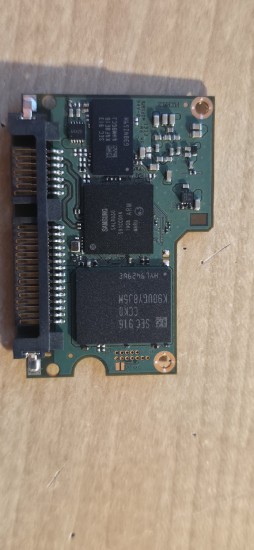 1000006261.jpg [ 231.77 KiB | Viewed 4958 times ]
Attachment:
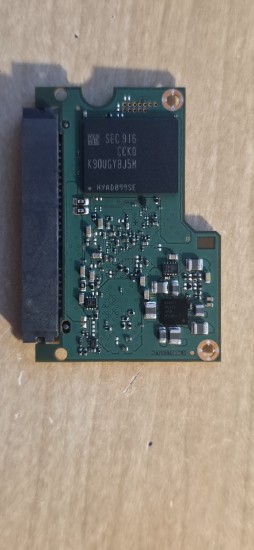 1000006260.jpg [ 212.57 KiB | Viewed 4958 times ]
Controller is Samsung MJX / S4LR030, DRAM is K4F8E164HM-BGCJ, and there are two K90UGY8J5M NAND packages, one on each side of the PCB.
The failure was pretty abrupt. This drive was normally left powered basically 24/7. The computer was fully functional, withstood daily reboots, no SMART errors just a week prior. It was shut down and left off for around a week while I went on vacation, and after that it would no longer boot normally. The motherboard would hang at the ASUS splash screen with the green BOOT LED.
The drive can still identify correctly, but I have never gotten a valid sector back from it since the failure.
I do have the BitLocker recovery key, but obviously that doesn’t matter until I can get raw sectors off the thing.
I originally tried the usual software-side stuff and then sent it to $300 Data Recovery. They were also unable to recover it and suggested a deeper lab.
I’ve since been doing board-level diagnostics myself.
With SystemRescue and the SATA link forced down to 1.5 Gbps, NCQ disabled, etc., Linux will eventually expose /dev/sda.
Kernel options I’m currently using are:
Code:
libata.force=6:1.5G,6.00:noncq,6.00:nologdir,6.00:noiddevlog,6.00:nodmalog,6.00:nosetxfer
The drive identifies completely and coherently.
hdparm -I /dev/sda gives:
Code:
Model: Samsung SSD 860 EVO 1TB
Firmware: RVT02B6Q
LBA sectors: 1,953,525,168
Logical/physical sector size: 512 bytes
SMART supported/enabled
Security not enabled / not locked
Checksum: correct
IDENTIFY is basically instant. With smartctl ioctl debugging I see IDENTIFY completing in approximately 0.0002 seconds.
Anything that actually needs the media side of the drive is a different story.
A typical read results in:
Code:
Emask 0x4 (timeout)
status: { DRDY }
The SATA link then gets reset, comes back at 1.5 Gbps, and the drive identifies again.
ddrescue forward and reverse both recovered 0 bytes.
I have also tried ordinary reads, DMA reads, and previously forced PIO/READ MULTIPLE. No valid user sector has ever been returned.
SMART is interesting though.
Code:
smartctl -A /dev/sda
smartctl -H /dev/sda
both fail.
However, with:
Code:
smartctl -r ioctl,2 -A /dev/sda
the initial IDENTIFY completes immediately, but SMART READ ATTRIBUTE VALUES (0xB0 / feature 0xD0) sits there for about 60 seconds before failing with an aborted command.
SMART STATUS CHECK behaves essentially the same way, about 60 seconds before aborting.
So these don’t appear to be immediate unsupported-command rejects. The drive accepts the operation and then disappears into something internally until the host gives up.
Power / board measurementsI’m powering the SSD independently from a bench supply using only SATA +5 V and ground. SATA 12 V and 3.3 V are not connected.
Normal current is roughly 0.20–0.22 A at 5 V.
The drive itself generates all of its internal rails, including a ~12.08 V boost rail.
The PMIC is a Samsung S2FPS05A01.
I checked the large inductors around it for shorts first. None of the outputs look shorted.
Measured live rails at the PMIC area are:
Code:
1.8 V
2.5 V
0.8 V
4.9 V
0.8 V
1.8 V
1.1 V
All of those remain stable during failed read attempts.
I also scoped the output side of the 0.8, 1.1, 1.8 and 2.5 V rails and did not see any obvious AC or DC ripple, collapse, or dropout when the drive hangs.
The switch node side of the buck inductors looks like normal switching activity.
Thermally, after running for a while:
Code:
MJX controller: ~125–130°F
PMIC/power area: ~106–120°F
NAND packages: essentially ambient
Attachment:
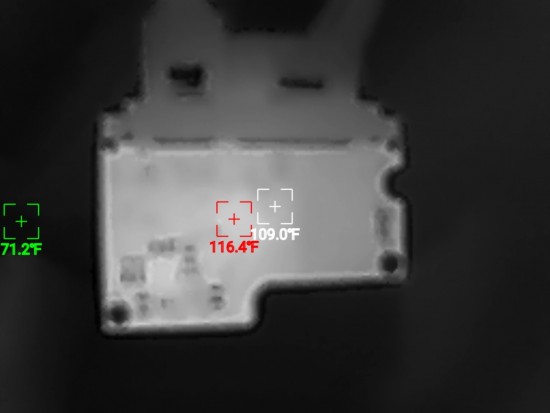 1000006336.jpg [ 72.01 KiB | Viewed 4958 times ]
Attachment:
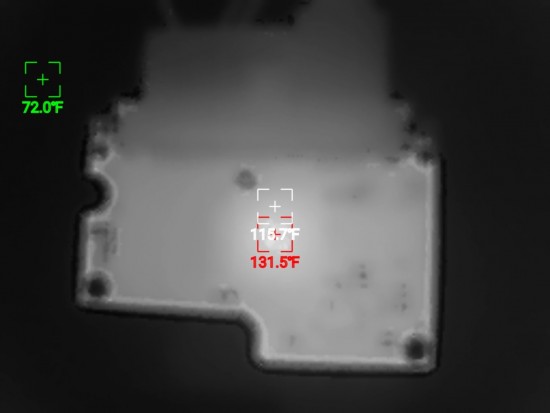 1000006335.jpg [ 69.78 KiB | Viewed 4958 times ]
I haven’t found any tiny passive getting abnormally hot.
The NAND areas on both sides of the PCB are also remarkably symmetrical electrically.
I mapped the local voltages around both packages. Between the two sides I have matching rails at approximately:
Code:
2.5 V
1.2 V
1.8 V
3.3 V
12.08 V
~0.5–0.6 V nodes
0 V / ground-reference nodes
Resistance-to-ground measurements between equivalent points around NAND A and NAND B are also very close.
Examples:
Code:
2.5 V pair: both ~156 kΩ
1.2 V pair: 4.5 kΩ / 4.3 kΩ
1.8 V pair: 45 kΩ / 49 kΩ
3.3 V pair: both ~145 kΩ
~0.6 V pair: both ~3.4 kΩ
0 V nodes: both ~300 Ω
The 12 V nodes are both very high resistance to ground, around the megohm range.
So at least from a gross board level perspective, I don’t see one NAND package with a missing supply or a hard short.
DRAM areaThe DRAM is the Samsung LPDDR4 package mentioned above.
Around that area I measured:
Code:
1.8 V
2.5 V
0.8 V
1.20 V
12.08 V
The 1.20 V rail is very stable and occasionally reads 1.21 V on the meter.
I also checked the DRAM-area rails during an actual failed sector read. The 1.8 V and 1.20 V rails remain solid while the command is hanging.
One interesting topology detail: there are two separate 1.8 V nodes near the DRAM area.
One measures roughly 40–45 kΩ to ground, the other roughly 538 kΩ to ground, and there is about 510 kΩ between the two, so they are clearly not the same 1.8 V net.
I have also been cross-referencing the PCB against the 860 EVO boardview image published by Lardman (with USBRecovery...) It appears to be literally the same board layout as the drive on my bench, and I’ve been able to start matching my temporary test-point labels to actual component designators.
Current behaviorWith SATA disconnected and only +5 V applied, current initially sits around:
Code:
0.204 A
During one long power-only test I logged:
Code:
02:39 AM 0.204 A
02:51 AM 0.221 A
04:18 AM 0.225 A
02:14 PM 0.204 A
So there was some kind of temporary internal state/current change, but after about 11 or 12 hours of uninterrupted power it was back at the original ~0.204 A.
When SATA was connected again it rose to roughly:
Code:
0.215 A
but reads still timed out.
I found the HDDGuru threads where people have reported 860 EVOs coming back after being left powered for many hours and then rebooting the host.
So, I also tried leaving the SSD continuously powered from the bench supply while rebooting/resetting the PC several times. The SSD never lost +5 V during this.
Each reboot causes visible changes in the current draw as the drive partially initializes, but it always ends up in exactly the same state: IDENTIFY works, Linux eventually sees the device, and anything involving actual media access hangs.
I’m now also trying extended idle periods with SATA connected, because I’m not sure whether whatever background recovery/maintenance routine these drives sometimes perform requires a live SATA link.
Where I’m currently atAt this point I’m fairly confident this is not a simple missing power rail or hard short failure.
The SATA/ATA-facing portion of the MJX is clearly alive. It can return a completely coherent IDENTIFY DEVICE structure with a valid checksum essentially instantly.
The failure seems to happen deeper inside the controller when it tries to do something involving NAND/FTL/system metadata.
My current suspects are something along the lines of:
MJX unable to initialize or reconstruct FTL/system area metadata
controller to NAND communication/channel problem
partial failure inside the MJX media side while SATA/front end still works
DRAM or MJX<->DRAM interface issue
NAND system area corruption rather than a simple NAND power failure
What I’d really like to know from anyone who has dealt with a lot of these is.... is this a known 860 EVO / MJX failure pattern?
Specifically, the combination of:
perfect IDENTIFY + valid checksum + DRDY + all actual reads/SMART commands hanging for ~60 seconds
seems pretty specific.
Also, if anyone familiar with the 860 EVO boardview knows which MJX support signals are worth checking next, like reset, clocks, enables, power good signals, etc. I’d appreciate some direction (I'll slip you a benjamin Lardman if you can get me some schematics

)
I’m avoiding blind reflow, NAND removal, controller reballing, random voltage injection, firmware updates, SMART self-tests, secure erase, etc. because, well, I'm not equipped to reflow unless it's in my kitchen oven.
I have microscope photos, thermal images, annotated NAND/DRAM voltage maps, oscilloscope captures, and the current measurements above if any of those would be useful.
Sorry for the long post, but with so few published case studies on these 860 drives, I figured someone on google might appreciate this in 5 years.



 FAQ
FAQ Search
 Login
Login Register
 HDDGURU FILES