MultiDrive – free backup, clone & wipe disk utility from Atola Technology

All times are UTC - 5 hours [ DST ]


Post new topic Reply to topic  [ 10 posts ] 
Author Message
 Post subject: JAR - JPEG Auto Repair
PostPosted: Yesterday, 17:38 
Offline
User avatar

Joined: May 13th, 2019, 7:50
Posts: 1221
Location: Nederland
What JAR does

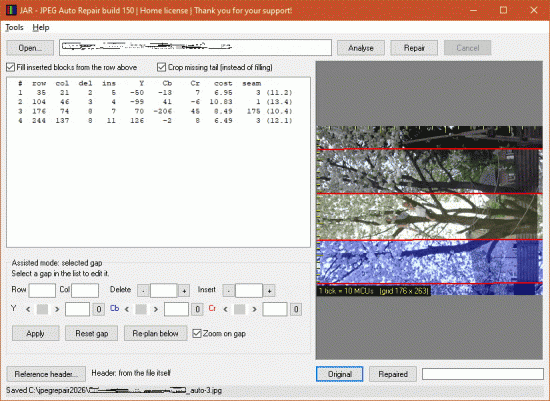
JAR repairs JPEG photos that open, but look broken. When a few bytes of a photo go missing or get damaged, everything after that point goes wrong: the rest of the picture slides sideways, turns grey, or changes colour. The photo isn’t lost. The picture data is still there; it’s just out of place. JAR puts it back.

A JPEG is built from small tiles, stored one after another like text on a page. Damage knocks the tiles that follow out of line. JAR finds each spot where that happens, works out how far the picture moved, shifts it back and fixes the colour. It does this for every damaged spot in the photo, automatically.

Typical damage JAR repairs:

* the bottom part of the photo is grey or a single colour;
* the picture breaks into bands that are shifted sideways;
* from some point on, the colours are wrong (too pink, too green, too dark);
* photos recovered from a damaged card, USB stick or drive that look “glitched”, including photos recovered with PhotoRec, Recuva, Disk Drill and similar tools;
* photos with chunks of other data mixed in, or cut off at the end;
* photos whose header is damaged, using an intact photo from the same camera as a reference.

Attachment:
jar-before-after.gif
jar-before-after.gif [ 176.19 KiB | Viewed 242 times ]


https://www.disktuna.com/jar-jpeg-auto-repair/

_________________
Joep - http://www.disktuna.com - video & photo repair & recovery service


Top
 Profile  
 
 Post subject: Re: JAR - JPEG Auto Repair
PostPosted: Today, 6:24 
Offline
User avatar

Joined: July 12th, 2010, 4:38
Posts: 1458
Location: Portugal
Top work.

_________________
http://www.pclab.com.pt facebook.com/PCLAB.A.T
ACELab partner


Top
 Profile  
 
 Post subject: Re: JAR - JPEG Auto Repair
PostPosted: Today, 7:39 
Offline
User avatar

Joined: March 6th, 2010, 3:46
Posts: 628
Location: Kolding | Denmark
Really cool :good:

_________________
Digitalsupport Data Recovery
https://digitalsupport.dk


Top
 Profile  
 
 Post subject: Re: JAR - JPEG Auto Repair
PostPosted: Today, 9:15 
Offline
User avatar

Joined: September 8th, 2009, 18:21
Posts: 17340
Location: Australia
If I open an undamaged JPEG, I get this warning:

"The header says progressive JPEG (not supported). If this is damage ..."

Strangely, if I use HxD to fill one sector, in the middle of the file, with zeros, I see no damage in the corrupted JPEG. Perhaps progressive JPEGs should be the default for archiving?

_________________
A backup a day keeps DR away.


Top
 Profile  
 
 Post subject: Re: JAR - JPEG Auto Repair
PostPosted: Today, 10:01 
Offline
User avatar

Joined: September 8th, 2009, 18:21
Posts: 17340
Location: Australia
Greyscale images don't seem to be handled well. I use this format for document scanning. The attached files include the results with both checkboxes ticked and unticked.


Attachments:
DG_instruction_set.7z [3.47 MiB]
Downloaded 3 times

_________________
A backup a day keeps DR away.
Top
 Profile  
 
 Post subject: Re: JAR - JPEG Auto Repair
PostPosted: Today, 10:06 
Offline
User avatar

Joined: May 13th, 2019, 7:50
Posts: 1221
Location: Nederland
Then you were lucky I suppose, try zero a block 25% into the progressive file. Yes JAR suggests it could be damaged header. A JPEG straight from camera is probably damaged. So good header would fix it.

FF C0 - 1100 0000 - baseline
FF C2 - 1100 0010 - progressive

For robustness I suppose restart markers would be best with short interval.

_________________
Joep - http://www.disktuna.com - video & photo repair & recovery service


Top
 Profile  
 
 Post subject: Re: JAR - JPEG Auto Repair
PostPosted: Today, 10:15 
Offline
User avatar

Joined: May 13th, 2019, 7:50
Posts: 1221
Location: Nederland
fzabkar wrote:
Greyscale images don't seem to be handled well. I use this format for document scanning. The attached files include the results with both checkboxes ticked and unticked.


I will check this out, thanks!

_________________
Joep - http://www.disktuna.com - video & photo repair & recovery service


Top
 Profile  
 
 Post subject: Re: JAR - JPEG Auto Repair
PostPosted: Today, 10:18 
Offline
User avatar

Joined: May 13th, 2019, 7:50
Posts: 1221
Location: Nederland
Found a bug. I fixed Huffman table that didn't need fixing.

_________________
Joep - http://www.disktuna.com - video & photo repair & recovery service


Top
 Profile  
 
 Post subject: Re: JAR - JPEG Auto Repair
PostPosted: Today, 10:23 
Offline
User avatar

Joined: September 8th, 2009, 18:21
Posts: 17340
Location: Australia
Arch Stanton wrote:
Then you were lucky I suppose, try zero a block 25% into the progressive file. Yes JAR suggests it could be damaged header. A JPEG straight from camera is probably damaged. So good header would fix it.

FF C0 - 1100 0000 - baseline
FF C2 - 1100 0010 - progressive

For robustness I suppose restart markers would be best with short interval.

I use progressive encoding as my default. This goes back to my dial-up modem days when images rendered very slowly in my browser. With progressive encoding you would see the full image at low resolution almost immediately.

Code:
Offset(h) 00 01 02 03 04 05 06 07 08 09 0A 0B 0C 0D 0E 0F

00000050                             FF C2 00 0B 08 06 DC
00000060  08 18 01 01 11 00

_________________
A backup a day keeps DR away.


Top
 Profile  
 
 Post subject: Re: JAR - JPEG Auto Repair
PostPosted: 36 minutes ago 
Offline
User avatar

Joined: May 13th, 2019, 7:50
Posts: 1221
Location: Nederland
Thank you, fixed this bug will upload later.

It will always do poor on files like these, it thinks there's gaps where there are none. Use assisted mode to get rid of the nonsense repairs.

https://youtu.be/4Cdwe8Shg1c

But it's on my list for later, thanks.

_________________
Joep - http://www.disktuna.com - video & photo repair & recovery service


Top
 Profile  
 
Display posts from previous:  Sort by  
Post new topic Reply to topic  [ 10 posts ] 

All times are UTC - 5 hours [ DST ]


Who is online

Users browsing this forum: No registered users and 13 guests


You cannot post new topics in this forum
You cannot reply to topics in this forum
You cannot edit your posts in this forum
You cannot delete your posts in this forum
You cannot post attachments in this forum

Search for:
Jump to:  
Powered by phpBB © 2000, 2002, 2005, 2007 phpBB Group