MultiDrive – free backup, clone & wipe disk utility from Atola Technology

All times are UTC - 5 hours [ DST ]


Post new topic Reply to topic  [ 11 posts ] 
Author Message
 Post subject: error on harddisk raid 1
PostPosted: September 2nd, 2006, 0:29 
Offline

Joined: July 27th, 2005, 3:35
Posts: 92
Hai to all, need some help to solve this problem.
I just receive 4 harddisk IDE 300GB installed inside HP server.
harddisk 1+3 (raid 0), harddisk 2+4 (raid 1).
the problem is when they change the Windows system (before is windows server 2000) to windows server 2003, all the data (in raid 1) gone.

Harddisk detected in BIOS but the file systems is "Dynamic Disk" and cannot be access in anywhere.

I already try to retrieve the data inside using many software data recovery. like media tools, easy recovery, test disk, etc. but none success.

any solution ???

regards
Tony


Top
 Profile  
 
 Post subject:
PostPosted: September 2nd, 2006, 8:43 
Offline

Joined: October 3rd, 2005, 0:40
Posts: 4753
Location: Hungary
Hello Tony,

I think U will have to manually analize the structure of the arrays to choose the right method of recovery. I'm afraid it is not about magic programs, though they are helpful of course if U know which one to use in a given situation and how.
U have to check the RAID structure, probably U will have to make a complete image by deinterleaving the RAID and create a continuous image. Then U can think about what program to use for filesystem recovery, if one is not working correctly, check the cause and eliminate it...

good luck and have success!

regards,
pepe


Top
 Profile  
 
 Post subject:
PostPosted: September 2nd, 2006, 16:44 
Offline

Joined: August 31st, 2006, 23:55
Posts: 28
If they were single disks, there are programs that can switch them to Basic from Dynamic without losing all the data. I had to do that on five different drives to get data off them after the 2000 Pro install on one of them went *poof*. I don't recall what software I used...

Here's something interesting. http://www.diydatarecovery.nl/dp_manual ... repair.htm

http://www.webservertalk.com/message176200.html

http://www.howtofixcomputers.com/bb/sutra57923.html

http://www.pcmech.com/forum/archive/ind ... 52509.html

http://blogs.technet.com/kevinremde/arc ... 91458.aspx

Looks like for a Dynamic software RAID setup, you're pretty well screwed. :( Unless there's some 3rd party software that can access it to copy the data.

IMHO it's extrememely stupid that a Dynamic volume created on a PC running XP or 2000 cannot just be plugged into any other PC running XP or 2000 and be readable. Stick with Basic volumes and get a RAID controller card (not motherboard integrated!) so you can move the whole works when upgrading the rest of the system.


Top
 Profile  
 
 Post subject:
PostPosted: September 3rd, 2006, 13:39 
Offline
User avatar

Joined: August 15th, 2006, 3:01
Posts: 3522
Location: CDRLabs @ Chandigarh [ India ]
Hi Bizzybody ,

That Was Very Interesting information,glad you shared this with us .

_________________
Regards
Amarbir S Dhillon , Chandigarh Data Recovery Labs [India]
Logical,Semi Physical And Physical Data Recovery
Website-> http://www.chandigarhdatarecovery.com


Top
 Profile  
 
 Post subject:
PostPosted: September 4th, 2006, 0:53 
Offline

Joined: July 27th, 2005, 3:35
Posts: 92
hi pepe, thank for the information. I still working on to recover the data.
I'm using r-studio v3.0 know to recover the data. it scan and found the a lot of data inside, but if I tr to recover it, the data become zero byte (have the right name with zero byte)

can anyone tell me why I only can recover the file (name is correct) but don't have any data inside (zero byte).

p.s. I'm very greatful If anyone have any suggestion or information how to recover the data inside.

thanks
regards
Tony


Top
 Profile  
 
 Post subject:
PostPosted: September 4th, 2006, 2:39 
Offline

Joined: October 5th, 2005, 12:58
Posts: 21
Location: Istanbul - TURKEY
Hi Tony,

Did you set the raid order correctly?
If you make it wrong the data will not be correct.

Baha Cevik
Istanbul - TURKEY


Top
 Profile  
 
 Post subject:
PostPosted: September 8th, 2006, 1:17 
Offline

Joined: July 27th, 2005, 3:35
Posts: 92
hallo baha cevik, thanks for the info. :)
I already try using r-studio again, but still can get a correct data out from the harddisk
here is the picture :
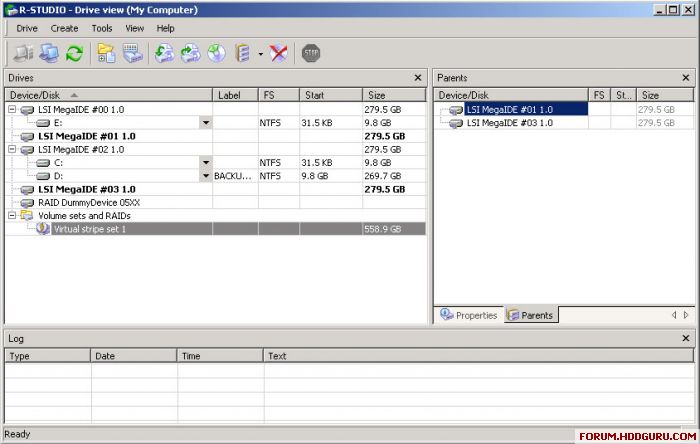
Image

note : I'm using virtual stripe set (because the harddisk is raid 0 and making into one huge volume (2x300gb = 600GB)
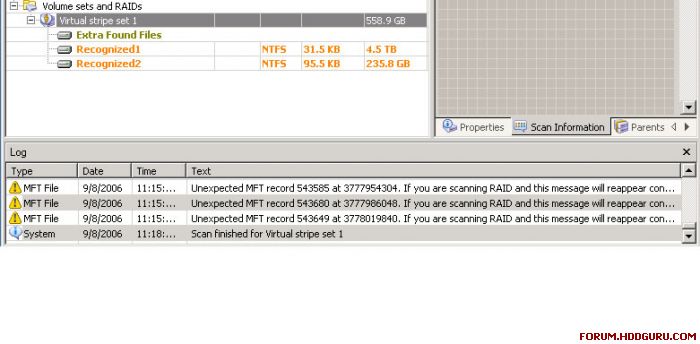
Image

note: after finished scanning, its show some recognized fragment files. What is Unexpected MFT record 543649.. bla..bla.. things ????
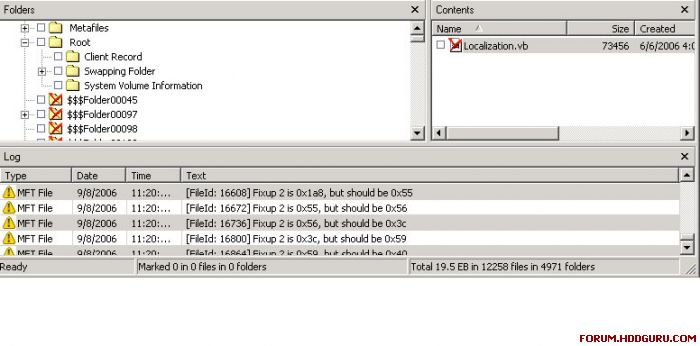

Image

note: after try to explore the founded recognized.. it show (below) "fixup 2 is 0x1a8, but should be 0x55" .. ??
I already try to read the manual.. but none is show about error message.
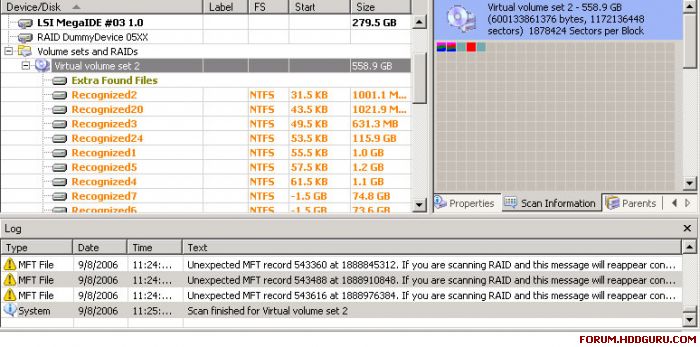
Image

note : I'm using virtual volume set, it recover a lot of files. but it show that the file should be (like : 12000bytes) but only recovery (6000bytes). I suggest this is because of the striping method using.

so any suggestion ?? how to merge the file together so can be access ??

or maybe anyone show me how to using in r-studio correctly ?

:)

thanks
Tony Heryanto


Top
 Profile  
 
 Post subject:
PostPosted: September 8th, 2006, 1:35 
Offline

Joined: November 1st, 2005, 10:04
Posts: 238
check properties (next to parents) for stripe size.
Check drives in hex viewer to see if you can manually
confirm start and stripe size - then probably it's in the bag.

I suspect partition table is shot, but don't worry about this.

success!

btw. seems like you running this R-stud from the client computer.
In this case you probably OK, but avoid this in future.
Use your own OS and clones of raid - much safer.
Did they not mirror the "Backup" Volume on drives 0 and 2 ?


Top
 Profile  
 
 Post subject:
PostPosted: September 8th, 2006, 1:44 
Offline

Joined: July 27th, 2005, 3:35
Posts: 92
thanks coffeebean.

ok.. I will check it now.
but, need to know.. which method should I choose.. Virtual Volume set ot Virtual Stripe set ??? because this to method generate diffence output files..

thanks
Tony Heryanto


Top
 Profile  
 
 Post subject:
PostPosted: September 8th, 2006, 2:22 
Offline

Joined: July 27th, 2005, 3:35
Posts: 92
Hi coffeebean, I already check it.
here is the result.
Check properties for stripe size (64KB) same as hdd stripe size 64KB (128sectors)

using region on virtual stripe set

here is the result , when try to recovery some files
" (Fileid:10424) closing attribute : parsed allocated size (12288) differ from stored one (24576) "
this message appear on every files I want to recover.

so, hopefully you can help me coffeebean.
many thanks to you

best regards
Tony Heryanto


Top
 Profile  
 
 Post subject:
PostPosted: September 8th, 2006, 4:10 
Offline

Joined: November 1st, 2005, 10:04
Posts: 238
Scan your stripe to get some file listings.
Look for some big txt file then you will get LBA for this file.

In R-Stud go to this LBA on each drive and you will figure out
the stripe size and order - by piecing this file together - manually.
Then you can work backwards and find out start of raid - probably LBA 0.

Once you certain about size, order and start the rest is up to you.

success!


Top
 Profile  
 
Display posts from previous:  Sort by  
Post new topic Reply to topic  [ 11 posts ] 

All times are UTC - 5 hours [ DST ]


Who is online

Users browsing this forum: No registered users and 33 guests


You cannot post new topics in this forum
You cannot reply to topics in this forum
You cannot edit your posts in this forum
You cannot delete your posts in this forum
You cannot post attachments in this forum

Search for:
Jump to:  
Powered by phpBB © 2000, 2002, 2005, 2007 phpBB Group

