MultiDrive – free backup, clone & wipe disk utility from Atola Technology

All times are UTC - 5 hours [ DST ]


Post new topic Reply to topic  [ 17 posts ] 
Author Message
 Post subject: Seagate hdd short
PostPosted: May 9th, 2007, 17:38 
Offline

Joined: May 9th, 2007, 17:26
Posts: 9
Hey, I'm pretty much a noob at circutry and the like, but i'll describe to be best of my knowledge and hope someone can help.
I tried to plug my seagate 80gig barracuda into a 4 pin power connecter while the computer was running (dumb, I know) and was met with a spark and I'm guessing a short as the psu will not turn on unless the hdd is not in the circuit. after some research, I deduced that the problem was probably a blown protection diode and I need to remove it. But, my warrenty is void if I rip it apart so I need to know for sure that I can fix this thing before I do so.
Any tips would be greatly appreciated, thanx.
Andy


Top
 Profile  
 
 Post subject:
PostPosted: May 10th, 2007, 12:13 
Offline

Joined: October 3rd, 2005, 0:40
Posts: 4753
Location: Hungary
Hi,

A model number (ST380xxxA) and a FW rev. would be helpful, also a picture of the PCB :)

regards,
pepe


Top
 Profile  
 
 Post subject:
PostPosted: May 10th, 2007, 17:57 
Offline

Joined: May 9th, 2007, 17:26
Posts: 9
The screws are star-shaped...I might need to get a special screw driver to take it apart... the model is st280811as

http://one.fsphost.com/nixx/IMG_0244.psd

Thanks for the reply


Top
 Profile  
 
 Post subject:
PostPosted: May 11th, 2007, 16:28 
Offline

Joined: November 15th, 2005, 11:05
Posts: 189
Location: Canada
T-8 torx bit is needed

_________________
I think ST is a sub company of Lucas


Top
 Profile  
 
 Post subject:
PostPosted: May 11th, 2007, 17:02 
Offline

Joined: September 27th, 2005, 4:26
Posts: 505
Location: Bulgaria, Sofia
Shortscurcuits wrote:
T-8 torx bit is needed

Or T9 :wink:

_________________
DataRecovery.bg


Top
 Profile  
 
 Post subject:
PostPosted: May 13th, 2007, 14:37 
Offline

Joined: May 9th, 2007, 17:26
Posts: 9
Ok, so I get that to open the drive, and I assume I'll need to open it to fix it since all the meat on the pcb is internal, what will I need to do to it?


Top
 Profile  
 
 Post subject:
PostPosted: May 13th, 2007, 15:33 
Offline

Joined: November 15th, 2005, 11:05
Posts: 189
Location: Canada
Hi no you need the torx to remove the PCB and replace it with a suitable donor PCB. Do not open the drive. (Unless you blew the pre-amp but ther's no way to tell untill you have another donor PCB. If you don't need the data you are best off to warranty the drive. Any tampering will void your warranty.

_________________
I think ST is a sub company of Lucas


Top
 Profile  
 
 Post subject:
PostPosted: May 13th, 2007, 15:49 
Offline

Joined: May 9th, 2007, 17:26
Posts: 9
Ok, so find a doner, I'll have to buy one then right? and the replacing of the pcb is pretty strait foreward yes?


Top
 Profile  
 
 Post subject:
PostPosted: May 13th, 2007, 22:29 
Offline

Joined: November 15th, 2005, 11:05
Posts: 189
Location: Canada
Hi yes you need same model drive, same pcb layout & identical firmware revision. Take out screws & swap good board for damaged one.

Be prepared though if you killed the preamp when you shorted the drive there is a good chance you may kill your new PCB when you connect it.

_________________
I think ST is a sub company of Lucas


Top
 Profile  
 
 Post subject:
PostPosted: May 13th, 2007, 23:31 
Offline

Joined: May 9th, 2007, 17:26
Posts: 9
and what will that mean? should I be replacing both the pcb and preamp? can you tell from the information I've givin so far what the problem probably is?
Thank you by the way for all the help, I'm just inexperienced so I need all the info I can get :P


Top
 Profile  
 
 Post subject:
PostPosted: May 14th, 2007, 4:21 
Offline

Joined: June 27th, 2006, 11:33
Posts: 2288
Location: In ur HDD !
u cannot change both preamp and the pcb first u got to know whats the problem that could be found by replacing the bad pcb with the good one .
Do that and post results here .


Top
 Profile  
 
 Post subject:
PostPosted: May 14th, 2007, 7:09 
Offline

Joined: November 15th, 2005, 11:05
Posts: 189
Location: Canada
Yes Rameez is right,all I was trying to tell you is that if you damaged your pre-amp when you shorted your power connector, there is a possibility that you might damage your new PCB in the process of trying it on your damaged hard drive. But there is no real way to tell beforehand. It might be an idea to buy a pair of working donors if you are prepared to do some very intricate soldering or a head change if the pre-amp is actually damaged on your drive.

_________________
I think ST is a sub company of Lucas


Top
 Profile  
 
 Post subject:
PostPosted: May 14th, 2007, 8:42 
Offline

Joined: May 9th, 2007, 17:26
Posts: 9
Ok, I have a donor drive on its way with matching firmware and model number. So for future reference, do you have any links to tutorials for pcb changes like the head change link you posted?
I think if the pcb change doesnt work, I'll probably end up having a professional fix it, but from what I've researched, its most likely a diode...which is on the pcb.
Thank you all again for the support


Top
 Profile  
 
 Post subject:
PostPosted: May 15th, 2007, 21:48 
Offline

Joined: November 15th, 2005, 11:05
Posts: 189
Location: Canada
All you have to do is remove the cover or Seashield (if there is one) remove all screws and move the good PCB to the damaged drive, replace the screws plug it in and you will know. It may sound silly but mark the drives & PCB's beforehand with a marker so you know which is which. All it takes is a distraction and they can get mixed up :D

_________________
I think ST is a sub company of Lucas


Top
 Profile  
 
 Post subject:
PostPosted: May 15th, 2007, 22:03 
Offline

Joined: May 9th, 2007, 17:26
Posts: 9
Ok, I hear its pretty self explanitory
Thanx all, I'll post the results soon


Top
 Profile  
 
 Post subject:
PostPosted: May 23rd, 2007, 20:29 
Offline

Joined: May 9th, 2007, 17:26
Posts: 9
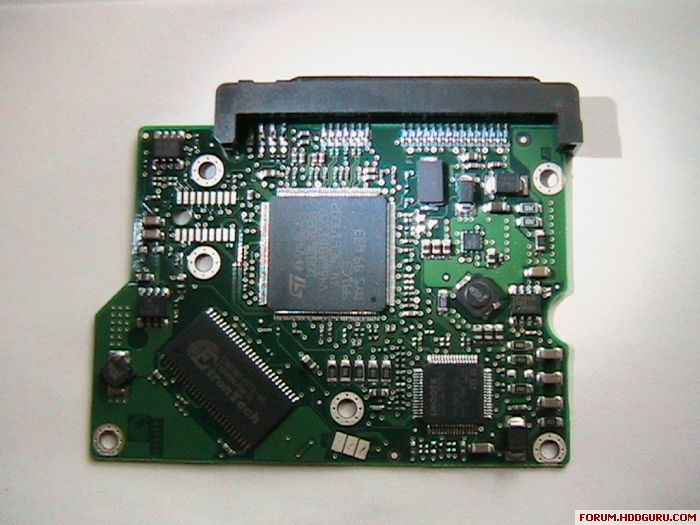
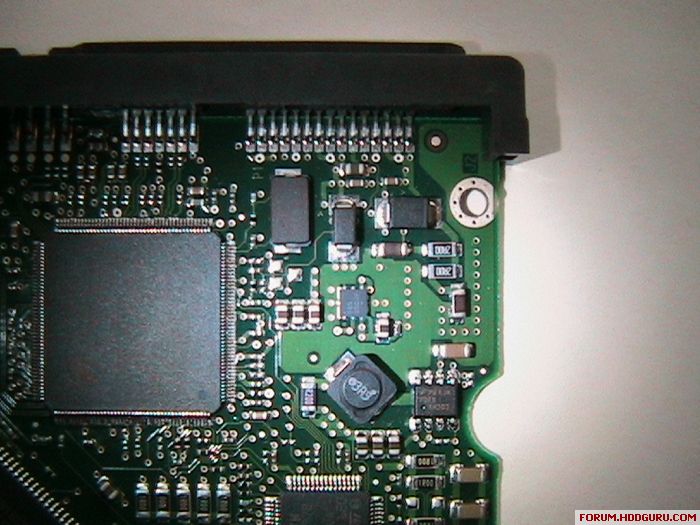
Ok, so I got the donor, a torx-8, made the swich, and turned it on. success...up to the point where POST tries to read the drive itself.
It froze up unless I had the drive disconnected. any ideas?
and this is the internal side of the frankenstein pcb...where is the diode I want to remove?

Image

Image


Top
 Profile  
 
 Post subject:
PostPosted: May 24th, 2007, 12:38 
Offline

Joined: May 9th, 2007, 17:26
Posts: 9
Ok, I got a PM with the location of the bad diode and I removed it...worked lika a charm, so thank you all for the support, you make my life much easier (and cheaper!)
for those who are watching with the same problem, carefully remove the piece circled in red, there will be some sticky stuff under it, make sure to wipe that of, but be careful not to scratch the board.

Image

and fyi, craftsman makes torx screw drivers, they're not hard to find, i got one from a friend who works at HP


Top
 Profile  
 
Display posts from previous:  Sort by  
Post new topic Reply to topic  [ 17 posts ] 

All times are UTC - 5 hours [ DST ]


Who is online

Users browsing this forum: No registered users and 33 guests


You cannot post new topics in this forum
You cannot reply to topics in this forum
You cannot edit your posts in this forum
You cannot delete your posts in this forum
You cannot post attachments in this forum

Search for:
Jump to:  
Powered by phpBB © 2000, 2002, 2005, 2007 phpBB Group