MultiDrive – free backup, clone & wipe disk utility from Atola Technology

All times are UTC - 5 hours [ DST ]


Post new topic Reply to topic  [ 5 posts ] 
Author Message
 Post subject: Hdd converted to dynamic, gone wrong.
PostPosted: June 7th, 2007, 2:54 
Offline

Joined: May 21st, 2007, 16:10
Posts: 1592
Location: Gothenburg/ Sweden
Hi,
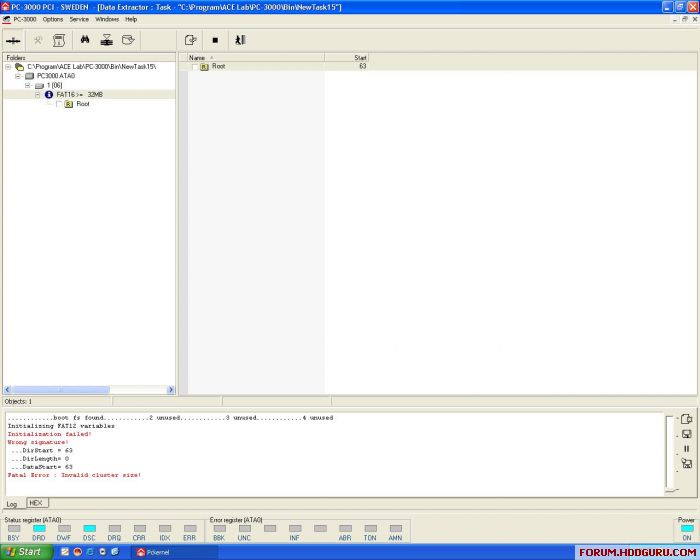
A friend of mine has convert a hdd to a dynamic drive, and it all has gone wrong.
Now it shows fat16, but should be ntfs.
I have pc3000 with DE, when I start it up in DE there is no folder structure, the only way I have pulled out data with success is with Raw data extraction, but it had been nice to have it all saved with structure and right names.

Anyone got a nice trick for this?


Image


Regards

Bosse


Top
 Profile  
 
 Post subject:
PostPosted: June 7th, 2007, 7:49 
Offline
User avatar

Joined: September 16th, 2006, 8:51
Posts: 141
Location: Vietnam
You need to make clear between DE and all other recovery data software. You see, software (GetDataback for examble) can not work with HDD've had bad sector 0 or real bad sector on user data. DE can clone HDD've bad sector but it can not help you now. You must use something like GetDataback for more right structure and name. Goodluck!


Top
 Profile  
 
 Post subject:
PostPosted: June 7th, 2007, 11:36 
Offline

Joined: May 21st, 2007, 16:10
Posts: 1592
Location: Gothenburg/ Sweden
Hi, hddlab...and thanks.
That worked just fine..of course :-)
Over 5 years ago I bought my first recovery software...GDB!
I must had a slightly blackout when I did this post ;-)

Regards

/Bosse


Top
 Profile  
 
 Post subject:
PostPosted: June 7th, 2007, 14:12 
Offline

Joined: January 29th, 2005, 22:58
Posts: 637
Location: Canada
hddlab wrote:
DE can clone HDD've bad sector but it can not help you now. You must use something like GetDataback for more right structure and name.

DE can recover NTFS - right-click on the disk and do "Logical scanning".
It'd be slow though, because it works in PIO, so GetDataBack or R-Studio would a be better choice in this case.


Top
 Profile  
 
 Post subject:
PostPosted: June 8th, 2007, 4:38 
Offline
User avatar

Joined: April 16th, 2005, 11:34
Posts: 92
Hi mr Spokk

DE is not as powerful as GDB or R-studio in finding and reconstructing
corrupted file system.
Just attach drive to IDE or USB port of your machine (or mount it from
inside DE) and try GDB or R-Sudio.
You may try Stellar Phoenix for windows too(choose NTFS scan) :wink:

Goodluck


Top
 Profile  
 
Display posts from previous:  Sort by  
Post new topic Reply to topic  [ 5 posts ] 

All times are UTC - 5 hours [ DST ]


Who is online

Users browsing this forum: we3fan and 119 guests


You cannot post new topics in this forum
You cannot reply to topics in this forum
You cannot edit your posts in this forum
You cannot delete your posts in this forum
You cannot post attachments in this forum

Search for:
Jump to:  
Powered by phpBB © 2000, 2002, 2005, 2007 phpBB Group