MultiDrive – free backup, clone & wipe disk utility from Atola Technology

All times are UTC - 5 hours [ DST ]


Post new topic Reply to topic  [ 11 posts ] 
Author Message
 Post subject: Newbie quesiton about dead hdd.
PostPosted: July 4th, 2007, 12:40 
Offline

Joined: July 4th, 2007, 12:35
Posts: 5
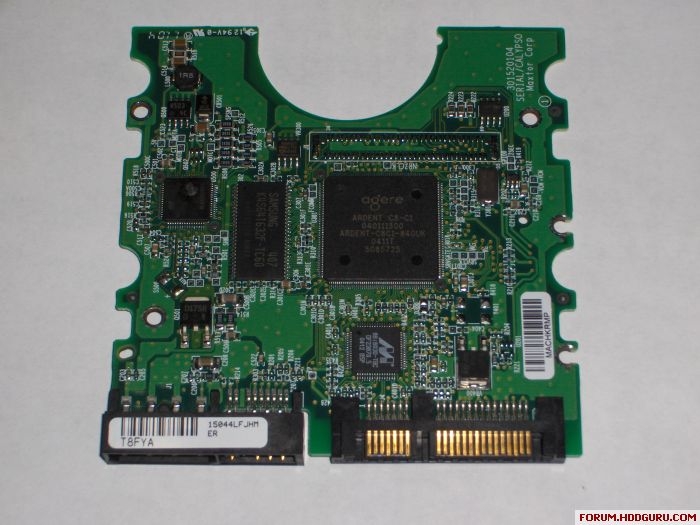
A few months ago when i turned my computer on my power supply shorted out and killed my hdd along with it. I noticed when i took the hdd out that one of the chip on the controller board was burnt. Would my data still be ok? The HDD doesn't power on or do anything. Could i just find the proper the controller board with the right firmware and replace the burnt out one and retrieve my data? Thanks!


Top
 Profile  
 
 Post subject:
PostPosted: July 4th, 2007, 16:11 
Offline

Joined: January 29th, 2005, 22:58
Posts: 637
Location: Canada
You have to search for the donor board.
What's the drive model?


Top
 Profile  
 
 Post subject:
PostPosted: July 4th, 2007, 21:47 
Offline

Joined: July 4th, 2007, 12:35
Posts: 5
Its a Maxtor DiamondMax Plus 9 200gb SATA HDD.

YAR51EW0
6Y200M006540A

Here is a pic of the controller board.. You can clearly see the the one chip has melted or something.. linkImage

anyway i found an controller board on ebay that i think should work. All the serial numbers and everything match my HDD.
http://cgi.ebay.ca/Maxtor-DiamondMax-Pl ... dZViewItem

My other question is if this new board works and all my data is safe. Would it be safe to use the HDD for storage or should i just pull all my data off it and store it on another drive?


Top
 Profile  
 
 Post subject:
PostPosted: July 4th, 2007, 22:21 
Offline
User avatar

Joined: June 8th, 2006, 19:44
Posts: 3144
Location: Atlanta, GA
Looks like the motor driver IC is toast.

On the replacement board: you'll need to determine which of the 8 pin ICs on the bad board is the ROM (Google the part number) and transplant it to your donor PCB. It contains adaptive information.

Drives are cheap. It is not wise to depend upon a repaired drive for important data.


Top
 Profile  
 
 Post subject:
PostPosted: July 4th, 2007, 22:53 
Offline

Joined: July 4th, 2007, 12:35
Posts: 5
jono-ats wrote:
you'll need to determine which of the 8 pin ICs on the bad board is the ROM (Google the part number) and transplant it to your donor PCB. It contains adaptive information.


I'm not exactly sure what you mean by that.. If i have an identical board shouldn't it work fine? And what do you mean by transplant?


Top
 Profile  
 
 Post subject:
PostPosted: July 4th, 2007, 23:24 
Offline
User avatar

Joined: June 8th, 2006, 19:44
Posts: 3144
Location: Atlanta, GA
In the "old days" often you could swap a good board for a bad one and expect to recover your data.

Modern drives are fine-tuned at the factory. Each drive has different parameters, e.g. defect maps, head maps (e.g some drives have heads that are not used although they are physically present), etc. This is called ADAPTIVE DATA.

Maxtor stores some of this adaptive data in a tiny serial ROM IC on the board. When you take a board from a donor drive, it will have it's own adaptive data which will likely not be entirely compatible with your drive. This will result in clicking, etc. and other start-up problems.

The solution, when swapping boards, is to desolder the ROM from your bad board and solder it onto the replacement (donor) PCB. This is best done with the correct tools and experience . . . .


Top
 Profile  
 
 Post subject:
PostPosted: July 5th, 2007, 2:17 
Offline

Joined: November 1st, 2005, 10:04
Posts: 238
Many drives do not contain this "Adaptive Data" in the ROM or on pcb.

Maxtor not so good with storing "Adaptive data" in Serial ROM.


Hi Spildit,

Where you see this "TVS" on this board, or maybe you think this TVS
appears on every board.

Besides, this "TVS" cannot be removed on some Seagate pcb, because
it is going to cause little explosion on MC on some Seagate drives when
it is removed - so be careful when applying one idea to all drives.


Top
 Profile  
 
 Post subject:
PostPosted: July 5th, 2007, 2:58 
Offline

Joined: June 27th, 2006, 11:33
Posts: 2288
Location: In ur HDD !
that depends on the probelm if the pcb is short from somewhere and if u remove the TVS and power the drive u could also toast the preamp .
Heroman,
I would suggest that u change the chip that is burned on your board that would be easier to find .


Top
 Profile  
 
 Post subject:
PostPosted: July 5th, 2007, 7:09 
Offline

Joined: July 4th, 2007, 12:35
Posts: 5
umm.. well thanks for all the help..


Top
 Profile  
 
 Post subject:
PostPosted: July 13th, 2007, 22:28 
Offline

Joined: July 4th, 2007, 12:35
Posts: 5
Good news! I bought a PCB from ebay for my drive and it worked perfectly! I've been able to get all my data back! Thanks for everyones help


Top
 Profile  
 
 Post subject:
PostPosted: July 14th, 2007, 6:14 
Offline
User avatar

Joined: August 15th, 2006, 3:01
Posts: 3522
Location: CDRLabs @ Chandigarh [ India ]
Heroman ,
what i Liked In This discussion .You Atleast Told everyone That you Solved a Issue And Thanked The Same .Very Good

_________________
Regards
Amarbir S Dhillon , Chandigarh Data Recovery Labs [India]
Logical,Semi Physical And Physical Data Recovery
Website-> http://www.chandigarhdatarecovery.com


Top
 Profile  
 
Display posts from previous:  Sort by  
Post new topic Reply to topic  [ 11 posts ] 

All times are UTC - 5 hours [ DST ]


Who is online

Users browsing this forum: No registered users and 55 guests


You cannot post new topics in this forum
You cannot reply to topics in this forum
You cannot edit your posts in this forum
You cannot delete your posts in this forum
You cannot post attachments in this forum

Search for:
Jump to:  
Powered by phpBB © 2000, 2002, 2005, 2007 phpBB Group