MultiDrive – free backup, clone & wipe disk utility from Atola Technology

All times are UTC - 5 hours [ DST ]


Post new topic Reply to topic  [ 27 posts ]  Go to page 1, 2  Next
Author Message
 Post subject: Dying Seagate Momentus ST94019A - need data
PostPosted: August 24th, 2008, 15:34 
Offline

Joined: December 10th, 2006, 18:24
Posts: 72
Hi all,

I seek advice what actions to take or what not to do.

The disk is a 2,5" ST94019A with 40 GB and 4200 rpm from a Compaq/HP laptop.
Quite quickly the PC started acting weird and the next day it was already unbootable.

It doesn't make too strange noises. What I think I hear is only multiple retries in reading sectors and quite seldomly a calibration "clack"-sound.

What I tried:
Running Seatools long mode: Seatools already finds 100 errors in the first 125000 LBA sectors.
Distribution of errors is clumped. See here: http://img233.imageshack.us/img233/4294/lbabadsectorscm1.png
Seatools is unable to repair the error. I canceled the procedure after it took several minutes to repair just one of the sectors. With MHDD scan he found UNC sectors displayed with an 'x' and sometimes sectors displayed with a green 'S' not far away. Remapping with MHDD didn't seem to work.

I tried getting an image of the data partition via TestDisk to an external USB drive. It took about 20 minutes for 6MB. I canceled the action because I think the drive may die completely in a while. TestDisk took several minutes after I selected the drive to show up the next menu.

Interestingly, the SMART data (in MHDD and HDAT2) show "reallocated sector count" is zero. I thought that the drive should have remapped sectors already. The other SMART values don't tell me much. Perhaps someone here has a clue what's up:
SMART 1: http://img353.imageshack.us/img353/4803/smartdata1ro9.png
SMART 2: http://img233.imageshack.us/img233/8103/smartdata2hh4.png

What I want to know from you guys:
- How dead is the drive? Would it be harmful to have the drive running (e. g. to copy an image)?
- Is there something I can do here (with TestDisk, MHDD, HDAT2, Victoria and the like)?
- If it is a job for a professional, what could be a rough price estimate for getting the data back?
- What reputable data recovery firm can you guys recommend in Germany? Kroll Ontrack?

As the last backup is from February, I wouldn't need to get so much data back.
If S/N or other info about the drive is needed, feel free to ask.

Best regards,
weaker
(hoping that you can shed a light on that case what may be damaged)


Top
 Profile  
 
 Post subject: Re: Dying Seagate Momentus ST94019A - need data
PostPosted: August 24th, 2008, 15:41 
Offline

Joined: July 18th, 2006, 3:05
Posts: 7476
Location: ITALY
Stop using any tools and try to image the drive (if you can) as , effectively, the drive can fail at anytime. 'Momentus' (like any other electromechanical apparatus) simply ... fail, without further warning or notice. They are prone to head and motor (bearing) failure, but it depends on what use you have made of the drive.


Top
 Profile  
 
 Post subject: Re: Dying Seagate Momentus ST94019A - need data
PostPosted: August 24th, 2008, 15:50 
Offline

Joined: December 10th, 2006, 18:24
Posts: 72
Thanks for the quick answer!

Trying to get the image via TestDisk took very long.
Do you think I should have the drive running for perhaps one or two days non-stop to get the image?
Or is there an imaging software (or a dd command line) that skips dead blocks fast?


Top
 Profile  
 
 Post subject: Re: Dying Seagate Momentus ST94019A - need data
PostPosted: August 24th, 2008, 15:52 
Offline

Joined: June 28th, 2008, 0:37
Posts: 225
Location: San Francisco Bay Area www.harddiskcrashed.com
I have a way for you to get an image from that drive.

Testdisk is not designed for working with failing disks.

Check your PM. Usually works fine. Let me know if you need additional assistance. :)

Leonid


Top
 Profile  
 
 Post subject: Re: Dying Seagate Momentus ST94019A - need data
PostPosted: August 24th, 2008, 16:43 
Offline

Joined: December 10th, 2006, 18:24
Posts: 72
Thanks for all your input. You are incredibly fast.

I'm getting a little confused now: Two votes for imaging and one against.

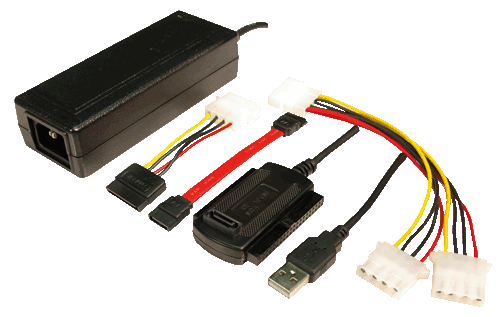
@Spildit: I know that I don't need every file but I don't know how the drive would behave on a second PC and if I were able to "just copy" things. The disk doesn't use the same interface as my adapter
Image
which on his backside uses standard ATA pin interface as seen here
Image

It uses something without pins I haven't seen so far. I would need to buy such an adapter first.
Do you think I could access the drive properly as a second disk?


Top
 Profile  
 
 Post subject: Re: Dying Seagate Momentus ST94019A - need data
PostPosted: August 24th, 2008, 16:56 
Offline

Joined: December 10th, 2006, 18:24
Posts: 72
I read here, that the drive has already an adaptor attached for use in that notebook.
http://forums.anandtech.com/messageview ... erthread=y
I will find out if I can remove the nonstandard-adaptor and connect the drive to another PC.

But I'm still undecided if I should risk taking an image or not. The important data starts from about LBA 14 million onwards on the second partition.


Top
 Profile  
 
 Post subject: Re: Dying Seagate Momentus ST94019A - need data
PostPosted: August 24th, 2008, 17:03 
Offline

Joined: November 29th, 2006, 10:08
Posts: 7864
Location: UK
Use a non-windows imager, such as media tools or dd_rescue.

Assuming you don't have access to pro tools such as DeepSpar or Ninja.

_________________
PC Image Data Recovery
http://www.pcimage.co.uk

New!! HDD-PCB.COM for all your PCB and donor HDD requirements!


Top
 Profile  
 
 Post subject: Re: Dying Seagate Momentus ST94019A - need data
PostPosted: August 24th, 2008, 17:43 
Offline
User avatar

Joined: June 8th, 2006, 19:44
Posts: 3144
Location: Atlanta, GA
I respectfully disagree with Spildit.

If you try to copy files off of a failing drive, it will keep retrying and may just time out. Worse, it may further damage your drive.

I recommend Media Tools Pro. It's fast and you can set it not to try to re-read bad sectors if you are racing against time.

Jon

_________________
http://www.datasaversllc.com


Top
 Profile  
 
 Post subject: Re: Dying Seagate Momentus ST94019A - need data
PostPosted: August 24th, 2008, 18:03 
Offline

Joined: June 28th, 2008, 0:37
Posts: 225
Location: San Francisco Bay Area www.harddiskcrashed.com
A 40GB drive can be imaged in an hour. I use ddrescue rather that dd_rescue.

I never do work on a drive without an image from it. If it does die, I can fix it and complete my image. :)


Top
 Profile  
 
 Post subject: Re: Dying Seagate Momentus ST94019A - need data
PostPosted: August 24th, 2008, 18:14 
Offline

Joined: December 10th, 2006, 18:24
Posts: 72
Thanks for all your input and advice! I really appreciate it.

My main issue is that I don't know how much I'm racing against time. I have no idea how long the drive will be operable to perform DR.


Top
 Profile  
 
 Post subject: Re: Dying Seagate Momentus ST94019A - need data
PostPosted: August 24th, 2008, 20:37 
Offline

Joined: June 28th, 2008, 0:37
Posts: 225
Location: San Francisco Bay Area www.harddiskcrashed.com
Spildit wrote:
@wiseleo

Quote:
If it does die, I can fix it and complete my image.


That is exactly why i didn't recommend weaker to do a image ....
Because if the drive dies he will not be able to fix the drive to complete the image. And if the bad sectors are on the beginning of the drive (C: partition) he might get lucky retriving files from the d: partition. If not, tools like restorer2000 pro will be able to retrive files and do a single read on bad sectors.
Sure, i would advice Prosoft Media Tools also but it's a very expensive tool if the files needed are few....
Let's say, why image a full 40Gb drive if you only need a 1Mb *.Doc file ?
I think that the question here is the amount of data needed from the drive. Sure, if you need 35GB of the 40Gb do a image of it !!!


Right, but if it does die during an image from a gentle process by a data recovery tool, those of us who can fix it, will have a much easier time doing so.

While there is a risk, it is manageable. As a rule, if I am lucky enough to have a drive that is still imageable, I image before I do anything else.

If the drive dies as a result of some other process...Well, there is risk of further damage.

Restorer2000 Pro is a Windows tool. I would guess that it uses Windows drivers to access the HDD and as such is subject to Windows kernel limitations when it comes to bad sectors behavior.

But, don't rely on my words for this advice ;)

Quote:

Answers on Frequently Asked Questions for Restorer2000 Data Recovery software from http://www.restorer2000.com/disk_recovery_FAQ.shtml

3. What is the best way to restore data from a hard drive on which new bad sectors are constantly appearing?

The less you work with the drive which is apparently dying, the higher chances to restore the data successfully. You can create an image of the drive to avoid working with the drive. Once the image is created, you may open this image to restorer lost data as it was the actual drive. You may create the image for a partition/logical disk, or the part of, or entire hard drive. Read the Image section in the Restorer2000 help to learn how to create and work with images. Please note that to store an image file you need free space equal to at least the size of the object which image you want to create.
You may specify the number of attempts to read bad sectors in the Read Attempts option (the Tools menu -> Options -> the Main tab). The fewer the number of read attempts, the fewer chances that Restorer2000 will read data from the bad sectors successfully. The larger the number of read attempts, the higher risk that the hard disk will be broken during reading the data from the bad sectors and the longer Restorer2000 would read the disk.


That FAQ is pretty good.


Top
 Profile  
 
 Post subject: Re: Dying Seagate Momentus ST94019A - need data
PostPosted: August 24th, 2008, 22:17 
Offline

Joined: June 9th, 2008, 12:06
Posts: 213
dd_rhelp-0.1.2.tar.gz might give it a try....saves your data first...goes for bad sectors last...can reverse image, pickup where left off , etc...just a bash script for ddrescue...works great...will speed things up dramatically.

_________________
http://pcrecoveryllc.com


Top
 Profile  
 
 Post subject: Re: Dying Seagate Momentus ST94019A - need data
PostPosted: August 25th, 2008, 2:03 
Offline

Joined: June 28th, 2008, 0:37
Posts: 225
Location: San Francisco Bay Area www.harddiskcrashed.com
Spildit wrote:
2 days ago i was working on a samsung 2.5 40 GB hard drive with a bad motor,
When i recive it, the heads were stick to the platter,
After releasing the heads, i realised that the drive would spin fine for a little while and then it would spin slowly. I knew that the drive could work for 5 minutes and then the speed would be so low that the heads would end up to crash on the platters and i would have to turn the drive upside down for some hours to gain some more 5 minutes of working motor at a decent speed, otherwise the speed would be so low that the air lock would not even move, preventing the heads from load from the ramp to the platters.


Impressive!

For every rule there is an exception. May I ask how you released the heads without opening the drive?


Top
 Profile  
 
 Post subject: Re: Dying Seagate Momentus ST94019A - need data
PostPosted: August 25th, 2008, 3:59 
Offline

Joined: January 8th, 2008, 5:21
Posts: 927
Location: uk
Yes of course to have an image of the failing drive would be number 1 choice!
Given the drive is failing and working time is limited before complete failiure and you don't have the facilities to re-build the drive I also would go for a quick recovery of the required files.
Download a programme called R-studio.
Make sure the drive is connected directly to a secondry ide port or a sata interface. Don't try using a usb connection! Its far too slow.
Boot into windows and wait for the system to become ready. (with a bad drive in the system this can often take 20 or 30 mins)
Open R-studio and set it to 1 retry (default is 2)
Highlight the drive/partition in question if available and attempt to browse it as if you were using windows explorer.
If you are lucky enough to reach this point then quickly grab the files and save them to a safe place.
Of course you would need a licensed version to recover the files but you can test this out with the demo. The programme itself is inexpensive.

Good luck!


Top
 Profile  
 
 Post subject: Re: Dying Seagate Momentus ST94019A - need data
PostPosted: August 25th, 2008, 4:28 
Offline

Joined: December 10th, 2006, 18:24
Posts: 72
If I would spend money on DR - yes. But probably not more than 200 - 300 USD. After reading the answers I have more questions :)

So you guys suspect the heads of the drive are damaged? Do you see that from the SMART data? Should I try to power the drive upside down or is that a bad idea in general?

Would it be better firing up a Linux live-cd than trying things in Windows? Will Windows be able to do anything with the drive?

If I use a dd-based recovery tool, would it be advisable to do the image in reverse?


Top
 Profile  
 
 Post subject: Re: Dying Seagate Momentus ST94019A - need data
PostPosted: August 25th, 2008, 5:35 
Offline

Joined: April 28th, 2008, 6:54
Posts: 69
if you use the latest R Studio you can select to skip files with bad sectors. You can also attach the drive to the ide port after windows has booted (save waiting 30 mintues and possibly killing the hard drive). Go to computer managment then scan for new devices.

Only do this if you don't want to clone the disk.

I suggest you scan completely with MHDD. Get a good idea of where the BAD's are located. Clone around these areas first. Then clone the remaining unreadables.


Top
 Profile  
 
 Post subject: Re: Dying Seagate Momentus ST94019A - need data
PostPosted: August 25th, 2008, 14:47 
Offline

Joined: December 10th, 2006, 18:24
Posts: 72
To give a short update:

Connecting the drive via adapter in Windows did not work. Drive made noises and powered itself down.

I am now getting an image of the drive via ddrescue. ATM 8 out of 40 GB transferred with 3.2MB in 46 errors. So far so good...


Top
 Profile  
 
 Post subject: Re: Dying Seagate Momentus ST94019A - need data
PostPosted: August 25th, 2008, 16:38 
Offline

Joined: June 28th, 2008, 0:37
Posts: 225
Location: San Francisco Bay Area www.harddiskcrashed.com
I think Weaker's image completed successfully :)

Spil - ah. Well, any time my Torx drivers come out, the amount on the invoice is proportional to the number of screws removed from the original drive. If the heads can be reused, that's a bonus. ;)

Still that's clever.


Top
 Profile  
 
 Post subject: Re: Dying Seagate Momentus ST94019A - need data
PostPosted: August 25th, 2008, 16:57 
Offline

Joined: December 10th, 2006, 18:24
Posts: 72
I'm crossing fingers so strongly I can hardly type :lol:

Imaging is still running (fine) 24 GB / 40 GB done, 9 MB in 71 errors.

Another question I had may have gone unnoticed:

Was the SMART data I posted of any use? I basically know only two SMART attributes: "Reallocated sector count" and "reallocated event count". When they are != 0 I know that the drive will probably die soon.
Does any of the shown SMART attributes also point to immediate drive failure? HDAT2 shows exclamation marks at some entries: are those the important ones? Does anyone know a more thorough description of the values or is this manufacturer-dependent?

Next time I rather want to know two days earlier if the drive is failing :-)


Top
 Profile  
 
 Post subject: Re: Dying Seagate Momentus ST94019A - need data
PostPosted: August 26th, 2008, 5:02 
Offline

Joined: December 10th, 2006, 18:24
Posts: 72
Image creation succeeded. 36 MB are in errors. Will do a second run to get most out of the error areas as the drive is still alive.


Top
 Profile  
 
Display posts from previous:  Sort by  
Post new topic Reply to topic  [ 27 posts ]  Go to page 1, 2  Next

All times are UTC - 5 hours [ DST ]


Who is online

Users browsing this forum: Google [Bot] and 59 guests


You cannot post new topics in this forum
You cannot reply to topics in this forum
You cannot edit your posts in this forum
You cannot delete your posts in this forum
You cannot post attachments in this forum

Search for:
Jump to:  
Powered by phpBB © 2000, 2002, 2005, 2007 phpBB Group