MultiDrive – free backup, clone & wipe disk utility from Atola Technology

All times are UTC - 5 hours [ DST ]


Post new topic Reply to topic  [ 8 posts ] 
Author Message
 Post subject: Toshiba PX1329E-1G40 External HDD not detected
PostPosted: March 26th, 2009, 2:06 
Offline

Joined: March 26th, 2009, 1:39
Posts: 2
Location: London
Hi guys. You seem to be discussing stuff at a much higher level here, but I will appreciate very much if you could help me solve my problem.

I was having it for a couple of weeks now - after start up the HDD wasn't appearing straight away, but only after a few minutes/hours. And since yestrday the system cannot locate it all. I've tried it on a different PC, tried another USB cable and all the available USB ports, restored the windows settings, but all that to no avail.

The drive powers up (light's blue) and is spinning with a silent repeating noise, warms up a bit after a while, so everything seems to be normal apart from the fact that I cannot access it.

The drive doesn't appear in explorer, sometimes (but not always) it appears under USB controllers in the device manager menu as Mass storage device, but when I click on properties it says "Currently, this hardware device is not connected to the computer. (Code 45) To fix this problem, reconnect this hardware device to the computer." My MP3 player connects to the PC without any problem, so it seems there's something wrong with the drive itself.

The drive is only 1 1/2 years old and has never left home so I refuse to write it off yet. To me it seems there's just some little mechanical fault - a weak link or bad connector, but obviously I don't know anything on this subject and might be just talking nonsense.

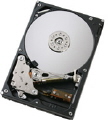
I removed the casing but expectedly didn't find anything suspicious apart from the fact that underneath it the disc itself is actually a Samsung!

Have you got any suggestions?

Thanks.


Top
 Profile  
 
 Post subject: Re: Toshiba PX1329E-1G40 External HDD not detected
PostPosted: March 26th, 2009, 2:12 
Offline
User avatar

Joined: October 2nd, 2005, 0:30
Posts: 288
Location: Jakarta - Indonesia
You have tried all you can to diagnose the problem, connecting it to other USB ports, change cables, change USB enclosures, and so on.

It's probably something you can't handle up to this point. I suspect the drive suffered mechanical and/or SA related problem

There are many members from this forum based in England. Sean (nick : pcimage) and Steve (nick : Steve), Duncan (nick : Odiferous) and also few others . Most of them offer no-fix-no-fee based.

You can consult any of them for data recovery process if you need.

_________________
My Forum


Top
 Profile  
 
 Post subject: Re: Toshiba PX1329E-1G40 External HDD not detected
PostPosted: March 26th, 2009, 2:17 
Offline
User avatar

Joined: February 27th, 2009, 3:26
Posts: 1721
Location: French Polynesia Tahiti
Did you try it in a new USB external enclosure? Or did you try to connect direct to your PC to see if you an see it in your BIOS? USB extrenal boxes can go bad and cause this problem. If it is not the two then you have some seroius problems with this drive. Sorry saw your post just before me. Same suggestion

_________________
Iorana Haraharaini


Top
 Profile  
 
 Post subject: Re: Toshiba PX1329E-1G40 External HDD not detected
PostPosted: March 26th, 2009, 2:26 
Offline
User avatar

Joined: October 2nd, 2005, 0:30
Posts: 288
Location: Jakarta - Indonesia
Oh yes, poehere is correct, your last attempt is directly connecting the drive to PC without USB enclosure. Have you tried this ?

_________________
My Forum


Top
 Profile  
 
 Post subject: Re: Toshiba PX1329E-1G40 External HDD not detected
PostPosted: March 26th, 2009, 2:38 
Offline

Joined: August 31st, 2006, 17:53
Posts: 354
Location: Birmingham, Al
cryoborgofthevenus wrote:
There are many members from this forum based in England. Sean (nick : pcimage) and Steve (nick : Steve), Duncan (nick : Odiferous) and also few others . Most of them offer no-fix-no-fee based.

You can consult any of them for data recovery process if you need.


I appreciate the referral , but I am in Birmingham Alabama ( usa)
Not Birmingham England ;)


Top
 Profile  
 
 Post subject: Re: Toshiba PX1329E-1G40 External HDD not detected
PostPosted: March 26th, 2009, 2:42 
Offline
User avatar

Joined: October 2nd, 2005, 0:30
Posts: 288
Location: Jakarta - Indonesia
Oh sorry Steve :D My mistake hahahahahaha :oops: , I think i should edit the previous post, but I can't... :mrgreen:

_________________
My Forum


Top
 Profile  
 
 Post subject: Re: Toshiba PX1329E-1G40 External HDD not detected
PostPosted: March 26th, 2009, 14:09 
Offline

Joined: March 26th, 2009, 1:39
Posts: 2
Location: London
poehere wrote:
Did you try it in a new USB external enclosure? Or did you try to connect direct to your PC to see if you an see it in your BIOS? USB extrenal boxes can go bad and cause this problem. If it is not the two then you have some seroius problems with this drive. Sorry saw your post just before me. Same suggestion


Thanks for your responses guys.
I don't know much about computers but to me this seems to be the most likely damage too. I'm not sure I'll be able to connect it directly to the PC but I'll give it a try.
Thanks again.


Top
 Profile  
 
 Post subject: Re: Toshiba PX1329E-1G40 External HDD not detected
PostPosted: March 26th, 2009, 14:52 
Offline
User avatar

Joined: February 27th, 2009, 3:26
Posts: 1721
Location: French Polynesia Tahiti
Normally in external boxes they set drive to CS mode or Master mode. If it is an ide cable connect to the drive you will need to set it to slave mode. Setting are on the label of the drive. Be sure to turn off you pc before connecting this drive to the ide adaptor cable on the computer. Connect it to the second nap connector on the HDD ide cable and hook up the power to the drive. It is not hard the cable only fits one way and the power cable only fits one way you can't mess this up too badly. After power on your computer and hit the del or f2 or what every your bios command is to go directly into the bios of your system without booting. After in the first window you can go to the device manager and see if you see this drive under the first hard drive as a slave drive and you should be able to see your other devices attached to the system. Hope that will help you attach this to your system.

_________________
Iorana Haraharaini


Top
 Profile  
 
Display posts from previous:  Sort by  
Post new topic Reply to topic  [ 8 posts ] 

All times are UTC - 5 hours [ DST ]


Who is online

Users browsing this forum: gold6565, Google [Bot] and 42 guests


You cannot post new topics in this forum
You cannot reply to topics in this forum
You cannot edit your posts in this forum
You cannot delete your posts in this forum
You cannot post attachments in this forum

Search for:
Jump to:  
Powered by phpBB © 2000, 2002, 2005, 2007 phpBB Group