MultiDrive – free backup, clone & wipe disk utility from Atola Technology

All times are UTC - 5 hours [ DST ]


Post new topic Reply to topic  [ 13 posts ] 
Author Message
 Post subject: Broken SATA connector - Cable plugged in reverse - Smoke
PostPosted: August 17th, 2010, 9:22 
Offline

Joined: August 17th, 2010, 8:57
Posts: 5
Seagate Barracuda 7200.10 320GB - ST3320820AS

Hi,

I've got a dead hard drive ("vibrates", then gives a short beep, this is continuous) to which I bought a donor drive for, so that I can swap PCB's/exchange platters if required. On the dead drive I however have a broken SATA connector and so it is really difficult to plug in the SATA data cable. Recently I have however by mistake put the cable in reverse and that caused smoke to come out of a small square electronic (probably a TVS) instantly. I immediately unplugged it from both the motherboard and computer PSU. I haven't got a multimeter to hand yet and I haven't tried plugging the hard drive back in. Would you suggest to simply do a PCB swap, that actually might bring the data back? Or shall I remove the TVS and try to set up a serial connection to diagnose the hard drive.

Thanks in advance


Top
 Profile  
 
 Post subject: Re: Broken SATA connector - Cable plugged in reverse - Smoke
PostPosted: August 17th, 2010, 9:33 
Offline

Joined: November 6th, 2006, 6:58
Posts: 1752
First of all you should get "your best friend" for this case, a multimeter so you can measure your TVS and check if that's the problem.


Top
 Profile  
 
 Post subject: Re: Broken SATA connector - Cable plugged in reverse - Smoke
PostPosted: August 17th, 2010, 9:33 
Offline
User avatar

Joined: May 7th, 2010, 13:20
Posts: 595
Location: United Kindgom
Well you were heading in a good direction- until you fried your orignal pcb.
You should not change platters either. Your only hope now is to use your donor pcb and get the drive running using that-- but youve made your recvoery a heck load more diffucult!
I gather your diy skills are not very good so if you want your data back-then take it somewhere-otherwise to mess about you can connc to the serial terminal- but that will not help you now. or even earlier it wouldnt have helped.

_________________
It seems that the unluckiest people in the world are those that don't backup.
Free Solutions
Picasaweb- Pictures and movies | Dropbox - Documents and other..


Top
 Profile  
 
 Post subject: Re: Broken SATA connector - Cable plugged in reverse - Smoke
PostPosted: August 17th, 2010, 9:35 
Offline

Joined: October 28th, 2009, 14:35
Posts: 775
Location: Toronto
When u say the drive vibrates, do u meen u can feel the platters inside the drive spin? The beeping u had before reversing the power and blowing PCB sounds like seized platters. Oh , and a small square chip is probably voice coil controler, not a diode.


Top
 Profile  
 
 Post subject: Re: Broken SATA connector - Cable plugged in reverse - Smoke
PostPosted: August 17th, 2010, 11:43 
Offline

Joined: August 17th, 2010, 8:57
Posts: 5
Hi,
First of all thanks for all your replies and fast response.

Alexii wrote:
When u say the drive vibrates, do u meen u can feel the platters inside the drive spin? The beeping u had before reversing the power and blowing PCB sounds like seized platters. Oh , and a small square chip is probably voice coil controler, not a diode.

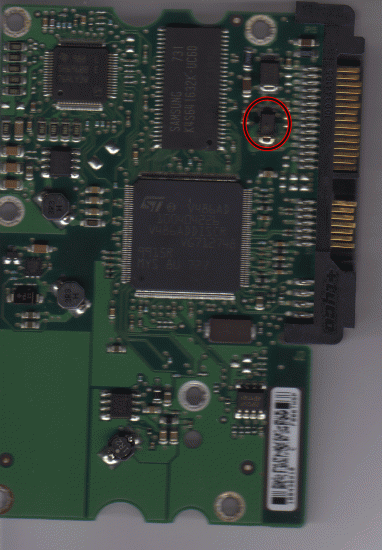
I'm not sure if they actually spin, but it seems more like they try to spin. Could that be a seized motor? Oh and actually its not a square shape, its a rectangular shape. Here are some pictures.
Attachment:
pcb.gif
pcb.gif [ 1.03 MiB | Viewed 9029 times ]

Attachment:
chip.gif
chip.gif [ 65.33 KiB | Viewed 9029 times ]

I have with a high resolution scan (1200 dpi) and Photoshop tried to make the writing on that chip readable. It says: QE R729

Thanks in advance

Edit: I had bought the donor drive on the assumption that I could exchange platters based on this tutorial (which uses a drive that is similar to mine), which I have to admit uses a very unprofessional and unsafe method, but uses one that is accessible to me.

http://www.drivelabs.com/hard-drive-rec ... 30608a.htm


Top
 Profile  
 
 Post subject: Re: Broken SATA connector - Cable plugged in reverse - Smoke
PostPosted: August 17th, 2010, 16:16 
Offline

Joined: August 17th, 2010, 8:57
Posts: 5
Alexii wrote:
When u say the drive vibrates, do u meen u can feel the platters inside the drive spin? The beeping u had before reversing the power and blowing PCB sounds like seized platters. Oh , and a small square chip is probably voice coil controler, not a diode.

I'm not sure if they actually spin, but it seems like its trying to spin rather than actually spinning. Could that be a seized motor? Oh and the chip is not actually a square shape, its a rectangular shape. I have attached some photos.

Attachment:
pcb.gif
pcb.gif [ 1.03 MiB | Viewed 9027 times ]

Attachment:
chip.gif
chip.gif [ 65.33 KiB | Viewed 9027 times ]


With a scanning resolution of 1200 dpi and some Photoshop I was able to read the text written on that chip it says:

QE
R729

I bought the donor hard drive in the assumption that I could recover the data through the method described on the following website:

http://www.drivelabs.com/hard-drive-rec ... 30608a.htm

I realise that this method is a bit of an unprofessional and unsafe one to use, but it is the only method that is accessible to me at the moment.

Thanks


Top
 Profile  
 
 Post subject: Re: Broken SATA connector - Cable plugged in reverse - Smoke
PostPosted: August 18th, 2010, 2:48 
Offline
User avatar

Joined: September 8th, 2009, 18:21
Posts: 16955
Location: Australia
The diodes will have marking codes, eg BUX or QE.

See my notes for help in identifying the components:
http://www.users.on.net/~fzabkar/HDD/TVS_diodes.txt
http://www.users.on.net/~fzabkar/HDD/HDD_ICs.txt

Aftwerwards, if you have a stiction fault, the following thread may help you, but be aware of the risks:
http://forums.seagate.com/t5/FreeAgent- ... 242#M11384


Top
 Profile  
 
 Post subject: Re: Broken SATA connector - Cable plugged in reverse - Smoke
PostPosted: August 18th, 2010, 7:00 
Offline

Joined: August 17th, 2010, 8:57
Posts: 5
fzabkar wrote:
The diodes will have marking codes, eg BUX or QE.

See my notes for help in identifying the components:
http://www.users.on.net/~fzabkar/HDD/TVS_diodes.txt
http://www.users.on.net/~fzabkar/HDD/HDD_ICs.txt

Aftwerwards, if you have a stiction fault, the following thread may help you, but be aware of the risks:
http://forums.seagate.com/t5/FreeAgent- ... 242#M11384

Hi,
Thanks. I'll have a look at that then. Oh and the faulty diode clearly says QE R729 as can be seen on the picture.


Top
 Profile  
 
 Post subject: Re: Broken SATA connector - Cable plugged in reverse - Smoke
PostPosted: August 19th, 2010, 10:32 
Offline

Joined: October 28th, 2009, 14:35
Posts: 775
Location: Toronto
Yes, the circled chip on the picture is indeed a diode. If it did its job and no other components got spiked, , removing in should restore PCB into working condition. Now the tutorial you linked scares me half to death tbh. If u truly want to go ahead with it - best of luck to you, but chances are very very very very low. If the DIY is your ONLY option - then after restoring PCB to working condition, open the drive and look where the read write heads are. If the are sitting close to the metal circle in the middle - they are parked and its not sticktion.


Top
 Profile  
 
 Post subject: Re: Broken SATA connector - Cable plugged in reverse - Smoke
PostPosted: August 19th, 2010, 10:38 
Offline
User avatar

Joined: May 7th, 2010, 13:20
Posts: 595
Location: United Kindgom
Nice forensic work on identifying the diode....

_________________
It seems that the unluckiest people in the world are those that don't backup.
Free Solutions
Picasaweb- Pictures and movies | Dropbox - Documents and other..


Top
 Profile  
 
 Post subject: Re: Broken SATA connector - Cable plugged in reverse - Smoke
PostPosted: August 21st, 2010, 17:14 
Offline

Joined: August 17th, 2010, 8:57
Posts: 5
Alexii wrote:
Yes, the circled chip on the picture is indeed a diode. If it did its job and no other components got spiked, , removing in should restore PCB into working condition. Now the tutorial you linked scares me half to death tbh. If u truly want to go ahead with it - best of luck to you, but chances are very very very very low. If the DIY is your ONLY option - then after restoring PCB to working condition, open the drive and look where the read write heads are. If the are sitting close to the metal circle in the middle - they are parked and its not sticktion.

Hi,
Thanks for your response. To minimise air flow, I closed the door and all windows. And before opening the drive I cleaned the workspace with some isopropyl alcohol and wore latex powder free gloves. I then had a quick look inside the drive and saw that the head was parked near the middle. What do you suggest I do now? And if any particles of dust get onto the platters should I try cleaning them with isopropyl alcohol?

Edit: Also there seems to be no damage to the platters at all, which I presume is a good sign.

Thanks


Top
 Profile  
 
 Post subject: Re: Broken SATA connector - Cable plugged in reverse - Smoke
PostPosted: August 23rd, 2010, 9:47 
Offline

Joined: October 28th, 2009, 14:35
Posts: 775
Location: Toronto
Try rotating ur platters ( use spindle in the center ) if they dont move - seized.


U are not working in the clean room enviroment , as such when u aply isopropyl alcohol on the platter to wipe the dust , by the time it evaporates ull just end up with bigger mess. Your particular sittuation is hopeless pretty much IMO. U wont be able to make sure the platters stay positioned to each other. U will lose cylinder alignment and good bye data... =(

Any case if u are insistent on moving on ill give some suggestions. Get a dead drive and open it. Familiarise urself fully with what u have inside. U need to work fast in dirty enviroment to minimize contamination. Pay close attention to top actuator magnet. That beasty is more powerfull then u think. Instead of using alcohol - use Air Can duster to eliminate dust specks as soon as they drop. Just make sure u get the one with clean air inside ( it will say on the label ) and do so gently.


Now 2 ways. 1 wont work 99.99 percent.
1) remove top actuator magnet
2) dismount heads
3) remove platters without breaking thier respective positioning

Do the same thing with donor and then reverse. Ill say again, ima 99.99 % sure it wont work.


If u are really desperate to try and DIY it - i think there is a better chance of success trying to free ur existing spindle. In most cases it will result in wobly platters wich in turn damage the heads (depending on wobly aplitude ) wich in turn damage the platters and kill ur data. What u need is a a 2 prong tool u can insert in the holes on the top of the metal platter lock. Then u rotate the spindle untill u free it completly. Dust off the platter and try . Chances are still incredibly low , but better then the platter swap.


Top
 Profile  
 
 Post subject: Re: Broken SATA connector - Cable plugged in reverse - Smoke
PostPosted: August 23rd, 2010, 9:54 
Offline

Joined: November 9th, 2006, 15:15
Posts: 2984
I have seen many cases where customers try to force spindle to spin and in many cases the DIY has resulted in development of rings in platter.

In a controlled environment with the right tools and experience, freeing the bearing is an optionand generally can be successful, much the same as platterswap but in a non-controlled enviroment and with inexperience, lack of correct tools, clean air lab etc chances are very slim.

If DIY is the only action that can be taken, then it will likely beee a good learning experience, but I have to agree with Alexii prediction of 99.99% not going to work,


Top
 Profile  
 
Display posts from previous:  Sort by  
Post new topic Reply to topic  [ 13 posts ] 

All times are UTC - 5 hours [ DST ]


Who is online

Users browsing this forum: Google [Bot] and 26 guests


You cannot post new topics in this forum
You cannot reply to topics in this forum
You cannot edit your posts in this forum
You cannot delete your posts in this forum
You cannot post attachments in this forum

Search for:
Jump to:  
cron
Powered by phpBB © 2000, 2002, 2005, 2007 phpBB Group