I am pleased to report a happy ending, had I seen that post suggesting professional data recovery could be closer to the €300 mark would probably have gone that route.
I'd like to thank everyone for their help.
I found a few video/audio clips of users who had similar drives with exactly the same symptoms/sound (this was a unique & distinct sound!) who had had positive experiences with the "Percussive Maintenance" technique.
Realising that this was risky I first looked at the internal layout of the heads of the drive and decided on giving the drive a tap towards the far right corner (if disk oriented with Printed Circuit Board upwards and connectors facing me) Assuming the heads had stiction on the landing zone towards center of the platter as seemed likely from what I had read online this would provide the best possibility of moving the heads off the landing zone with as little inertia as possible.
I tried the a couple taps of that corner into my palm keeping the disk as horizontal as possible to avoid the inertia making the heads tap disk's surface.
No luck, I wasn't willing to tap it as hard as some had suggested less I sabotage other options open to me. It was now the wee hours and knew from experience that tired minds make mistakes so gave it a break.
Next morning I decided that I could probably reproduce something close to a clean room environment with things from around the house
(this contraption in was not in the end used however I thought I'd include how I made the contraption at the bottom of this post including link to a photo in the case that someone else wanted to give the idea a try)*.
I thought I'd give the "Percussive Maintenance" one last try before opening it, but decided to change the conditions a little by letting the drive heat up on my central heating radiator to I'd say about 40 degrees celcius (maybe equivalent to a quite hot shower)
I think this idea was partly inspired by something I'd read "that with age in some circumstances the protective surface of a hot platter could break down a little increasing stiction & that this could be compounded when the platter cooled"
I took the platter off of the radiator, plugged it into my computer & immediately gave it another tap as before (tap was even lighter than the one I'd given it previously)
And jackpot the drive spun up and was immediately recognized by the system. ( felt great:) I wasn't taking any chances and immediately copied of the data starting with the most critical content.
I think warming up the drive helped reduce the stiction though I can't be certain.
Tomorrow I will run some Samsung diagnostics on the drive and post what I find. Given what I've heard in other posts I wouldn't be surprised if the drive checks tests report the drive is in good health.
Even if that is the case I won't be using this drive as anything more than a backup in future and will be paying carefull attention that it is unmounted consistently.
One moral of the story is Back Up, Back Up then Back up some more, working in the IT field I've seen enough crashed data horror stories to know this but it's so easy to let one's guard down.
A note of caution, please don't try this without fully understanding what you are doing!: As a few experienced users have posted in most cases tapping a hard drive is going to be asking for trouble, if you don't know what you're doing better not unless you don't have anything to loose. In this case as stated the sound of the drive was unusual from most disk failures I've seen and quite distinct. The other users who tried this technique had similar model drives making a unique and distinctive sound as heard in the YouTube video link in my second post. Those users positive experience encouraged me to take a leap and try the risky "Percussive Maintenance" technique. If your symptoms differ in any way I would not try this. I'd hate someone to spoil their important data by trying this without first getting professional advice.
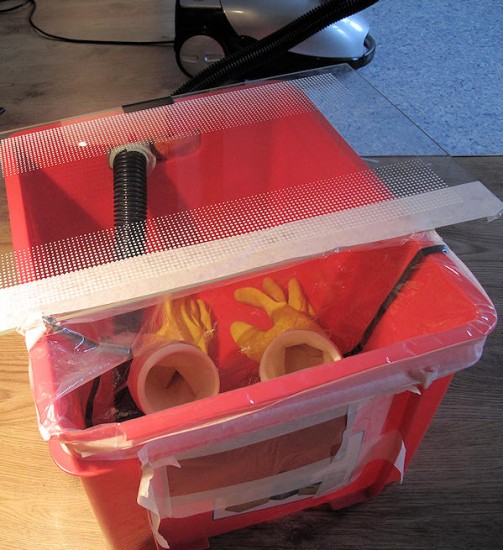
My DIY Clean-Room rig (was never put to use)*I used a plastic bin, my partner's kitchen gloves, a thick transparent plastic bag, a Pringles style cardboard cocoa container with ends removed chopped in two to attach gloves, a couple fine paper napkins and new paper vacuum cleaner bag as air filters, a glass plate from my fridge as viewing window, our vacuum-cleaner as air pump, masking tape.
I washed/dried everything,
Cut a couple holes in the plastic bag & used the cardboard chocolate container cylinders to tape the gloves into the bottom of plastic sac,
Placed the glass plate onto top of bin leaving space for my arms on one end,
Taped the plastic bag with attached gloves over that space.
Enlarged the handle holes sealing my vacuum-cleaner hose into the side of one of the holes and covering the rest with a layer of new vacuum-cleaner bag then paper napkin over the top taped on from the outside of the box.
Had the "percussive maintenance" not resolved the issue I had then planned to:
1. Slightly loosen the torque screws on the drive
2. Put the drive inside box with my torque screw-driver leaving my usb to sata adapter attached to drive with cables sealed & dangling outside the box.
3. Seal the glass to top of bin with the masking tape .
4. Use the vacuum-cleaner to vacuum methodically all surfaces inside the box.
5. Leave the vacuum-cleaner running for 30 minutes to extract any dust particles suspended in the air.
6. Leaving the vacuum-cleaner running insert hands into gloves with spot-light positioned overhead, open the drive to see possition of heads.
7. Depending on what found connect drive to computer via cables left outside the box and find out what if any mechanic movement corresponded to the sounds made by the failed drive, take photo's and get consultation from there
Attachment:
File comment: Home brewed clean room contraption
 diycleanroomrig.jpg [ 110.14 KiB | Viewed 18386 times ]



 FAQ
FAQ Search
 Login
Login Register
 HDDGURU FILES




 , but some movies you like to see twice
