|
Hi Everyone
Apologies to re-ignite an old post, but I have almost the exact same HDD/PCB that is being talked about here, with exactly the same problem, and stupidly, it houses the only copy of some very very important data. I am going to have to bite the bullet if I cant fix this myself and take it to a professional recovery place, but if I can save £500 (or USD $750) then all the better.
So here is what happened:
The HDD in question is from a G-RAID 2 1TB Enclosure, which as far as I am aware was setup as RAID 0. This RAID has been working without fault since it was bought in 2009, and a few days ago, after being brought home from a visit to my workplace, does not work. The light comes on, I can hear the fan start, but aside from that, NOTHING. Not mounting on a PC or mac, with multiple AC adapters and firewire/usb cables being tested - NOTHING.
I then opened up the enclosure as it is way out of the warranty period. All appears to be in order - nothing is burned, broken or looking bad to me. There are 2 x 500gb drives inside (striped to make 1TB) and they sit one on top of the other with a cradle in between them. Having fired it up again, I realised that the drive at the top is spinning, no bad noises, all fine. But the bottom drive - is not. No buzzing, no spinning, no vibrations - NOTHING at all.
I then thought I should test both drives individually, so I went out and bought a SATA-USB caddy. Again, the drive that is powering up, still powers up in the caddy, the drive didn't - still DOES NOT!
I get a "this disk must be initialized" error when I mount the one that powers up on my mac - which makes sense to me as they are a striped RAID set so they need to be mounted together. I did a deep scan last night with that drive on disk drill - but as expected, only very small documents or pictures were appearing properly, everything else does not appear at all and if it does, its garbled. Please correct me if I am wrong but this is because there are fragments of these files on both drives which have to be present to use these files properly.
Now, what I need to know is, what are my options? I have read alot of forums where people have had success by replacing PCB Boards and ROM Chips and the drive has worked again. I have also read other stories where it hasnt and the only option is then data recovery. I have uploaded pictures of:
G-RAID Sticker at the bottom of the Enclosure
Sticker on top of the HDD
Sticker on the PCB Board
Please please can ANYONE help?!
Thanks
Taj
| Attachments: |
File comment: PCB
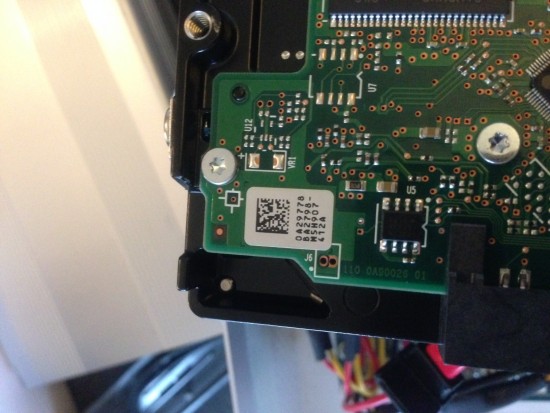
photo 1.JPG [ 612.92 KiB | Viewed 15267 times ]
|
File comment: HITACHI DESKSTAR 500GB HDD (Feb 2009)
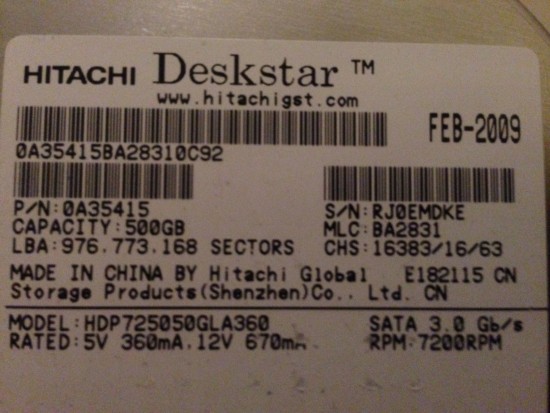
photo 2.JPG [ 674.4 KiB | Viewed 15267 times ]
|
File comment: G-RAID 2 1TB
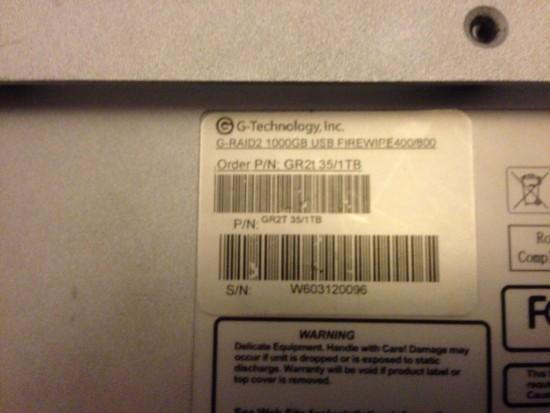
photo 3.JPG [ 654.77 KiB | Viewed 15267 times ]
|
|



 FAQ
FAQ Search
 Login
Login Register
 HDDGURU FILES


