MultiDrive – free backup, clone & wipe disk utility from Atola Technology

All times are UTC - 5 hours [ DST ]


Post new topic Reply to topic  [ 22 posts ]  Go to page 1, 2  Next
Author Message
 Post subject: WDC MyBook 3 Tb Replaced Enclosure Board and Data
PostPosted: September 29th, 2013, 14:02 
Offline

Joined: September 29th, 2013, 10:37
Posts: 11
Location: Indonesia
Dear All

I know this case is quite common one here
And i've tried to find and browse around before i made this thread
So despite there are some similarities, somehow i see my case is bit different, or maybe i've missed the solution (if i do please point out the the solution's thread)

Anyway,

I have this 3Tb WD My Book, and the enclosure board is damaged (the light indicator is on but is not detected on the USB3 ports), so i purchased from Ebay for the replacement board (from this post in ebay _http://www.ebay.com/itm/200933646639?ssPageName=STRK:MEWAX:IT&_trksid=p3984.m1423.l2649 )

The hard disk is filled (and full) with my 5 years-collected data, and it was used for temporary back up before i distribute it to other hard disk before it failed.

My board's serial is 4060-705094-001 Rev. A (same with ebay seller's number/revision)

After i installed the new generic ebay-purchased board i only can see the hard disk (in WD SmartWare and Windows' Disk Management). With the old damaged board i can't. But i can't do anything about it since it's locked and read as raw.

Here's the view on WD Smartware (after the ebay's new board replacement):
Attachment:
WD Smartware.jpg
WD Smartware.jpg [ 121.35 KiB | Viewed 15631 times ]


It's locked (due to too many password failed attempt While i never put any password previously

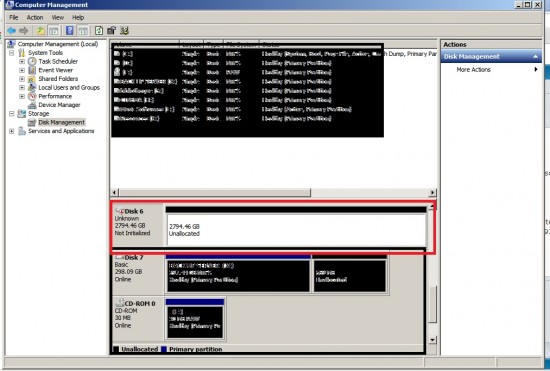
And here's the view of Windows' Disk Management (after the ebay's new board replacement):
Attachment:
disk management.jpg
disk management.jpg [ 173.79 KiB | Viewed 15631 times ]


(read as raw)

I just want to extract the data because i need it desperately

I can't go to recovery service (because it will cause too much, i'm a student)
I'm living in Indonesia with so many inconveniences (contacting WD office, finding sparepart/service guy to fix my old board)
I never do any soldering work and don't own microscope (it's too pricey here)

So any solution such as:
-a place to find other board which will fit exactly to my old one

or anything that'll help me to make this hard disk's content be possible to read

Thank you in advance


Top
 Profile  
 
 Post subject: Re: WDC MyBook 3 Tb Replaced Enclosure Board and Data
PostPosted: September 29th, 2013, 17:50 
Offline

Joined: July 2nd, 2011, 14:16
Posts: 463
Location: England
WD drives have all their data encrypted by the bridge board that came with the enclosure, so sticking a new one will not work without the encryption chip. So sticking a new bridge board probably won't work because each one is different. Your best bet is to find out what went wrong with the original USB3 Bridge board and have it repaired. Can you provide images of the damaged board and possibly more information on what was done?

Did you connect the wrong power supply or does not not power on at all?

Shane

EDIT: -

Now looking at the image, perhaps the dual MOSFET died on the bridge board and if the drive can be powered by another source, while connected to the bridge board, perhaps this might temporarily provide a way to get data off.


Top
 Profile  
 
 Post subject: Re: WDC MyBook 3 Tb Replaced Enclosure Board and Data
PostPosted: September 30th, 2013, 7:02 
Offline

Joined: November 9th, 2006, 15:15
Posts: 2984
ShaneWard wrote:
So sticking a new bridge board probably won't work because each one is different.


With very few exceptions, the key is stored to the HDD and the bridge is generic.

For this case, what happens if you try to run recovery software against the disk connected to the new bridge?


Top
 Profile  
 
 Post subject: Re: WDC MyBook 3 Tb Replaced Enclosure Board and Data
PostPosted: September 30th, 2013, 7:05 
Offline

Joined: September 29th, 2013, 10:37
Posts: 11
Location: Indonesia
ShaneWard, thank you very much for replying

As i stated before, i can't find anyone who can check what went wrong with the original USB3 bridge board, with naked eyes i can't see any damage, but i will post some pictures later

About the power supply, i use the default power supply, and both the old an new bridge board light indicator work (the new generic board made the hard drive read again as informed in two pictures above, but it's raw and locked)

Can you elaborate more about this dual MOSFET and what should i do to recover/retrieve my data back

thank you :)

hddguy wrote:
ShaneWard wrote:
So sticking a new bridge board probably won't work because each one is different.


With very few exceptions, the key is stored to the HDD and the bridge is generic.

For this case, what happens if you try to run recovery software against the disk connected to the new bridge?


I've tried :
-Get Databack (i/o error or unknown error)
-active file recovery (it says no item found)
-R-studio
-GetData Recover My Files Pro ()

none of'em be able to open anything (nothing found)

Any suggestion?


Last edited by mamamiaw on September 30th, 2013, 7:11, edited 1 time in total.

Top
 Profile  
 
 Post subject: Re: WDC MyBook 3 Tb Replaced Enclosure Board and Data
PostPosted: September 30th, 2013, 7:07 
Offline

Joined: November 9th, 2006, 15:15
Posts: 2984
Quote:
what happens if you try to run recovery software against the disk connected to the new bridge?


:?:


Top
 Profile  
 
 Post subject: Re: WDC MyBook 3 Tb Replaced Enclosure Board and Data
PostPosted: September 30th, 2013, 12:32 
Offline

Joined: September 29th, 2013, 10:37
Posts: 11
Location: Indonesia
Pictures of the old board [if anyone interested]
Sorry for the quality, it was taken by quite old blackberry camera only
[spoiler=board]
Attachment:
IMG-20130930-00185.jpg
IMG-20130930-00185.jpg [ 416.54 KiB | Viewed 15550 times ]

Attachment:
IMG-20130930-00188.jpg
IMG-20130930-00188.jpg [ 453.49 KiB | Viewed 15550 times ]

Attachment:
IMG-20130930-00189.jpg
IMG-20130930-00189.jpg [ 573.95 KiB | Viewed 15550 times ]

Attachment:
IMG-20130930-00190.jpg
IMG-20130930-00190.jpg [ 712.91 KiB | Viewed 15550 times ]

Attachment:
IMG-20130930-00191.jpg
IMG-20130930-00191.jpg [ 597.99 KiB | Viewed 15550 times ]

Attachment:
IMG-20130930-00194.jpg
IMG-20130930-00194.jpg [ 483.4 KiB | Viewed 15550 times ]

Attachment:
IMG-20130930-00195.jpg
IMG-20130930-00195.jpg [ 480.44 KiB | Viewed 15550 times ]

[/spoiler]


Attachments:
IMG-20130930-00185.jpg
IMG-20130930-00185.jpg [ 416.54 KiB | Viewed 15550 times ]
Top
 Profile  
 
 Post subject: Re: WDC MyBook 3 Tb Replaced Enclosure Board and Data
PostPosted: October 1st, 2013, 12:51 
Offline

Joined: September 29th, 2013, 10:37
Posts: 11
Location: Indonesia
i hate to be a drag but i really need my 3Tb data for submitting some of the works i had.... :(


Top
 Profile  
 
 Post subject: Re: WDC MyBook 3 Tb Replaced Enclosure Board and Data
PostPosted: October 1st, 2013, 16:20 
Offline
User avatar

Joined: September 8th, 2009, 18:21
Posts: 16955
Location: Australia
I'd like to help you, but your photos are useless.

_________________
A backup a day keeps DR away.


Top
 Profile  
 
 Post subject: Re: WDC MyBook 3 Tb Replaced Enclosure Board and Data
PostPosted: October 1st, 2013, 16:33 
Offline

Joined: July 2nd, 2011, 14:16
Posts: 463
Location: England
yeah, need better pics, not much we can do, sorry.

Shane


Top
 Profile  
 
 Post subject: Re: WDC MyBook 3 Tb Replaced Enclosure Board and Data
PostPosted: October 2nd, 2013, 8:10 
Offline

Joined: November 9th, 2006, 15:15
Posts: 2984
mamamiaw wrote:
i hate to be a drag but i really need my 3Tb data for submitting some of the works i had.... :(


I have tried to help but since you are ignoring my posts Ill assume you dont need help...


Top
 Profile  
 
 Post subject: Re: WDC MyBook 3 Tb Replaced Enclosure Board and Data
PostPosted: October 2nd, 2013, 12:11 
Offline

Joined: September 29th, 2013, 10:37
Posts: 11
Location: Indonesia
hddguy wrote:

I have tried to help but since you are ignoring my posts Ill assume you dont need help...


I'm sorry if i seemed to ignore you, but i did reply you along with ShaneWard
Here's the quote:

mamamiaw wrote:
hddguy wrote:

For this case, what happens if you try to run recovery software against the disk connected to the new bridge?


I've tried :
-Get Databack (i/o error or unknown error)
-active file recovery (it says no item found)
-R-studio
-GetData Recover My Files Pro ()

none of'em be able to open anything (nothing found)

Any suggestion?


Anyway, here's some picture i took, i hope this one is better
Attachment:
DSC_0003.jpg
DSC_0003.jpg [ 2.13 MiB | Viewed 15418 times ]

Attachment:
DSC_0004.jpg
DSC_0004.jpg [ 2.75 MiB | Viewed 15418 times ]

Attachment:
DSC_0006.jpg
DSC_0006.jpg [ 1.81 MiB | Viewed 15418 times ]

Attachment:
DSC_0009.jpg
DSC_0009.jpg [ 1.61 MiB | Viewed 15418 times ]

Thank you in advance


Top
 Profile  
 
 Post subject: Re: WDC MyBook 3 Tb Replaced Enclosure Board and Data
PostPosted: October 4th, 2013, 2:58 
Offline
User avatar

Joined: September 8th, 2009, 18:21
Posts: 16955
Location: Australia
@mamamiaw, your Disk Management screenshot is showing a 3TB drive that is Not Intialised and Unallocated. This is suggesting that sector 0 is readable but may be encrypted.

Before you begin troubleshooting your original board, could you show us the contents of sectors 0 and 1 using the eBay PCB? You could use HxD or DMDE for this purpose. Select Mode -> Hexadecimal.

_________________
A backup a day keeps DR away.


Top
 Profile  
 
 Post subject: Re: WDC MyBook 3 Tb Replaced Enclosure Board and Data
PostPosted: October 4th, 2013, 8:24 
Offline

Joined: September 22nd, 2013, 1:38
Posts: 8
Location: India
There are two numbers on the bridge board - one on the white sticker and embossed one at the back. These numbers are not the same. when you are buying the control board make sure that both these numbers match. The number on the back is the part number, so i presume the number on the front is related to the batch with specific encryption.

I had trouble with the bridgeboard of 1TB WD My Book couple of weeks back. I bought the control board over ebay, plonked it on the hard disk and got back every bit of data. Before buying the bridge board, I tried both test disk & photorec - nothing came out. The data is encrypted, but it is there.

' good luck.


Top
 Profile  
 
 Post subject: Re: WDC MyBook 3 Tb Replaced Enclosure Board and Data
PostPosted: October 5th, 2013, 12:36 
Offline

Joined: September 29th, 2013, 10:37
Posts: 11
Location: Indonesia
fzabkar wrote:
@mamamiaw, your Disk Management screenshot is showing a 3TB drive that is Not Intialised and Unallocated. This is suggesting that sector 0 is readable but may be encrypted.

Before you begin troubleshooting your original board, could you show us the contents of sectors 0 and 1 using the eBay PCB? You could use HxD or DMDE for this purpose. Select Mode -> Hexadecimal.


Sorry for the long long delay
I was sick

I've tried the DMDE

Here's my screenshot
Attachment:
1.jpg
1.jpg [ 81.43 KiB | Viewed 15352 times ]

Attachment:
2.jpg
2.jpg [ 195.23 KiB | Viewed 15352 times ]

Attachment:
3.jpg
3.jpg [ 204.11 KiB | Viewed 15352 times ]

Attachment:
4.jpg
4.jpg [ 199.13 KiB | Viewed 15352 times ]


Then i got stuck here
Attachment:
05.jpg
05.jpg [ 121.11 KiB | Viewed 15352 times ]


This is after i pressed close
Attachment:
06.jpg
06.jpg [ 264.13 KiB | Viewed 15352 times ]


Thank you in advance

rajrag wrote:
There are two numbers on the bridge board - one on the white sticker and embossed one at the back. These numbers are not the same. when you are buying the control board make sure that both these numbers match. The number on the back is the part number, so i presume the number on the front is related to the batch with specific encryption.

I had trouble with the bridgeboard of 1TB WD My Book couple of weeks back. I bought the control board over ebay, plonked it on the hard disk and got back every bit of data. Before buying the bridge board, I tried both test disk & photorec - nothing came out. The data is encrypted, but it is there.

' good luck


Sadly i can't find the totally matching board
That's why i also posted in Market board

Thank you


Top
 Profile  
 
 Post subject: Re: WDC MyBook 3 Tb Replaced Enclosure Board and Data
PostPosted: October 5th, 2013, 23:34 
Offline
User avatar

Joined: September 8th, 2009, 18:21
Posts: 16955
Location: Australia
I'm assuming your screenshots were obtained with the drive attached to the eBay bridge board, rather than to a SATA port on your motherboard. I notice that DMDE is reporting 5.8 billion LBAs at 512 bytes per LBA. Bridge boards for 3TB My Books are normally configured with 4KB LBAs, although this can be changed by WD's formatting utility.

I'm wondering whether your eBay bridge board was configured for a 2TB drive or smaller, rather than for a 3TB drive.

_________________
A backup a day keeps DR away.


Top
 Profile  
 
 Post subject: Re: WDC MyBook 3 Tb Replaced Enclosure Board and Data
PostPosted: October 6th, 2013, 2:41 
Offline

Joined: September 29th, 2013, 10:37
Posts: 11
Location: Indonesia
fzabkar wrote:
I'm assuming your screenshots were obtained with the drive attached to the eBay bridge board, rather than to a SATA port on your motherboard. I notice that DMDE is reporting 5.8 billion LBAs at 512 bytes per LBA. Bridge boards for 3TB My Books are normally configured with 4KB LBAs, although this can be changed by WD's formatting utility.

I'm wondering whether your eBay bridge board was configured for a 2TB drive or smaller, rather than for a 3TB drive.


Yes it did use the ebay bridge board just like you told me to on the previous post
To be really honest, i don't really understand about your explanation, i almost know nothing about hard drive :)

I don't know also what the ebay bridgeboard was configured for, should i ask the seller?
Can you tell me the exact and clearest way to ask for this

All i want is just my data to be back...

Thank you in advance


Top
 Profile  
 
 Post subject: Re: WDC MyBook 3 Tb Replaced Enclosure Board and Data
PostPosted: October 6th, 2013, 4:16 
Offline

Joined: September 28th, 2005, 8:56
Posts: 22
Location: Krasnoyarsk, Russia
1. Does your HDD spinning up, being connected to faulty bridge PCB?
2. Which connectors, with exception USB3, your faulty bridge board have? SATA? ESATA?
3. Did you tryed them?
4. What happening in WINDOWS device manager list, when you plugging in your faulty bridge board? Do you see any changes?
5. How your old bridge board became faulty?


Top
 Profile  
 
 Post subject: Re: WDC MyBook 3 Tb Replaced Enclosure Board and Data
PostPosted: October 6th, 2013, 7:18 
Offline

Joined: September 29th, 2013, 10:37
Posts: 11
Location: Indonesia
Randy wrote:
1. Does your HDD spinning up, being connected to faulty bridge PCB?
2. Which connectors, with exception USB3, your faulty bridge board have? SATA? ESATA?
3. Did you tryed them?
4. What happening in WINDOWS device manager list, when you plugging in your faulty bridge board? Do you see any changes?
5. How your old bridge board became faulty?


Hello Randy
1. Maybe it's spinning but i can't really tell
2. It's Sata
3. Yes i did
4. Not detected (with ebay board it read as raw, with old/faulty it's nothing)
5. I don't know what exactly happened but when i plug it won't read back then


Top
 Profile  
 
 Post subject: Re: WDC MyBook 3 Tb Replaced Enclosure Board and Data
PostPosted: October 6th, 2013, 8:33 
Offline

Joined: September 28th, 2005, 8:56
Posts: 22
Location: Krasnoyarsk, Russia
Hi mamamiaw,

If HDD is spinning, you can hear a specific noise from it. Do you hear it with faulty PCB, or noise comes only with a new PCB?

What written on power adapter's label? What voltage, current, polarity? You can take a picture of it too.

New PCB you trying to use, do you powering it up with that adapter?

Try to make a really good pictures of your new and faulty board.

Do it with a good camera, use enough light and disable digital zoom.
If your camera unable to take such pictures, then just scan PCBs with any scanner around. (Just place boards to the glass.)

The primary goal is to get a pictures with readable text marks from ICs and other components.

With that data, it will be possible for us to find, which voltage and on which points it should be on a faulty PCB.
For me it looks like PCB without power.

Then, you have to find a multimeter, and you should know, how to measure voltage and resistance with it. I (or somebody else) will try to guide you, on which point and what to measure.

But be careful. Any wrong move with multimeter probes, any short, and you can completely fry your PCB.


Do it on your own risk. If you not shure. And your data so important, maybe better to contact with professionals?


Top
 Profile  
 
 Post subject: Re: WDC MyBook 3 Tb Replaced Enclosure Board and Data
PostPosted: October 6th, 2013, 16:57 
Offline
User avatar

Joined: September 8th, 2009, 18:21
Posts: 16955
Location: Australia
WD's 3TB My Books are intended to be compatible with Windows XP straight out of the box. This means that they need to be set up with an MBR partitioning system rather than GPT. Standard MBR partitions are normally limited to a capacity of 2TiB. However, WD circumvents this problem by increasing the sector size from 512 bytes to 4096 bytes, thus allowing for a maximum MBR partition size of 16TiB.

This means that WD may use 512-byte sectors for their 2TB My Books and 4KB sectors for their 3TB versions. If the bridge boards are otherwise identical (I don't know if they are), then the difference must be stored in firmware, either on the bridge board or on the drive itself. The bridge board has an 8-pin serial flash memory chip, probably at location U2. I suspect that this chip may contain a 512B/4KB "flag". The HDD, OTOH, has a reserved section at the end of the user area (on the platters). Notice that there is a discrepancy between the number of sectors reported by DMDE and the full native capacity of the drive. This area would be reserved for SmartWare.

FYI, this is the [Data Destructive] "Quick Formatter" tool that WD supplies for its external drives:

Using WD Quick Formatter to format external drives (Windows 8, 7, Vista, XP) or Mac OSX (Leopard, Snow Leopard, Lion or Mt. Lion):
http://wdc.custhelp.com/app/answers/det ... -vista,-xp)-or

The instructions are dumbed down, so they don't explicitly mention the sector sizes. Instead the user is given a choice of "XP Compatible" (4KB) or "Factory Default" (512B). IMO these descriptions are somewhat ambiguous, since 4KB is the default for 3TB My Books. (Why does WD think that all their users are dumb?)

As for voltage measurements, carefully measure the voltages at each of the pins of U4 (the dual MOSFET). Also measure the voltage on the pins of the coil marked "150" (5V DC-DC converter). Use a screw hole as the Ground reference.

_________________
A backup a day keeps DR away.


Top
 Profile  
 
Display posts from previous:  Sort by  
Post new topic Reply to topic  [ 22 posts ]  Go to page 1, 2  Next

All times are UTC - 5 hours [ DST ]


Who is online

Users browsing this forum: No registered users and 43 guests


You cannot post new topics in this forum
You cannot reply to topics in this forum
You cannot edit your posts in this forum
You cannot delete your posts in this forum
You cannot post attachments in this forum

Search for:
Jump to:  
Powered by phpBB © 2000, 2002, 2005, 2007 phpBB Group
