MultiDrive – free backup, clone & wipe disk utility from Atola Technology

All times are UTC - 5 hours [ DST ]


Post new topic Reply to topic  [ 7 posts ] 
Author Message
 Post subject: Does Internet HDD Speed Effect USB Read/Write Speeds?
PostPosted: May 9th, 2014, 9:10 
Offline

Joined: April 2nd, 2014, 12:29
Posts: 31
Location: United Kingdom
Hi,

I have an old laptop that I use daily, it runs a 5400RPM 60GB HDD thats fairly new. When I run a set of benchmarks using different storage methods, I get very similar results.

1) Internal HDD gets average read 32.5 mbps / 15ms
2) USB 3.0 stick over USB 2.0 port gets average read 32.8 mbps / 0.9ms
3) External SSD in USB 3.0 caddy over USB 2.0 port gets an average read of 32.9 mbps / 0.5ms

My question here is, can the internal HDD be a bottleneck for read/writes via USB? (If not, is the CPU a bottleneck for read/writes via USB?)

Also, am I right to assume that using my USB 3.0 pen drive (as an OS) would be faster then using the internal hard drive, as it has a slightly faster average read and also a much quicker access time?

Thanks!


Top
 Profile  
 
 Post subject: Re: Does Internet HDD Speed Effect USB Read/Write Speeds?
PostPosted: May 9th, 2014, 9:28 
Offline
User avatar

Joined: December 4th, 2012, 1:35
Posts: 3903
Location: Adelaide, Australia
There is a feature called readyboost that is supposed to help system performance. I guess it basically uses a USB Flash disk as Ram, or swapspace... Though I have not looked at it at all, as it doesn't interest me a whole lot.

Most PCs, if you do a very simple test using the windows experience index, will show the hard disk as the component that brings the score down.

I would not recommend using a USB stick in this manner for reasons such as if any interruption to USB such as knocking it, or a USB port that is not very good at the connection will give file corruption, or can kill the usb stick.

IMHO, a better idea would be to ad a SSD, and increase RAM to full amount the MB supports.

Also, a 5400 with not much cache will give pretty average performance.

You don't say if you have made sure the chipset drivers, storage drivers and BIOS etc are all up to date, as this can have an effect.


Top
 Profile  
 
 Post subject: Re: Does Internet HDD Speed Effect USB Read/Write Speeds?
PostPosted: May 9th, 2014, 10:19 
Offline

Joined: April 2nd, 2014, 12:29
Posts: 31
Location: United Kingdom
I suppose you have a point about the USB stick moving out of place and causing a crash. I never thought of it like that.

My RAM is already maxed out @ 2GB so thats out of the question, also the HDD is PATA/IDE which means so SATA drive will work so I can't finder a faster drive for a reasonable price (unless I upgrade to SSD PATA which does exist.)

I'm actually running Linux Mint on the laptop so I'm pretty sure all the drivers are already installed. Also my BIOS is up to date.


Top
 Profile  
 
 Post subject: Re: Does Internet HDD Speed Effect USB Read/Write Speeds?
PostPosted: May 9th, 2014, 15:44 
Offline
User avatar

Joined: September 8th, 2009, 18:21
Posts: 16960
Location: Australia
I would use a tool such as HD Tune to display the read benchmark results graphically. This will tell us where the bottleneck exists. Otherwise I would copy data from each physical device to the NULL device rather than from the flash drive to the HDD or vice versa.

That said, 30MB/s is a typically maximum data transfer rate for USB 2.0 mass storage devices.

It would also help to know the model number of your HDD so that we could consult the manufacturer's documentation.

_________________
A backup a day keeps DR away.


Top
 Profile  
 
 Post subject: Re: Does Internet HDD Speed Effect USB Read/Write Speeds?
PostPosted: May 10th, 2014, 8:38 
Offline

Joined: April 2nd, 2014, 12:29
Posts: 31
Location: United Kingdom
Hi, sorry for that. The drive is a: 60GB IDE Travelstar 7K100 HTS721060G9AT00

The odd thing about the USB is I used a USB 3.0 drive so naturally it should run much faster over a 2.0 port.

HD Tune does not exist for Linux but the inbuilt benchmark tool gives about the same results as when I was running Windows and using HD Tune.

Basically what I am wondering is, hypothetically speaking if I could replace my IDE with an SSD would the USB transfer rates speed up?

Thanks!


Top
 Profile  
 
 Post subject: Re: Does Internet HDD Speed Effect USB Read/Write Speeds?
PostPosted: May 10th, 2014, 16:54 
Offline
User avatar

Joined: September 8th, 2009, 18:21
Posts: 16960
Location: Australia
PentiumCore wrote:
The odd thing about the USB is I used a USB 3.0 drive so naturally it should run much faster over a 2.0 port.

I don't think it works that way. USB 2.0 and 3.0 use different pins and signalling methods.

http://pinoutsguide.com/Slots/usb_3_0_c ... nout.shtml
http://pinouts.ru/Slots/USB_pinout.shtml

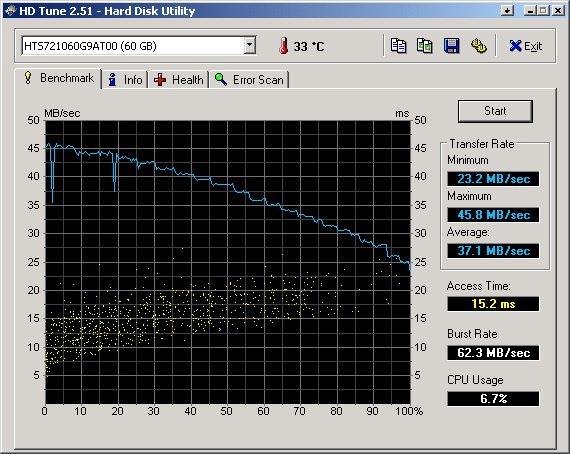
Here is a HD Tune benchmark result:
http://www.hdtune.com/results/Hitachi_H ... G9AT00.gif

The maximum transfer rate is 46MB/s and the average is 37MB/s.

If you use Linux dd to read LBA 0 to LBA 1 million, say, then that should result in the maximum possible transfer rate. Choose dev/null as the target device.

_________________
A backup a day keeps DR away.


Top
 Profile  
 
 Post subject: Re: Does Internet HDD Speed Effect USB Read/Write Speeds?
PostPosted: May 11th, 2014, 20:13 
Offline
User avatar

Joined: December 4th, 2012, 1:35
Posts: 3903
Location: Adelaide, Australia
PentiumCore wrote:
Hi, sorry for that. The drive is a: 60GB IDE Travelstar 7K100 HTS721060G9AT00

The odd thing about the USB is I used a USB 3.0 drive so naturally it should run much faster over a 2.0 port.

HD Tune does not exist for Linux but the inbuilt benchmark tool gives about the same results as when I was running Windows and using HD Tune.

Basically what I am wondering is, hypothetically speaking if I could replace my IDE with an SSD would the USB transfer rates speed up?

Thanks!


USB3.0 devices will not run past the maximum speed for USB 2.0 when placed into a USB2.0 port.

Also you are forgetting that most USB devices have a much slower Write rate than read rate, and using it as a HDD you need to do both.

Remember also that the USB reads to RAM then to the Hard Disk. So any read/write operation to/from the hard disk is not coming directly to/from the USB.


Top
 Profile  
 
Display posts from previous:  Sort by  
Post new topic Reply to topic  [ 7 posts ] 

All times are UTC - 5 hours [ DST ]


Who is online

Users browsing this forum: Google [Bot] and 31 guests


You cannot post new topics in this forum
You cannot reply to topics in this forum
You cannot edit your posts in this forum
You cannot delete your posts in this forum
You cannot post attachments in this forum

Search for:
Jump to:  
Powered by phpBB © 2000, 2002, 2005, 2007 phpBB Group