MultiDrive – free backup, clone & wipe disk utility from Atola Technology

All times are UTC - 5 hours [ DST ]


Post new topic Reply to topic  [ 9 posts ] 
Author Message
 Post subject: WD missing components? WD6003FZBX 001-0B41785
PostPosted: June 14th, 2023, 13:44 
Offline

Joined: March 13th, 2023, 20:34
Posts: 13
Location: Chicago
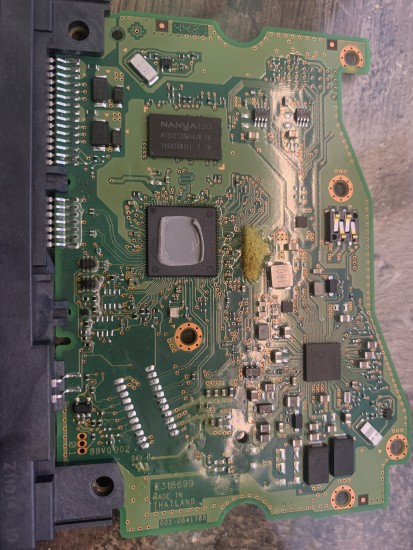
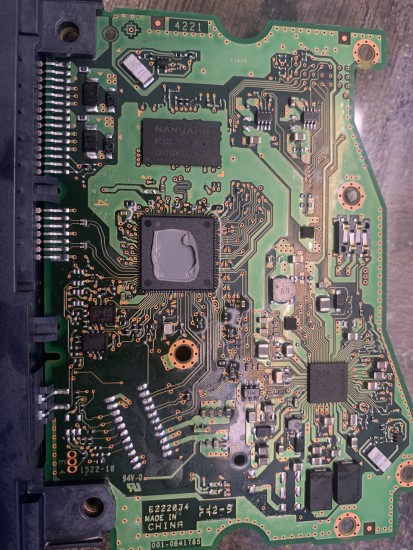
Had a HDD go bad again due to power shortage. Purchased a new one via Amazon just as they came back into stock. I replaced BOTH the bios chips, the drive spins up and disk is detected but can gain no access and says 0 bytes out of 6tb. Taking a look at the motherboards of the drives, there seem to be quite a few components missing. You can also see the the original (original board which has previously been replaced) and the new replacement board have different manufacturer origins.

Original board (Thailand):
Attachment:
File comment: Original board, bios chips removed.
Thailand
IMG_3940.jpg
IMG_3940.jpg [ 1.58 MiB | Viewed 4480 times ]


NEW replacement board (China):
Attachment:
File comment: NEW Replacement board, with bios chips.
China
IMG_3939.jpg
IMG_3939.jpg [ 1.92 MiB | Viewed 4480 times ]


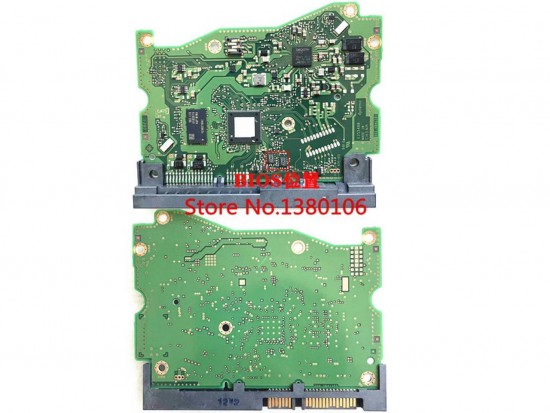
STOCK photo for BIOS CHIP Loaction:
Attachment:
File comment: BIOS chip location. STOCK photo.
AU62D2111130KTKGKF9.jpg
AU62D2111130KTKGKF9.jpg [ 112.04 KiB | Viewed 4480 times ]


Are the components near the bios chips and others around the board necessary? Can this be the reason my drive is not loading any of the data?
Attachment:
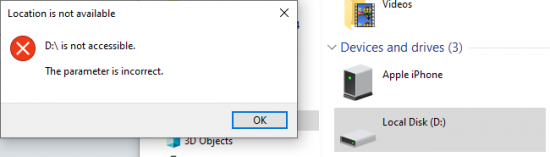
error.PNG
error.PNG [ 13.8 KiB | Viewed 4480 times ]


Top
 Profile  
 
 Post subject: Re: WD missing components? WD6003FZBX 001-0B41785
PostPosted: June 14th, 2023, 13:53 
Offline

Joined: March 13th, 2023, 20:34
Posts: 13
Location: Chicago
Here are the missing or switched components in red:
Attachment:
IMG_3939-circled.jpg
IMG_3939-circled.jpg [ 2.94 MiB | Viewed 4473 times ]


Top
 Profile  
 
 Post subject: Re: WD missing components? WD6003FZBX 001-0B41785
PostPosted: June 14th, 2023, 14:02 
Offline
User avatar

Joined: September 8th, 2009, 18:21
Posts: 16954
Location: Australia
That's interesting. Can you tell us the markings on the missing IC?

Did you check the fuses and TVS diodes on the original PCB?

Here is a similar layout:

http://users.on.net/~fzabkar/HDD/0B40385/TVS_diodes_fuses.jpg

Does the "repaired" HDD report SMART data to CrystalDiskInfo or some other SMART tool?

_________________
A backup a day keeps DR away.


Top
 Profile  
 
 Post subject: Re: WD missing components? WD6003FZBX 001-0B41785
PostPosted: June 14th, 2023, 14:19 
Offline

Joined: March 13th, 2023, 20:34
Posts: 13
Location: Chicago
fzabkar wrote:
That's interesting. Can you tell us the markings on the missing IC?

Did you check the fuses and TVS diodes on the original PCB?

Here is a similar layout:

http://users.on.net/~fzabkar/HDD/0B40385/TVS_diodes_fuses.jpg

Does the "repaired" HDD report SMART data to CrystalDiskInfo or some other SMART tool?


This is the "repaired" with the china mobo:
Attachment:
error1.PNG
error1.PNG [ 13.8 KiB | Viewed 4470 times ]

Attachment:
Capture2.PNG
Capture2.PNG [ 26.9 KiB | Viewed 4470 times ]

Attachment:
Capture3.PNG
Capture3.PNG [ 61.1 KiB | Viewed 4470 times ]


Will check the fuses now once i locate my multimeter


Top
 Profile  
 
 Post subject: Re: WD missing components? WD6003FZBX 001-0B41785
PostPosted: June 14th, 2023, 14:28 
Offline
User avatar

Joined: September 8th, 2009, 18:21
Posts: 16954
Location: Australia
The drive is sick. However, I'm wondering whether you are seeing the result of a unique encryption key in the MCU. IMO it would be best to repair the original PCB and return the ROMs.

Can you show us the hexadecimal contents of sector 0 with DMDE? That should tell us whether you are now facing an encryption issue.

https://dmde.com/

_________________
A backup a day keeps DR away.


Top
 Profile  
 
 Post subject: Re: WD missing components? WD6003FZBX 001-0B41785
PostPosted: June 14th, 2023, 14:52 
Offline

Joined: March 13th, 2023, 20:34
Posts: 13
Location: Chicago
fzabkar wrote:
The drive is sick. However, I'm wondering whether you are seeing the result of a unique encryption key in the MCU. IMO it would be best to repair the original PCB and return the ROMs.

Can you show us the hexadecimal contents of sector 0 with DMDE? That should tell us whether you are now facing an encryption issue.

https://dmde.com/


Attachment:
Capture4.PNG


Am unable to find another multimeter, loaned it to father. Ordering one with delivery tomorrow.


Top
 Profile  
 
 Post subject: Re: WD missing components? WD6003FZBX 001-0B41785
PostPosted: June 14th, 2023, 15:07 
Offline
User avatar

Joined: September 8th, 2009, 18:21
Posts: 16954
Location: Australia
The missing components appear to constitute a UART interface. One IC is a 3.3V LDO regulator, while the other two are level shifters. Therefore, these components would have no bearing on the functionality of the replacement PCB.

https://ae01.alicdn.com/kf/H5ced1cae1ee5481a9621501c49615281y/Western-digital-circuit-board-0B41785-004-0B41785-001-0B41785.jpg

BU33TD3WG, Rohm, 3.3V, 200mA, LDO regulator, marking G7+xx+xx, SSOP5:
https://wwwmouser.com/datasheet/2/348/buxxtd3wg_e-1874160.pdf

TXS0101DCKR, Texas Instruments, 1-Bit Bidirectional Voltage-Level Shifter for Open-Drain and Push-Pull Application, marking 2GO, SC70-6:
http://www.ti.com/lit/gpn/txs0101

_________________
A backup a day keeps DR away.


Top
 Profile  
 
 Post subject: Re: WD missing components? WD6003FZBX 001-0B41785
PostPosted: June 14th, 2023, 15:10 
Offline
User avatar

Joined: September 8th, 2009, 18:21
Posts: 16954
Location: Australia
Your data look OK, so it's not an encryption issue.

I would use HDDSuperClone to clone your drive, and then use DMDE to recover your data from the clone.

_________________
A backup a day keeps DR away.


Top
 Profile  
 
 Post subject: Re: WD missing components? WD6003FZBX 001-0B41785
PostPosted: June 15th, 2023, 13:19 
Offline

Joined: March 13th, 2023, 20:34
Posts: 13
Location: Chicago
fzabkar wrote:
Your data look OK, so it's not an encryption issue.

I would use HDDSuperClone to clone your drive, and then use DMDE to recover your data from the clone.


Thanks Fzabkar for your help, a new larger drive is on the way for the procedure. Will update with results.


Top
 Profile  
 
Display posts from previous:  Sort by  
Post new topic Reply to topic  [ 9 posts ] 

All times are UTC - 5 hours [ DST ]


Who is online

Users browsing this forum: No registered users and 35 guests


You cannot post new topics in this forum
You cannot reply to topics in this forum
You cannot edit your posts in this forum
You cannot delete your posts in this forum
You cannot post attachments in this forum

Search for:
Jump to:  
Powered by phpBB © 2000, 2002, 2005, 2007 phpBB Group