MultiDrive – free backup, clone & wipe disk utility from Atola Technology

All times are UTC - 5 hours [ DST ]


Post new topic Reply to topic  [ 11 posts ] 
Author Message
 Post subject: Resetting/Erasing Samsung NVMe SSD BitLocker Encrypted
PostPosted: August 24th, 2025, 4:59 
Offline

Joined: August 24th, 2025, 4:41
Posts: 3
Location: Melbourne
Hi everyone,

I’m stuck trying to recover and reset a Samsung OEM NVMe SSD, and I’d really appreciate some guidance from the experts here.

some hardware context
- SSD model: Samsung MZVL22T0HBLB-00BH7 (2TB, OEM NVMe drive)
- System it came from: HP Z4 G4 Workstation (workstation-class desktop, running Windows 10/11 originally)

The drive was pulled from the HP system, shows up as BitLocker encrypted when connected to any other machine, and is currently not writable, not format-able


In Windows Disk Management, the drive shows up but “Format” is greyed out.

Tried DiskPartclean, but it errors out with cyclic redundancy check.

SMART health looks GOOD, but the drive is effectively locked.

Now the things i have already tried are

1. Samsung DC Toolkit (Windows + Linux)

On Windows, DC Toolkit detects the drive but won’t allow erase.

AND


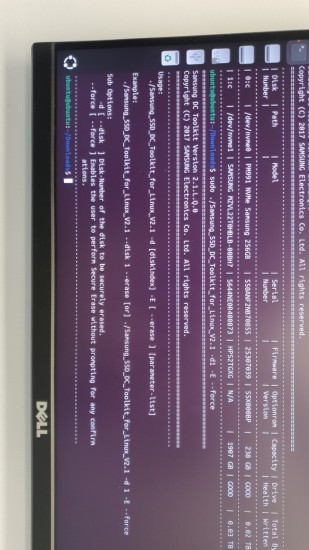
On Linux (Ubuntu Live USB, DC Toolkit v2.1), the drive is listed with --list.

you can see the attached photo here as well

Attachment:
List of HDDs.jpg
List of HDDs.jpg [ 279.39 KiB | Viewed 829 times ]


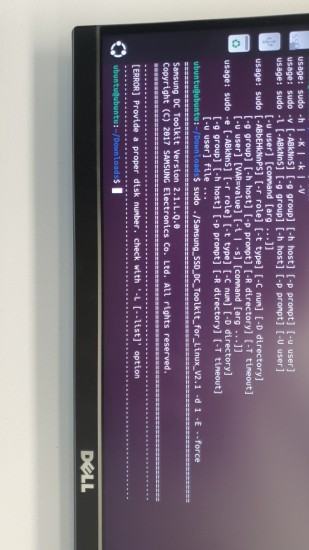
But when I run erase commands

I always get “Provide a proper disk number” or syntax errors.

Attachment:
proper Disk number.jpg
proper Disk number.jpg [ 248.98 KiB | Viewed 829 times ]


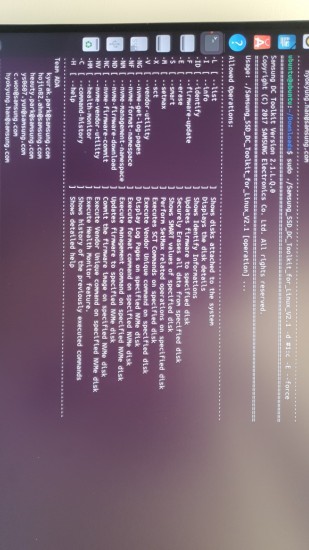
now i check online forums as well and for some reason people have used # in the command for indicating a number i mean for example

Attachment:
command with HAsh.jpg
command with HAsh.jpg [ 288.71 KiB | Viewed 829 times ]


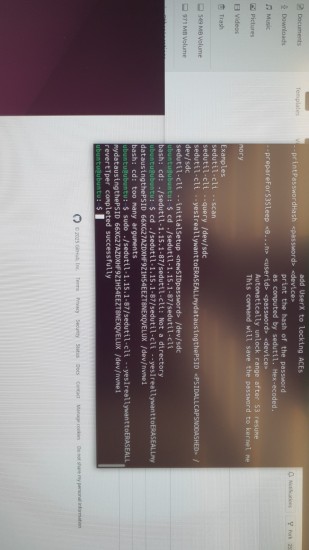
i have already reverted it using the PSID i think but no idea what to do next, or even if i did it correctly.

Attachment:
psid revert.jpg
psid revert.jpg [ 255.12 KiB | Viewed 829 times ]


ANY help would be appreciated. i do still have a system similar to the one i pulled it off from. been trying to solve this for almost a week now. if i missed any crucial detail just ask i have shit ton of commands i ran to get a response.

THANK YOU


Top
 Profile  
 
 Post subject: Re: Resetting/Erasing Samsung NVMe SSD BitLocker Encrypted
PostPosted: August 24th, 2025, 8:48 
Offline
User avatar

Joined: May 13th, 2019, 7:50
Posts: 1150
Location: Nederland
Quote:
SMART health looks GOOD, but the drive is effectively locked.


Can we see pls.

_________________
Joep - http://www.disktuna.com - video & photo repair & recovery service


Top
 Profile  
 
 Post subject: Re: Resetting/Erasing Samsung NVMe SSD BitLocker Encrypted
PostPosted: August 24th, 2025, 19:08 
Offline

Joined: August 24th, 2025, 4:41
Posts: 3
Location: Melbourne
It shows Encrypted on Ubuntu as well as Windows. Here are the Attached Photos


Showing Encrypted in Ubuntu
Attachment:
Ubuntu Encrypted.jpg
Ubuntu Encrypted.jpg [ 469.67 KiB | Viewed 793 times ]


Showing Encrypted in Windows
Attachment:
Windows Enrypted.jpg
Windows Enrypted.jpg [ 744.84 KiB | Viewed 793 times ]


No Format Options in windows as well

Attachment:
Windows no options 2.jpg
Windows no options 2.jpg [ 722.35 KiB | Viewed 793 times ]

Attachment:
Windows no option.jpg
Windows no option.jpg [ 678.91 KiB | Viewed 793 times ]


Listed Disk in Ubuntu
Attachment:
Ubuntu Disk LIst.jpg
Ubuntu Disk LIst.jpg [ 498.37 KiB | Viewed 793 times ]


Listed Disk in DISKPART
Attachment:
Disk list WIndows.jpg
Disk list WIndows.jpg [ 318.37 KiB | Viewed 793 times ]


Top
 Profile  
 
 Post subject: Re: Resetting/Erasing Samsung NVMe SSD BitLocker Encrypted
PostPosted: August 24th, 2025, 22:02 
Offline
User avatar

Joined: April 7th, 2009, 21:36
Posts: 487
Try some more generic linux apps to read/write test it such as: dd, shred, fio, smartmontools

was it removed because its faulty? Could be write protected if its end of life

_________________
Zero Alpha: zeroalpha.com.au
Find Cheap Donor Drives App: https://www.zeroalpha.com.au/donor-drive-app Updated February 2026


Top
 Profile  
 
 Post subject: Re: Resetting/Erasing Samsung NVMe SSD BitLocker Encrypted
PostPosted: August 25th, 2025, 3:36 
Offline
User avatar

Joined: May 13th, 2019, 7:50
Posts: 1150
Location: Nederland
Still no SMART?

_________________
Joep - http://www.disktuna.com - video & photo repair & recovery service


Top
 Profile  
 
 Post subject: Re: Resetting/Erasing Samsung NVMe SSD BitLocker Encrypted
PostPosted: August 28th, 2025, 2:08 
Offline

Joined: August 24th, 2025, 4:41
Posts: 3
Location: Melbourne
I have tried the dd method and basically write 00 on the complete drive

Other then that there is no Smart Data diagnostics, it doesn't show. apologies for the previous statement that "smart health looks good" it was the health that shows up in DC tool kit that i was referring to already shared a screenshot above. i have tried on windows and just as a last bit of context, i tried crucial Storage Executive as well as Samsung Magician Software. Both showed N/A in everything.

i get that when SSDs are worn out they go into read only, but the health shows up as good when checking in Linux using DC Tool kit. last i remember the health was showing up as 98% but that only shows up in Linux. Any other software i try, it's unable to read it.

Here some more pictures for more context. Some are from windows showing its Bitlocked and in read only as well as some are from Crucial Storage executive.

No Clue this can be fixed but i am trying to find a fool proof way of figuring out if it actually dead or just somehow proving difficult to unlock

when trying disk part it says attribute removed but it stays in Readonly

Attachment:
Diskpart.png
Diskpart.png [ 13.5 KiB | Viewed 749 times ]


rest of the screen shots

Attachment:
This PC.png
This PC.png [ 40.94 KiB | Viewed 749 times ]
Attachment:
Crucial basic page.png
Crucial basic page.png [ 148.31 KiB | Viewed 749 times ]
Attachment:
Drive Details.png
Drive Details.png [ 81.92 KiB | Viewed 749 times ]

Attachment:
Smart.png
Smart.png [ 127.18 KiB | Viewed 749 times ]
Attachment:
Provisioning.png
Provisioning.png [ 142.57 KiB | Viewed 749 times ]


Top
 Profile  
 
 Post subject: Re: Resetting/Erasing Samsung NVMe SSD BitLocker Encrypted
PostPosted: August 28th, 2025, 2:32 
Offline

Joined: February 22nd, 2023, 13:49
Posts: 327
Location: Eastern Europe
First - there is a different section on the forum for SSD (Flash storage, SSD).
Second:
-Critical Warnings
*Low Unused Spare Bloks
*Write Protect Mode
What's not clear about this? And even with a password, SMART should be read. If it is not read - the problem is with the SSD.


Top
 Profile  
 
 Post subject: Re: Resetting/Erasing Samsung NVMe SSD BitLocker Encrypted
PostPosted: May 20th, 2026, 8:51 
Offline

Joined: May 20th, 2026, 8:50
Posts: 1
Location: Florida
I’d just remove the BitLocker key, turn off encryption, then run the drive’s built‑in secure erase from the firmware menu to wipe everything clean.


Top
 Profile  
 
 Post subject: Re: Resetting/Erasing Samsung NVMe SSD BitLocker Encrypted
PostPosted: May 20th, 2026, 9:30 
Offline
User avatar

Joined: May 13th, 2019, 7:50
Posts: 1150
Location: Nederland
SamFarha wrote:
I’d just remove the BitLocker key, turn off encryption, then run the drive’s built‑in secure erase from the firmware menu to wipe everything clean.


Yeah, but is seems you're a bit of a dunce.

_________________
Joep - http://www.disktuna.com - video & photo repair & recovery service


Top
 Profile  
 
 Post subject: Re: Resetting/Erasing Samsung NVMe SSD BitLocker Encrypted
PostPosted: June 6th, 2026, 5:45 
Offline
User avatar

Joined: June 6th, 2026, 5:23
Posts: 2
Location: France
Hello,

There are several easy ways to bypass BitLocker encryption, here are a few website articles that discuss this (in French) :

Une faille permet d'ouvrir un disque BitLocker avec quelques fichiers sur une clé USB.

BitLocker détourné avec une technique de mouvement latéral


The first method is called YellowKey and involves using a USB drive. Here are the instructions to reproduce it :

• Copy the FsTx folder to "YourUSBStick:\System Volume Information\FsTx" as is and make sure to use a filesystem that's compatible with Windows (NTFS is preferable but I think FAT32/exFAT should work as well). Funny thing is, the vulnerability is extremely convenient, you don't even need to plug an external storage device, you can just pull out the disk, copy the files in the EFI partition, put it back and it will still work. That's how bad it is.

• Plug the USB stick in your target windows computer with bitlocker protection turned on.

• Reboot to Windows Recovery Environment Agent (you can do that by holding SHIFT and clicking on the restart button using your mouse)

• Once you click on the restart button, lift your finger off the SHIFT key and hold CRTL and do NOT lift your finger off it.

• If you did everything properly, a shell will spawn with unrestricted access to the bitlocker protected volume.

If you do a quick search online, you'll easily find the FsTx folder ...

Regards


Top
 Profile  
 
 Post subject: Re: Resetting/Erasing Samsung NVMe SSD BitLocker Encrypted
PostPosted: Today, 12:49 
Offline
User avatar

Joined: June 6th, 2026, 5:23
Posts: 2
Location: France
In just a few days, here’s yet another way to bypass BitLocker protection : GreatXML...

I can’t believe my eyes – BitLocker is such a sieve!


Top
 Profile  
 
Display posts from previous:  Sort by  
Post new topic Reply to topic  [ 11 posts ] 

All times are UTC - 5 hours [ DST ]


Who is online

Users browsing this forum: No registered users and 37 guests


You cannot post new topics in this forum
You cannot reply to topics in this forum
You cannot edit your posts in this forum
You cannot delete your posts in this forum
You cannot post attachments in this forum

Search for:
Jump to:  
Powered by phpBB © 2000, 2002, 2005, 2007 phpBB Group