MultiDrive – free backup, clone & wipe disk utility from Atola Technology

All times are UTC - 5 hours [ DST ]


Post new topic Reply to topic  [ 7 posts ] 
Author Message
 Post subject: 2TB Hitachi Ultrastar A7K2000 no spin
PostPosted: February 26th, 2026, 15:36 
Offline

Joined: May 5th, 2025, 11:14
Posts: 13
Location: Planet Earth
I bought this hard drive today for a little under $3 :D But it's not working because it won't spin up. While deciding whether to buy it or not, I noticed that some SMD components were missing from the board. When I received it, I looked closely and saw that one capacitor was missing and another had been torn off the board. This circuit looks like a voltage regulator, so it's no surprise the drive isn't working :lol:
Attachment:
damage.jpg
damage.jpg [ 154.22 KiB | Viewed 314 times ]

I can replace them, but I have no idea what capacitance these capacitors should be. I hope some of you have an LCR meter :D

P.S. I already tried soldering the torn capacitor back and took a capacitor that I think is suitable, which was located between +5V and GND, right where the SATA power connector is located, and replaced the missing one, but the drive still won't spin up. The board appears to be receiving power and showing signs of life, as the computer's BIOS displays a faulty IDE device error when I connect a drive to it, and at least the ROM chip is receiving 2.5V on the VCC pin...

Of course, I could find another identical drive that's clicking and just replace the board, but I don't want to invest more money because I don't know if this drive was working before I bought it, and the seller doesn't know either :( I want to try fixing this board, but I can't figure out why it's still not working.

P.P.S. HDD model is Hitachi HUA722020ALA331, PCB P/N is 110 0A90201 01


Top
 Profile  
 
 Post subject: Re: 2TB Hitachi Ultrastar A7K2000 no spin
PostPosted: February 27th, 2026, 12:18 
Offline
User avatar

Joined: September 8th, 2009, 18:21
Posts: 16955
Location: Australia
Show us the whole PCB.

_________________
A backup a day keeps DR away.


Top
 Profile  
 
 Post subject: Re: 2TB Hitachi Ultrastar A7K2000 no spin
PostPosted: February 27th, 2026, 14:56 
Offline

Joined: May 5th, 2025, 11:14
Posts: 13
Location: Planet Earth
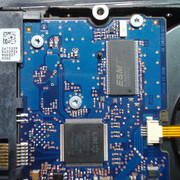
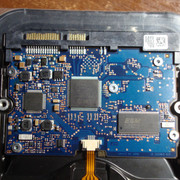
Visually there is no other damage on the board except what I found, but maybe I'm missing something.
Image Image Image


Top
 Profile  
 
 Post subject: Re: 2TB Hitachi Ultrastar A7K2000 no spin
PostPosted: February 27th, 2026, 17:44 
Offline
User avatar

Joined: September 8th, 2009, 18:21
Posts: 16955
Location: Australia
Measure the resistances of the 12V and 5V TVS diodes (SUA and ZA) near the SATA power connector. Also measure the resistances of the two R100 resistors (0.1 ohm) in that same area.

Measure the voltage between ground (any screw hole) and the 1R1 inductor adjacent to the motor controller. That's Vcore. Then measure the voltage between ground and the nearest inductor (100) adjacent to the motor controller. That's Vio.

The two 100/M05 inductors near the SATA connector constitute a Cuk converter which produces the -5V supply for the preamp. You should find +5V and -5V on the capacitors in that area.

_________________
A backup a day keeps DR away.


Top
 Profile  
 
 Post subject: Re: 2TB Hitachi Ultrastar A7K2000 no spin
PostPosted: February 28th, 2026, 10:29 
Offline

Joined: May 5th, 2025, 11:14
Posts: 13
Location: Planet Earth
In short, there is no -5V.

******
fzabkar wrote:
resistances of the 12V and 5V TVS diodes (SUA and ZA) near the SATA power connector
The diode on the 5-volt line (SUA in the photo) has a resistance of 1.17K Ohms in both directions; a little later, for some reason, it began to measure 10K Ohms in both directions.
The diode on the 12-volt line (Z4 in the photo) has a resistance of approximately 32.7K Ohms.

fzabkar wrote:
measure the resistances of the two R100 resistors (0.1 ohm) in that same area
Both of these resistors have a resistance of about 0.1-0.2 ohms. My multimeter is very bad at measuring resistances below 1 ohm.

fzabkar wrote:
Measure the voltage between ground (any screw hole) and the 1R1 inductor adjacent to the motor controller. That's Vcore. Then measure the voltage between ground and the nearest inductor (100) adjacent to the motor controller. That's Vio.
The Vcore voltage is 1.26 V or 1.32 V, depending on which side of the inductor coil the measurement was taken from. The Vio voltage is 2.62 or 2.58 volts.

fzabkar wrote:
The two 100/M05 inductors near the SATA connector constitute a Cuk converter which produces the -5V supply for the preamp. You should find +5V and -5V on the capacitors in that area.

I found a positive 5V voltage where the capacitor was missing, but there doesn't seem to be a negative 5V voltage. I took a few working Hitachi 7K1000 hard drives I have, which have slightly different controller boards but the same VCM driver and surrounding components, and found that the negative 5V voltage should be on the inductive coil closest to the ROM chip, on the side facing the ROM chip, and on the large capacitor located next to the 3.3V power pins on the SATA power connector.

But on the damaged PCB the voltage is 0 volts where it should be -5 volts, and there is a strange decreasing voltage between the two capacitors where on good drives the voltage in that spot is around 0 volts.
Attachment:
preamp_voltages.jpg
preamp_voltages.jpg [ 130.85 KiB | Viewed 210 times ]


Top
 Profile  
 
 Post subject: Re: 2TB Hitachi Ultrastar A7K2000 no spin
PostPosted: February 28th, 2026, 20:16 
Offline
User avatar

Joined: September 8th, 2009, 18:21
Posts: 16955
Location: Australia
I don't know about this model, but in other models the -5V supply is switched on and off by the MCU in conjunction with the motor controller. In some models the MCU will look for a preamp and switch off the -5V supply if it can't detect it. In such cases, the -5V supply would come up briefly after power-on and then switch off again within a second or two.

In short, I don't see an easy DIY solution. The most expedient approach, if data recovery were the intention, would be to transfer the ROM to a compatible donor PCB.

The only other possibility that comes to mind is whether the drive is configured to Power Up In Standby (PUIS).

_________________
A backup a day keeps DR away.


Top
 Profile  
 
 Post subject: Re: 2TB Hitachi Ultrastar A7K2000 no spin
PostPosted: March 9th, 2026, 17:19 
Offline

Joined: May 5th, 2025, 11:14
Posts: 13
Location: Planet Earth
fzabkar wrote:
the -5V supply would come up briefly after power-on and then switch off again within a second or two.
I checked this, and the voltage doesn't appear for even a split second. It's possible there's a slight spike to -0.16 volts maximum, but that could just be noise from the power supply connection. After that, the voltage stays at around 0.1 volts. The board behaves this way regardless of whether it's connected to the HDA or not.

fzabkar wrote:
The only other possibility that comes to mind is whether the drive is configured to Power Up In Standby (PUIS).
I'd never seen this feature in action before, so I took a nearly 20-year-old Western Digital hard drive, whose sticker indicated that the appropriate contacts needed to be jumpered to enable PUIS. I also took a Core2 Duo motherboard of roughly the same age. The hard drive didn't spin up with PUIS enabled, and to my surprise, this motherboard froze during POST and reported a hard drive failure :shock: I also took an old Hitachi P7K500, disconnected the flat flex cable going to the spindle motor, and connected the drive to the computer in this state. The motherboard behaved exactly the same – it froze during POST and reported a hard drive failure. But to my surprise, it didn't freeze or report anything when I connected my non-functioning A7K2000 hard drive.

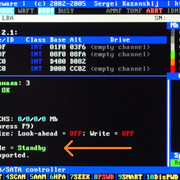
Another thing that surprised me is that MHDD and Victoria are completely useless and uninformative in such situations. All Victoria can do is show a blank hard drive passport, but at least it can detect that the hard drive is in standby mode.
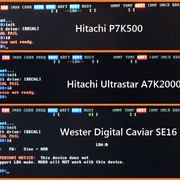
Image Image

But I use a newer HP computer, and it had no problems running this Western Digital drive with PUIS enabled. This same computer was the one complaining about the Hitachi A7K2000 being faulty.

So this Hitachi drive either has some weird, non-standard implementation of the PUIS function, or it's just... faulty.

******
I checked the preamplifier's resistance. The +5 volt line has about 60K ohms, while the -5 volt line has infinite resistance. However, in diode check mode, these two lines have roughly the same voltage drop - around 480 and 450 mV, respectively, if the black probe is positioned at the higher potential. So, at a minimum, there were no open or shorted circuits.

I also tried replacing the broken capacitor with a likely working 10μF, 10V one from a scrap motherboard. The capacitor had minor damage from being torn out; in my experience, this rarely disrupts the device's operation, but perhaps this minor damage was sufficient. Unfortunately, replacing the capacitor didn't help; the drive still won't spin up.

I also flashed a dump I found here in the files section, from a hardware-identical Deskstar 7k2000, to the board. It also didn't help; the drive won't spin up, and -5 volts don't appear on the board.

The last thing I want to try is unsoldering the inductor and applying -5 volts to the load using another faulty hard drive as a power source. This might be enough to trick the VCM into thinking the required voltage is being generated and the drive can continue spinning up. I don't know if this is a good idea, but I don't think it can do any harm.

fzabkar wrote:
transfer the ROM to a compatible donor PCB
This is likely the only viable option. Unfortunately, I've only found two options for donor hard drives so far: one for the same price as the 7k2000, but with a board in even worse condition and also non-functional, and one drive for double the price, but with a fully functional board. If I were absolutely certain my drive was mechanically perfect, I'd buy this donor, but for now, I'm risking spending half the price of a working, but slightly used, hard drive on this venture, only to end up with two faulty drives. So, it looks like this drive will have to be shelved until better times come.


Top
 Profile  
 
Display posts from previous:  Sort by  
Post new topic Reply to topic  [ 7 posts ] 

All times are UTC - 5 hours [ DST ]


Who is online

Users browsing this forum: Google [Bot] and 47 guests


You cannot post new topics in this forum
You cannot reply to topics in this forum
You cannot edit your posts in this forum
You cannot delete your posts in this forum
You cannot post attachments in this forum

Search for:
Jump to:  
Powered by phpBB © 2000, 2002, 2005, 2007 phpBB Group